

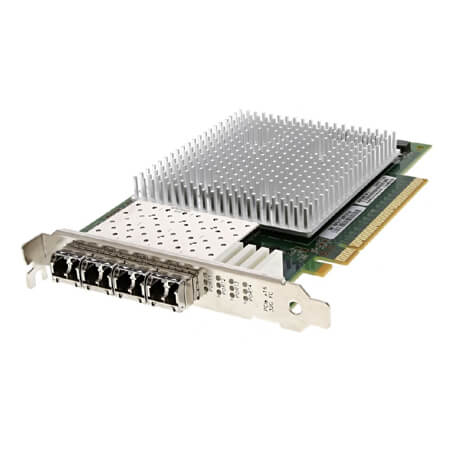


Description
Installation and Configuration of the 359FJ
To install and configure the 359FJ Dell 32GBPS Quad Port PCI-E 3.0 X16 SFP Host Bus Adapter, follow these steps:
- Install the adapter in an available PCI-E slot on your server motherboard.
- Connect the SFP transceivers to the adapter.
- Install the appropriate device driver and software for your operating system. This can be done through the Dell Support website or by using the CD provided with the adapter.
- Configure the adapter settings, such as the speed and duplex of each port, using the appropriate software tools or the server’s BIOS.
- Test the adapter to ensure that it is working properly and that data can be transmitted and received through each port.
Management and Monitoring of the 359FJ
The 359FJ Dell 32GBPS Quad Port PCI-E 3.0 X16 Sfp Host Bus Adapter can be managed and monitored through various methods, including the following:
- Device Manager: The adapter can be managed and monitored through the Windows Device Manager. The Device Manager provides information about the adapter’s drivers, hardware, and performance.
- Dell OpenManage Server Administrator (OMSA): OMSA is a web-based management tool that provides advanced management and monitoring features for Dell servers and storage systems. It can be used to manage and monitor the adapter, including viewing performance statistics, configuring network settings, and updating firmware.
- Command Line Interface (CLI): The adapter can be managed and monitored through a CLI. The CLI allows for advanced management and monitoring of the adapter, including configuring network settings, viewing performance statistics, and updating firmware.
- SNMP: The adapter supports Simple Network Management Protocol (SNMP) which allows for remote management and monitoring of the adapter. This allows for real-time monitoring of the adapter’s performance, including data transfer rates and errors, and provides the ability to configure network settings remotely.
In conclusion, the 359FJ Dell 32GBPS Quad Port PCI-E 3.0 X16 Sfp Host Bus Adapter provides various options for management and monitoring, allowing for effective administration of the adapter and ensuring its optimal performance.
Compatibility with Different Operating Systems
The 359FJ Dell 32GBPS Quad Port PCI-E 3.0 X16 Sfp Host Bus Adapter is compatible with the following operating systems:
- Windows Server 2008 R2
- Windows Server 2012
- Windows Server 2012 R2
- Windows Server 2016
- Windows Server 2019
- VMware vSphere 6.0, 6.5, 6.7
- VMware ESXi 6.0, 6.5, 6.7
- Red Hat Enterprise Linux 6, 7
- SUSE Linux Enterprise Server 11, 12
- Oracle Linux 6, 7
General Information
- Brand: Dell
- MPN : 359FJ
- Type: Controller
- Sub-Type: Host Bus Adapter
- SKU : 359FJ
Technical Specifications of the 359FJ
- Data Transfer Rate: 32Gb/s
- Connectors: SFP+
- Number of Ports: 4
- Full Height Bracket
- BUS Type: PCI-E
- Includes 4 x 32Gb GBICs
- Model Number: QLE2764-T-DEL


-324x324.jpg)
