

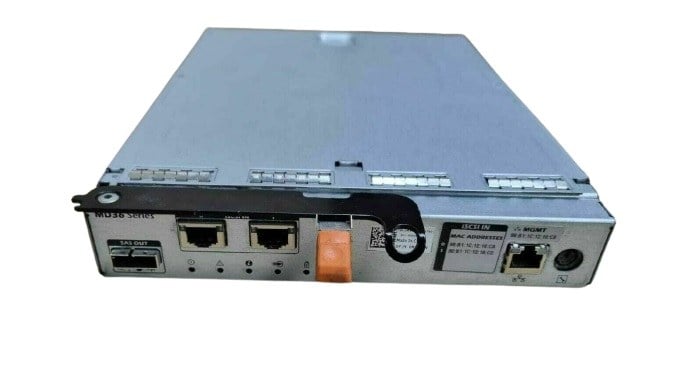


Description
Key Features of the 35CTT Controller
Here are the key features of the 35CTT Dell 10GB ISCSI Dual Port Raid Controller for Powervault MD3600I and MD3620I:
- 10GB ISCSI Dual Port: This feature allows for high-speed data transfer and redundant network connections for increased reliability.
- RAID Support: The controller supports various RAID levels, including 0, 1, 5, 6, 10, 50, and 60, for improved data protection and performance.
- Advanced Data Protection: The controller supports advanced data protection features such as hot spare support, background initialization, and global hot spare.
- Performance Optimization: The controller has the ability to optimize performance by using multiple virtual disks, multiple paths, and load balancing.
- Easy Management: The controller supports both local and remote management, allowing for ease of administration and maintenance.
- Compatibility: The 35CTT is compatible with Dell Powervault MD3600I and MD3620I storage systems.
- iSCSI Initiator Support: The controller supports iSCSI initiator functions, allowing for integration with existing iSCSI environments.
Compatibility with Powervault MD3600I and MD3620I
The Dell 35CTT 10GB ISCSI Dual Port Raid Controller is compatible with both the Powervault MD3600I and MD3620I storage arrays. This controller provides high-speed connectivity and advanced storage management capabilities, making it a suitable choice for businesses looking to improve their storage infrastructure. With dual 10GB ISCSI ports, the controller offers a high-performance and highly scalable solution for connecting to a variety of storage arrays, including the Powervault MD3600I and MD3620I.
RAID Configuration and Management
The RAID configuration and management for the 35CTT Dell 10GB ISCSI Dual Port Raid Controller for Powervault MD3600I and MD3620I can be performed using the following steps:
- Connect to the Dell Powervault Storage Array: Connect to the Dell Powervault Storage Array via the web-based GUI or Command Line Interface (CLI).
- Create a Virtual Disk (VD): Create a Virtual Disk (VD) using the available disk drives and assign a RAID level to it. RAID levels can range from RAID 0 to RAID 6.
- Configure ISCSI Initiator: Configure the ISCSI initiator on the host machine to connect to the VD created on the Dell Powervault Storage Array.
- Initialize and format the disk: Initialize and format the disk, so it can be used as a storage device.
- Monitor and manage the Virtual Disk: Monitor and manage the Virtual Disk using the web-based GUI or CLI.
- Create and manage snapshots: Snapshots can be created and managed to take backup copies of the data.
- Schedule periodic backups: Schedule periodic backups to ensure that the data is backed up at regular intervals.
- Add/remove disks: Add or remove disks from the Virtual Disk as per the requirement.
- Upgrade firmware: Regularly upgrade the firmware of the Dell Powervault Storage Array to ensure that the system is up-to-date and functioning optimally.
General Information
- Brand: Dell
- MPN : 35CTT
- Product Type: Controller
- Product Name: ISCSI
Technical Specifications of the 35CTT Controller
- Controller Type: Dell 10GB ISCSI Dual Port Raid Controller (35CTT)
- Supported Devices: Powervault MD3600I and MD3620I
- Data Transfer Rate: 10 Gbps
- RAID Levels: 0, 1, 5, 6, 10, 50 and 60
- Cache Memory: 512 MB DDR3
- Number of Ports: 2
- Connector Type: SFP+
- Operating Systems: Windows Server 2008 R2, Windows Server 2012, Windows Server 2012 R2, Windows Server 2016, Red Hat Enterprise Linux 5.5, 6.0, 6.5, 7.0 and VMware vSphere 5.1, 5.5 and 6.0
- Form Factor: Full Height/Low Profile PCI-Express x8
- Dimensions: 6.6 x 2.5 x 0.9 inches (167 x 64 x 23 mm)
- Weight: 0.6 lbs (0.27 kg)


-324x324.jpg)

