Description
Drive Overview
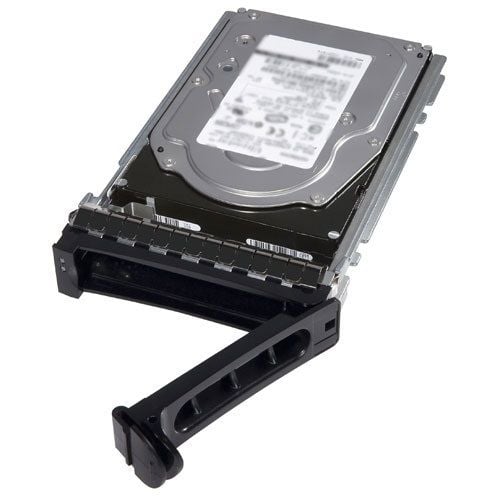
The Dell 400-ADRZ 400GB SAS 12Gbps SSD Mixed Use MLC Hot Plug might seem like a jumble of technical jargon, but it represents a vital component in the realm of data storage and computing. In this comprehensive guide, we will break down the intricate terminology into simple English, providing a clear understanding of what this device is, how it functions, and its significance in the domain of data storage and computing.
Understanding the Terminology
Before delving into the details, let’s dissect the name “Dell 400-ADRZ 400GB SAS 12Gbps SSD Mixed Use MLC Hot Plug” to understand its essential components.
- Dell: This is the manufacturer, Dell, a renowned company in the world of computer hardware and technology solutions.
- 400-ADRZ: This is likely a product or model identifier specific to Dell, helping to distinguish this particular storage device.
- 400GB: This indicates the storage capacity of the device, which is 400 gigabytes. While not the largest storage capacity available, it is sufficient for various data storage requirements.
- SAS 12Gbps: SAS stands for Serial Attached SCSI, a high-speed data transfer interface. “12Gbps” denotes the data transfer rate, which is 12 gigabits per second. This high speed ensures rapid data access and transfer.
- SSD: SSD stands for Solid State Drive, a type of storage device that uses flash memory to store data. SSDs are known for their speed, durability, and reliability compared to traditional hard disk drives (HDDs).
- Mixed Use: “Mixed-use” suggests that this SSD is optimized for both reading and writing data, making it versatile for various applications that require a balanced approach.
- MLC: MLC, or Multi-Level Cell, is a type of NAND flash memory technology used in SSDs. MLC memory can store multiple bits of data in each cell, which increases storage capacity and reduces costs compared to Single-Level Cell (SLC) memory.
- Hot Plug: The “Hot Plug” capability allows for inserting or removing the SSD from a system while it is operational, without requiring a system shutdown. This feature simplifies maintenance and upgrades.
Now that we’ve deconstructed the name, let’s delve into each of these components to gain a more profound understanding.
Dell – The Manufacturer
Dell is a prominent global manufacturer of computer hardware and technology solutions. They produce a wide range of products, including laptops, desktops, servers, and storage devices like the Dell 400-ADRZ SSD. Dell is recognized for its commitment to quality and innovation, making its products a popular choice for businesses and individuals.
Storage Capacity – 400 Gigabytes
The storage capacity of 400 gigabytes is one of the most crucial aspects of this SSD. To put this in context, a gigabyte is roughly equivalent to 1,000 megabytes. While it may not be the largest storage capacity available, 400 gigabytes is sufficient for various data storage needs. It can accommodate a considerable number of files, documents, images, and more.
SAS 12Gbps – High-Speed Data Transfer
The term “SAS 12Gbps” refers to the connection standard and data transfer rate. SAS is a high-speed data transfer interface used to connect storage devices to a computer’s motherboard. The “12Gbps” signifies that the data transfer speed is 12 gigabits per second (Gbps), which is notably faster than older SATA standards.
This high data transfer rate ensures that data can be read from and written to the SSD rapidly. It is particularly crucial for applications and systems that require quick access to large datasets, such as databases, multimedia editing, and gaming.
SSD (Solid State Drive) – Speed and Reliability
An SSD, or Solid State Drive, is a type of storage device that differs from traditional Hard Disk Drives (HDDs). SSDs use flash memory to store data, while HDDs employ spinning disks. SSDs are known for their speed, reliability, and durability. Here’s a breakdown of their advantages:
- Speed: SSDs lack moving parts, allowing them to read and write data much faster than HDDs. This results in quicker boot times, faster application launches, and speedy data transfers.
- Reliability: Since there are no moving parts, SSDs are less susceptible to mechanical failures. This makes them more reliable and durable, which is vital for critical data storage.
- Durability: SSDs can withstand shocks and vibrations better than HDDs because they lack delicate spinning disks. This makes them ideal for laptops and portable devices.
Mixed Use – Versatility in Performance
The term “Mixed Use” indicates the primary purpose of this SSD. In storage terminology, “mixed-use” SSDs are designed to provide a balanced performance approach, optimizing the drive for both reading and writing data. These SSDs are versatile and suitable for applications with varied data access patterns.
Common use cases for mixed-use SSDs include:
- Enterprise Applications: Mixed-use SSDs are often used in enterprise environments where workloads require both reading and writing data. This includes databases, virtualization, and email servers.
- Virtual Desktop Infrastructure (VDI): VDI environments benefit from mixed-use SSDs because they handle a mix of read and write operations, particularly in boot storms and updates.
- Content Creation: For tasks involving video editing, 3D rendering, and other content creation activities, a balance between reading and writing data is crucial.
The advantage of a mixed-use SSD is its adaptability to various applications, making it a reliable choice for businesses and individuals with diverse computing needs.
MLC (Multi-Level Cell) – Efficient Memory Technology
MLC, or Multi-Level Cell, is a type of NAND flash memory technology used in SSDs. MLC memory can store multiple bits of data in each cell, typically two or more bits, which increases storage capacity and reduces costs compared to Single-Level Cell (SLC) memory.
While MLC offers cost-efficiency and higher storage capacity, it tends to have slightly lower endurance than SLC memory. However, modern MLC SSDs employ advanced technologies like wear-leveling algorithms to enhance their longevity and performance.
Hot Plug – Convenience and Maintenance
The term “Hot Plug” capability allows for inserting or removing the SSD from a system while it is operational, without requiring a system shutdown. This feature offers several advantages:
- Convenience: Hot Plug capability is especially useful in enterprise environments where system uptime is critical. You can replace or upgrade storage devices without disrupting operations.
- Maintenance: It simplifies maintenance tasks. IT administrators can perform drive swaps, expansions, or replacements without scheduling downtime.
- Scalability: It allows for easy scalability of storage. When more storage is needed, additional SSDs can be hot-plugged into the system, providing an instant storage boost.
Significance of the Dell 400-ADRZ 400GB SAS 12Gbps SSD
Now that we’ve broken down the components of the Dell 400-ADRZ 400GB SAS 12Gbps SSD Mixed Use MLC Hot Plug, let’s explore its significance in the world of data storage and computing:
- Versatile Performance: This SSD is optimized for mixed-use workloads, making it a versatile choice for applications that require both reading and writing data. Its ability to deliver balanced performance is valuable for various applications.
- Moderate Storage Capacity: With 400 gigabytes of storage space, this SSD is suitable for applications that require a moderate amount of storage but prioritize balanced performance. It’s an ideal choice for enterprise environments, including databases, email servers, and virtualization.
- High-Speed Data Transfer: The SAS 12Gbps interface ensures rapid data transfer speeds, a vital feature for applications that demand quick access to large datasets. It ensures that data can be read and written swiftly, improving overall system performance.
- Advanced NAND Flash Technology: The use of MLC NAND flash memory provides cost-efficiency while still delivering competitive performance and durability. This makes it an attractive option for businesses seeking a balance between performance and budget considerations.
- Hot Plug Convenience: The Hot Plug capability simplifies maintenance and upgrades, making it a practical choice for businesses and organizations that require high availability and scalability.
General Information about this 400GB Solid State Drive
- Manufacturer: Dell
- Part Number or SKU# 400-ADRZ
- Type: Solid State Drive
- SSD Type: SAS-12GBPS
Technical Information of SAS-12GBPS
- Device Type: Hot-Swap Solid State Drive
- Storage Capacity: 400GB
- Form Factor: 2.5 inches
- Interfaces: SAS 12GB/S
- Data Transfer Rate: 1.2 GBPS
- Drive Transfer Rate: 1.2 GBPS (External)
Compatibility for Server
- Poweredge M915
- Poweredge R320
- Poweredge R620
- Poweredge R630
- Poweredge R720
- Poweredge R720XD
- Poweredge R730
- Poweredge R730XD
- Poweredge R820
- Poweredge R920
- Poweredge R930
- Poweredge T320
- Poweredge T420
- Poweredge T430
- Poweredge T620
- Poweredge T630
In summary, the Dell 400-ADRZ 400GB SAS 12Gbps SSD Mixed Use MLC Hot Plug is a significant component in the world of data storage and computing. It offers versatile performance, making it well-suited for applications that require a balance between reading and writing data. With its moderate storage capacity, high-speed data transfer, advanced NAND flash technology, and hot-plug capability, it provides a reliable and performant option to meet your storage needs.
Understanding the components and significance of hardware like the Dell 400-ADRZ SSD empowers businesses and individuals to make informed decisions when it comes to storage solutions. Whether you’re managing an enterprise environment, working with databases, or seeking a versatile storage solution for mixed-use applications, the Dell 400-ADRZ SSD offers the performance and flexibility needed to meet your computing requirements.