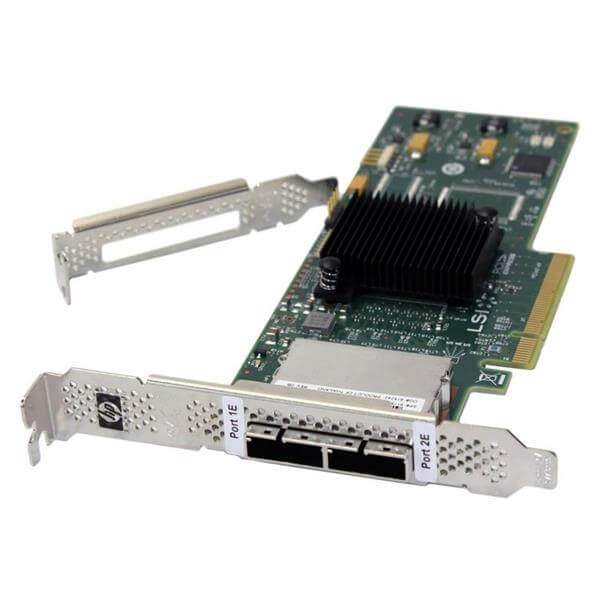
Description
Product overview for the Dell 405-AAES
In the world of computer hardware and data storage, Host Bus Adapters (HBAs) play a vital role in ensuring that data can be efficiently transferred between different components of a computer system. Among the many HBAs available in the market, the Dell 405-AAES HBA stands out as a powerful and versatile option. In this comprehensive guide, we will delve into the details of the Dell 405-AAES HBA, breaking down its name and specifications, so you can understand what it is, how it works, and why it might be the right choice for your specific needs.
Host Bus Adapter (HBA)
Before we dive into the specifics of the Dell 405-AAES SAS 12GBPS HBA, it’s important to understand what an HBA is and why it’s essential in the context of computer systems.
Understanding Host Bus Adapters
A Host Bus Adapter (HBA) is a hardware device that connects a computer or server to a network or storage devices, such as hard drives, solid-state drives, or storage area networks (SANs). It serves as an interface between the computer’s bus, which is the data pathway within the computer, and external storage or network infrastructure. The primary role of an HBA is to facilitate the efficient and high-speed transfer of data between the computer and these external devices.
HBAs are particularly important in scenarios where there’s a need to manage and access a large volume of data, often in enterprise or data center environments. They are especially prevalent in server configurations and are a crucial component of the architecture that enables these servers to access and store data.
Now that we have a basic understanding of what an HBA is, let’s take a closer look at the Dell 405-AAES HBA and break down its name to understand its features and capabilities.
Decoding the Dell 405-AAES HBA Name
The name “Dell 405-AAES Host Bus Adapter SAS 12GBPS Serial Attached Hba External Controller Low Profile” might appear complex at first glance, but it contains valuable information about the product’s key features. Let’s break it down step by step:
Dell
The first part of the name, “Dell,” indicates the manufacturer of the HBA. In this case, the HBA is produced by Dell, a well-known and reputable technology company with a long history of producing quality hardware and computer peripherals.
405-AAES
The alphanumeric sequence “405-AAES” appears to be a model or part number assigned by Dell to this specific HBA. It is essential for identifying and ordering the correct product when dealing with Dell or its authorized distributors.
Host Bus Adapter
The term “Host Bus Adapter” is the full form of HBA. It reiterates that the product is indeed a Host Bus Adapter. This is a critical piece of information, as it ensures that you are looking at the right type of hardware if you are in the market for an HBA.
SAS 12GBPS
“SAS” stands for Serial Attached SCSI (Small Computer System Interface), and “12GBPS” indicates the data transfer rate of the HBA. SAS is a protocol used to connect and transfer data between servers and storage devices. The 12GBPS specification highlights that this HBA is designed for high-speed data transfer, making it suitable for demanding applications where data throughput is a critical factor.
Serial Attached
The term “Serial Attached” further emphasizes that this HBA is designed to connect to storage devices and networks using the Serial Attached SCSI protocol. This protocol allows for serial communication between devices, which can enhance data transfer efficiency.
Heba External Controller
The inclusion of “HBA External Controller” in the name clarifies that this HBA is an external controller device. External controllers are typically used to manage and control storage devices that are not directly integrated into the computer’s motherboard. They play a crucial role in expanding storage capacity and enabling data management in a server or enterprise environment.
Low Profile
The term “Low Profile” refers to the physical form factor of the HBA. Low-profile HBAs are designed to fit into systems with limited space. This is an essential consideration for those who need to install the HBA in a compact or small form factor computer or server.
Key Features and Specifications
Now that we’ve dissected the name of the Dell 405-AAES HBA, let’s explore its key features and specifications in more detail.
Data Transfer Rate
One of the standout features of the Dell 405-AAES HBA is its impressive data transfer rate of 12GBPS. This high-speed data transfer capability is essential for applications and scenarios where large volumes of data need to be quickly and efficiently moved between the computer and external storage devices. Whether you’re dealing with large databases, video editing, or high-performance computing, this HBA can handle the demands of data-intensive tasks.
SAS Compatibility
The HBA’s support for SAS (Serial Attached SCSI) is another critical feature. SAS is a widely used protocol in enterprise environments due to its reliability and scalability. It provides a high level of data protection and redundancy, making it ideal for mission-critical applications. The Dell 405-AAES HBA’s SAS compatibility ensures seamless integration with SAS-based storage devices and networks.
External Controller
As an external controller, this HBA is designed to manage external storage devices effectively. It acts as an intermediary between the computer’s internal bus and the external storage infrastructure. This setup allows for more flexibility in expanding storage capacity without the need for extensive changes to the computer’s motherboard. Additionally, external controllers like the Dell 405-AAES HBA often offer advanced management and monitoring capabilities, which are crucial for maintaining data integrity and system stability.
Low Profile Form Factor
The “Low Profile” designation means that the HBA is physically designed to fit into systems with limited space. This can be a significant advantage when you’re working with compact server configurations or small form factor PCs. The low profile form factor ensures that the HBA can be seamlessly integrated into such systems without any issues.
Dell Quality and Reliability
Dell is a renowned brand in the world of technology, known for producing high-quality and reliable hardware. When you choose a Dell product like the 405-AAES HBA, you can have confidence in its performance and durability. Dell’s reputation for excellent customer support and warranty services further adds to the overall value of its products.
Use Cases
Now that we’ve explored the features and specifications of the Dell 405-AAES HBA, it’s essential to understand where and how this HBA can be effectively used. Here are some common use cases for this type of HBA:
Enterprise Data Centers
Enterprise data centers often require high-performance HBAs to manage the vast amount of data generated and stored by businesses. The Dell 405-AAES HBA’s 12GBPS data transfer rate and SAS compatibility make it a suitable choice for data center applications. It can efficiently connect servers to storage arrays and SANs, ensuring that data can be accessed and processed quickly.
High-Performance Computing
In the realm of high-performance computing (HPC), where tasks such as scientific simulations and data analysis demand immense computational power, data throughput is crucial. The Dell 405-AAES HBA’s 12GBPS speed is a valuable asset in HPC environments, where it can facilitate fast data access and analysis.
Video Editing and Media Production
Video editing and media production workflows often involve working with large video files that require rapid access and editing. The high data transfer rate of the 405-AAES HBA is well-suited for these applications, as it can expedite the import and export of video footage, reducing editing time.
Virtualization
Virtualization technology allows multiple virtual machines to run on a single physical server. In such scenarios, efficient data storage and retrieval are essential. The Dell 405-AAES HBA can enhance the performance of virtualized environments by providing fast access to data stored on external storage devices.
Small Form Factor Systems
As mentioned earlier, the “Low Profile” form factor of the 405-AAES HBA makes it an ideal choice for small form factor systems. This includes small desktop PCs, workstations, and compact servers where space is limited. The HBA’s compact design ensures it can be seamlessly integrated into such systems without any compatibility issues.
Compatibility
Before purchasing the HBA, verify that it is compatible with your server or computer system. Check the system’s specifications and requirements to confirm that it can accommodate the HBA’s low profile form factor and SAS interface.
Firmware Updates
Firmware updates are essential for maintaining the stability and security of the HBA. Regularly check for firmware updates on Dell’s website and apply them as needed to ensure that the HBA operates with the latest enhancements and security patches.
System Configuration
Once the HBA is physically installed and drivers are loaded, you may need to configure it to work with your specific storage devices and network. This configuration will depend on your system and the requirements of your applications.
General Information about Dell 405-AAES
- Manufacturer: Dell
- Part Number or SKU# 405-AAES
- Product Type: Controller
- Product Name: SAS Controller
Key Features for the SAS Controller
- Device Type: Low-Profile Storage Controller Plug-in Card
- Interface: SAS 12Gbps
- Data Transfer Rate: 1.2Gbps
- Ports: Low Profile
- Data Link Protocol: Host Bus Adapter
In summary, the Dell 405-AAES Host Bus Adapter SAS 12GBPS Serial Attached Hba External Controller Low Profile is a versatile and high-performance HBA designed to meet the demands of data-intensive applications in enterprise, data center, and high-performance computing environments. Its key features, including a 12GBPS data transfer rate, SAS compatibility, external controller capabilities, and low profile form factor, make it a valuable addition to systems that require efficient data management and storage solutions.
The Dell 405-AAES HBA’s compatibility with a wide range of use cases, from enterprise data centers to small form factor systems, highlights its flexibility and adaptability. When integrated into your system correctly and kept up to date with the latest drivers and firmware, it can significantly enhance data transfer speeds and system performance.