
Description
Product overview of J8CD5 Dell Ultra Speed Drive
The J8CD5 Dell Ultra Speed Drive Quad X16 PCIE to M.2 Adapter is a type of computer hardware that enables the transfer of data from a computer’s PCIe slot to an M.2 slot. This adapter is designed to be used with Dell computers and is a cost-effective solution for users who need to add M.2 storage to their system.
An M.2 slot
Before delving into the details of the J8CD5 Dell Ultra Speed Drive Quad X16 PCIE to M.2 Adapter, it is essential to understand what an M.2 slot is. M.2 is a type of small form factor computer storage device that is commonly used in modern computers. It is a replacement for the older mSATA standard and provides faster data transfer speeds.
M.2 drives come in different sizes, including 2230, 2242, 2260, and 2280. These numbers indicate the length of the M.2 drive in millimeters. The M.2 drive is plugged into an M.2 slot on the motherboard, which allows it to communicate with the rest of the computer system.
A PCIe slot
A PCIe slot is a type of expansion slot on a motherboard that is designed to provide high-speed connectivity to various types of computer hardware. PCIe slots come in different sizes, including x1, x4, x8, and x16. These numbers indicate the number of data lanes that the slot provides.
The J8CD5 Dell Ultra Speed Drive Quad X16 PCIE to M.2 Adapter
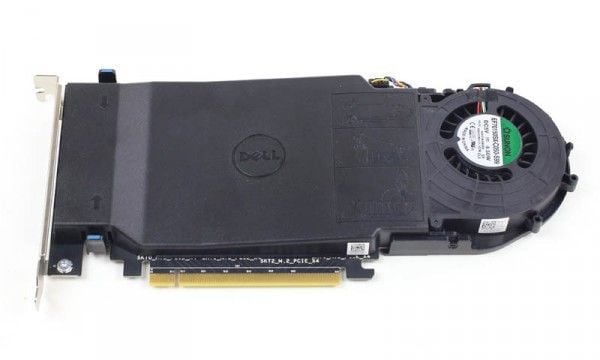
The J8CD5 Dell Ultra Speed Drive Quad X16 PCIE to M.2 Adapter is a type of hardware that allows users to connect an M.2 storage device to a PCIe slot on a Dell computer. The adapter is designed to work with Dell Precision workstations and is compatible with PCIe Gen3 and Gen4 slots.
The J8CD5 adapter has four M.2 slots, which allows users to add up to four M.2 storage devices to their system. Each M.2 slot supports PCIe x4 connectivity and can accommodate M.2 drives up to 110mm in length.
The adapter also features a heatsink that helps to dissipate heat from the M.2 drives. This is important because M.2 drives can generate a significant amount of heat, which can affect their performance and lifespan.
Installation and Compatibility
The J8CD5 Dell Ultra Speed Drive Quad X16 PCIE to M.2 Adapter is easy to install and requires no additional drivers or software. Users can simply plug the adapter into an available PCIe slot on their Dell Precision workstation and insert their M.2 drives into the adapter’s M.2 slots.
The adapter is compatible with Dell Precision workstations that have PCIe Gen3 and Gen4 slots. However, it is essential to check the compatibility of the adapter with the specific model of Dell Precision workstation before purchasing it.
Benefits of the J8CD5 Dell Ultra Speed Drive Quad X16 PCIE to M.2 Adapter
The J8CD5 Dell Ultra Speed Drive Quad X16 PCIE to M.2 Adapter offers several benefits to users who need to add M.2 storage to their Dell Precision workstation. These benefits include:
- Cost-effective solution: The J8CD5 adapter is a cost-effective solution for users who need to add M.2 storage to their system. It is much cheaper than purchasing a new computer system that has built-in M.2 storage.
- Improved performance: M.2 storage devices offer faster data transfer speeds than traditional hard disk drives (HDDs) and solid-state drives (SSDs). By adding M.2 storage to their system, users can significantly improve the performance of their computer.
General Information about the Dell J8CD5
- Manufacturer : Dell
- Model Number or SKU# J8CD5
- Type : Controller
- Sub-Type : Storage Controller
Technical Information
- Card Interface: PCI-E X16
- Form Factor: PCI-E Adapter
- Slots: ( 4 ) Four M.2 Slots
- M.2 Form Factor: 2280 / 2260 / 2242
Contact us or ask for live chat/help if you have any questions about the compatibility of this item to ensure the model’s matching features with your current system.