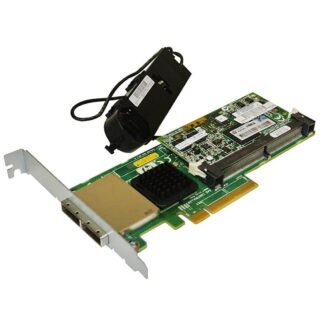
Description
Monitoring and Troubleshooting NR5PC Dell Perc H830
The NR5PC Dell PERC H830 PCI-Express 3.0 SAS controller is a critical component of your storage infrastructure. Monitoring and troubleshooting the controller is essential to ensure that it is functioning correctly and to minimize the risk of downtime. Here are some best practices for monitoring and troubleshooting the NR5PC Dell PERC H830 SAS controller:
- Monitor the Controller: Regularly monitor the controller for any signs of issues, such as hardware or software errors or failures. You can use the Dell OpenManage Server Administrator (OMSA) or iDRAC to monitor the controller’s health and performance.
- Keep Firmware Up-to-date: Ensure that the firmware on the controller is up-to-date with the latest version available from the Dell support website. Firmware updates can fix bugs, security vulnerabilities, and improve performance.
- Monitor Disk Health: Monitor the health of the disks in the storage array regularly. The Dell OMSA or iDRAC can provide information on the status of the disks, such as temperature, error rates, and capacity.
- Verify RAID Configuration: Verify that the RAID configuration is correct and healthy. Check that all disks are properly assigned to the RAID group, and there are no failed disks.
- Check Controller Cache: Check the status of the controller cache regularly. If the cache battery fails or is degraded, the controller may not operate at optimal performance. Check the controller’s event log or Dell OMSA/iDRAC for any cache-related alerts or errors.
- Perform Regular Maintenance: Regularly clean the controller and check for any loose connections or damaged components. Also, perform any recommended maintenance tasks, such as replacing the battery or cleaning the air filters.
If you encounter issues with the NR5PC Dell PERC H830 SAS controller, perform the following troubleshooting steps:
- Verify the controller is installed correctly: Ensure that the controller is properly installed in the server and that all cables and connections are secure.
- Check the controller’s event log: The controller’s event log can provide valuable information about any issues or errors that the controller has encountered.
- Run diagnostics: Use Dell OMSA or iDRAC to run diagnostics on the controller and attached devices.
- Contact Dell support: If you cannot resolve the issue with the above steps, contact Dell support for further assistance.
Performance Optimization with NR5PC Dell Perc H830
The NR5PC Dell Perc H830 PCI-Express 3.0 SAS Controller with 2GB NV Cache is a high-performance storage controller that can provide significant improvements in storage performance for your server or workstation. Here are some tips for optimizing the performance of the controller:
- Configure RAID Appropriately: The RAID configuration can significantly impact the performance of the controller. Choose a RAID level that balances performance, capacity, and data protection. RAID 10 generally provides the best performance for most workloads.
- Optimize Read/Write Cache: The controller’s 2GB NV cache can help accelerate read and write operations. Make sure the cache is configured appropriately for your workload. For example, if your workload is primarily read-intensive, you may want to allocate more cache for read operations.
- Use High-Performance Disks: The performance of the controller is closely tied to the performance of the disks it is controlling. Choose high-performance SAS or SATA disks that can provide high throughput and low latency.
- Monitor Performance: Regularly monitor the performance of the controller using tools like Dell OpenManage Server Administrator or Performance Monitoring and Diagnostics (PerfMon). This will allow you to identify performance bottlenecks and tune the system accordingly.
- Keep Firmware Up to Date: Regularly update the firmware for the controller to ensure it has the latest bug fixes and performance enhancements.
- Use Compatible Drivers: Make sure you are using the latest drivers for the controller that are compatible with your operating system. Using outdated or incompatible drivers can cause performance issues.
Compatibility with Other Dell Servers and Storage Arrays
The NR5PC Dell Perc H830 PCI-Express 3.0 SAS Controller with 2GB NV Cache is designed for use with Dell servers and storage arrays that support PCI-Express 3.0. It is compatible with the following Dell servers:
- Dell PowerEdge R430
- Dell PowerEdge R530
- Dell PowerEdge R630
- Dell PowerEdge R730
- Dell PowerEdge R730xd
- Dell PowerEdge R930
- Dell PowerEdge T430
- Dell PowerEdge T630
It is also compatible with the following Dell storage arrays:
- Dell PowerVault MD1420
- Dell PowerVault MD3420
- Dell PowerVault MD3460
- Dell PowerVault MD3860f
- Dell PowerVault MD3860i
Before installing the NR5PC Dell Perc H830 PCI-Express 3.0 SAS Controller with 2GB NV Cache, it is important to ensure that your server or storage array meets the following requirements:
- PCIe 3.0 x8 slot available for the card
- Adequate power supply capacity to support the card and storage array
- Adequate cooling to keep the card and storage array at safe operating temperatures
In addition, it is important to verify that the firmware on the controller card is up-to-date and compatible with the firmware on the server or storage array. You can download the latest firmware for the NR5PC Dell Perc H830 PCI-Express 3.0 SAS Controller from the Dell support website.
General Information
- Brand: Dell
- MPN : NR5PC
- Type: Controller
- Sub-Type: SAS Controller
Technical Information
- Device Type : Storage Controller (Raid) – Plug-In Card – Low Profile
- Host Bus : PCIE 3.0 X8
- Interface : SAS 12GB/S
- Data Transfer Rate : 1.2 GBPS
- Buffer Size : 2GB NV
- Supported Devices : Hard Drive, Disk Array (Raid), Solid State Drive
- Channel Qty : 8
- SAS Connectors : 2×4 External
- Max Storage Devices Qty : 255
- Raid Level : Raid 0, Raid 1, Raid 5, Raid 6, Raid 10, Raid 50, JBOD, Raid 60