
Description
Technical Specifications of the Adapter
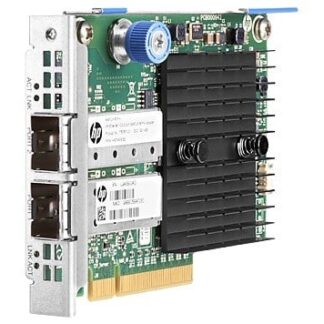
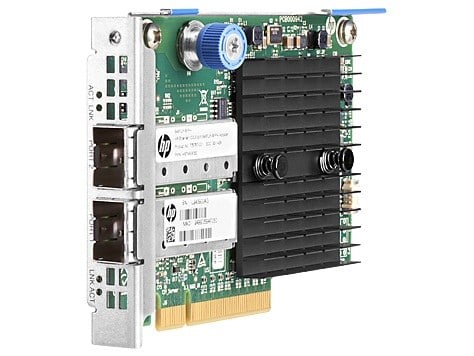
The 779798-B21 HP Ethernet 10GB 2-port 546flr-sfp+ Adapter is a network interface card that provides two ports for connecting to a network using optical fiber cables. It is designed to be used in a server or workstation that has a PCI Express 3.0 x8 slot available for installation.
Here are the technical specifications of the adapter:
- Data Transfer Rate: The adapter supports a data transfer rate of 10 Gigabits per second (Gbps) per port, for a total of 20 Gbps when both ports are used.
- Interface: The adapter uses a PCI Express 3.0 x8 interface, which provides a maximum bandwidth of 8 Gigabytes per second (GB/s) in each direction.
- Ports: The adapter has two Small Form-factor Pluggable Plus (SFP+) ports, which can be used to connect to optical fiber cables using SFP+ transceivers.
- Fiber Type: The adapter supports optical fiber cables with multi-mode or single-mode fiber types, depending on the SFP+ transceiver used.
- Form Factor: The adapter has a low-profile form factor, which makes it compatible with both standard and low-profile PCI Express slots.
- Supported Operating Systems: The adapter is compatible with a variety of operating systems, including Microsoft Windows Server, Red Hat Enterprise Linux, SUSE Linux Enterprise Server, and VMware ESXi.
- Power Consumption: The adapter has a maximum power consumption of 8.4 watts per port, or 16.8 watts when both ports are used.
Benefits of Using the Adapter in your Network
The 779798-B21 HP Ethernet 10GB 2-port 546flr-sfp+ Adapter is a network interface card that provides two 10 Gigabit Ethernet ports for high-speed data transfer. This adapter is designed for use with servers and other network devices that have a PCI Express 3.0 x8 slot, and it uses optical fiber cables to connect to other network devices.
Here are some of the benefits of using the 779798-B21 HP Ethernet 10GB 2-port 546flr-sfp+ Adapter in your network:
- High-speed data transfer: With 10 Gigabit Ethernet ports, this adapter can provide extremely fast data transfer rates, which can be particularly useful in high-bandwidth applications like data centers, cloud computing, and large file transfers.
- Reduced latency: The high-speed data transfer capabilities of this adapter can also help reduce network latency, which can improve the overall performance of your network.
- Increased network capacity: By providing two 10 Gigabit Ethernet ports, this adapter can increase the capacity of your network, allowing more devices to connect and reducing congestion on your network.
- Compatibility with optical fiber cables: Optical fiber cables provide a number of advantages over copper cables, including longer transmission distances, higher bandwidth, and immunity to electromagnetic interference. By using optical fiber cables with this adapter, you can take advantage of these benefits.
- Easy installation: This adapter is designed to be easy to install, with support for plug-and-play installation and hot-swappable capabilities. This can help reduce downtime and minimize the need for technical expertise when installing and configuring your network.
Installing and Configuring the Adapter in Your System
The HP Ethernet 10GB 2-port 546FLR-SFP+ Adapter (part number 779798-B21) is a high-speed network interface card designed for use in servers and workstations. It provides two ports for connecting to optical fiber networks, and uses the PCI Express 3.0 x8 interface to communicate with the host system.
To install and configure the adapter in your system, follow these general steps:
- Turn off your server or workstation and unplug it from power. Open the system case or access panel to gain access to the motherboard and PCI Express slots.
- Locate an available PCI Express 3.0 x8 slot that is compatible with the adapter. Check your system documentation for details on which slots are recommended for use with high-speed network adapters.
- Remove the protective cover from the adapter’s bracket, and carefully insert the adapter into the PCI Express slot. Make sure the adapter is firmly seated and the bracket is securely screwed into the chassis.
- Connect the optical fiber cables to the adapter’s SFP+ ports. Use compatible SFP+ transceivers that match the requirements of your network, such as short or long-range modules, single-mode or multi-mode fibers, or specific wavelengths.
- Power on your system and log in to the operating system. Install the latest drivers and firmware for the adapter from the HP website or the installation media provided with the adapter. Follow the instructions provided by the installer program, and reboot the system if necessary.
- Configure the adapter’s settings and properties using the operating system’s network configuration tools or third-party management software. Configure the IP address, subnet mask, gateway, DNS, VLAN, QoS, and other parameters as needed for your network environment.
- Test the adapter’s connectivity and performance by running network benchmarks, transfer tests, or application workloads that stress the network. Monitor the adapter’s status and logs for errors or warnings that may indicate issues with the hardware, software, or network.
General Information about the HP 779798-B21
- Manufacturer: HP
- Part Number or SKU# 779798-B21
- Type: Networking
- Adapter Type: Network Adapter 2 Port
Networking
- Ports : 10 Gigabit Sfp+ X 2
- Connectivity Technology : Wired
- Data Link Protocol : 10 GIGE
- Data Transfer Rate : 10 GBPS
- Network / Transport Protocol : Tcp/ip
Features
- Ipv6 Support, Quality Of Service (qos), Jumbo Frames Support, Ipv4 Support, Pxe Support, Rdma Over Converged Ethernet (roce)
Compliant Standards
- Ieee 802.1q, Ieee 802.1p, Ieee 802.3x, Ieee 802.3ad (lacp), Ieee 802.3ae, Ieee 802.1ab (lldp), Ieee 802.1qbb, Ieee 802.1qaz, Ieee 802.1qbg
Processor / Memory
- Processor : Mellanox Connectx-3
- Ram : 128 MB
Expansion / Connectivity
- Interfaces : 2 X 10gb Ethernet – Sfp+