

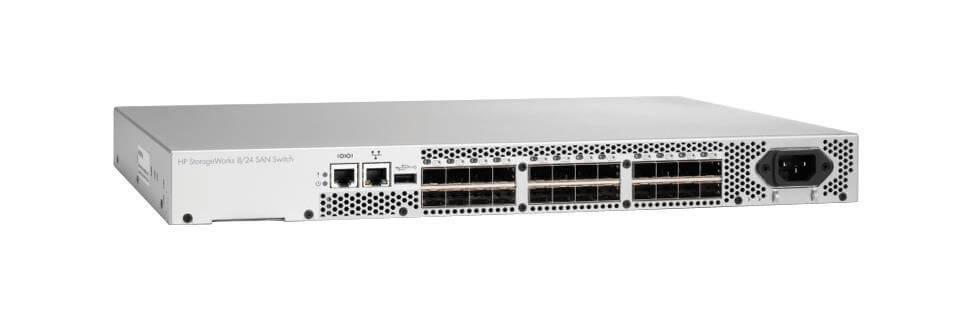
Description
Data Centers SAN Switching
A storage area network (SAN) switch is a critical component of a data center’s storage infrastructure. Data center SAN switching refers to the process of connecting servers, storage arrays, and other devices within a data center using a high-speed SAN.
The primary function of a SAN switch in a data center is to provide high-speed connectivity between servers and storage arrays. This allows data to be transferred quickly and reliably between storage devices and servers, which is essential for supporting mission-critical applications and services.
A SAN switch acts as the central hub of a data center’s storage network, connecting storage devices and servers together and providing a centralized management point for storage traffic. The switch typically provides several key features and functionalities, including:
- Port aggregation: The ability to combine multiple ports into a single logical link, allowing for higher bandwidth and increased reliability.
- Traffic management: The ability to prioritize, shape, and monitor storage traffic, ensuring that critical applications receive the necessary bandwidth and resources.
- Network security: The ability to secure the storage network against unauthorized access and potential security threats.
- Scalability: The ability to expand the storage network as needed, by adding new ports, switches, or storage devices.
In conclusion, data center SAN switching is an essential component of a data center’s storage infrastructure. The SAN switch provides high-speed connectivity between storage devices and servers, and acts as a central hub for storage traffic management and security.
Advanced Network Management
Advanced network management refers to the use of advanced software tools and technologies to manage and monitor computer networks. These tools and technologies are designed to provide network administrators with greater visibility and control over the network, as well as to automate many routine network management tasks.
Advanced network management typically includes several key features and functionalities, such as:
- Network discovery and mapping: The ability to automatically discover and map the components of a network, including devices, servers, and applications.
- Network monitoring and reporting: The ability to monitor network performance in real-time, and to generate detailed reports on network utilization, availability, and security.
- Network configuration and management: The ability to manage and configure network devices, servers, and applications from a centralized management console.
- Network automation: The ability to automate routine network management tasks, such as software updates, backup and recovery, and network security.
- Network security: The ability to secure the network against unauthorized access and potential security threats, including malware, viruses, and hacking attacks.
Advanced network management tools and technologies are essential for large and complex networks, where manual management and monitoring can be time-consuming and error-prone. By providing greater visibility and control over the network, advanced network management enables network administrators to proactively manage network performance and to respond quickly to network issues.
In conclusion, advanced network management refers to the use of advanced tools and technologies to manage and monitor computer networks. These tools and technologies provide network administrators with greater visibility and control over the network, as well as to automate many routine network management tasks.
Installation and Deployment
Installation and deployment refer to the process of installing and setting up a new system, product, or solution in a production environment. This process involves several key steps, including:
- Preparation: Preparing the environment for the installation, including checking hardware and software requirements, verifying compatibility with existing systems, and preparing the necessary documentation.
- Installation: Installing the system or solution, including setting up the hardware, configuring the software, and integrating with existing systems as necessary.
- Configuration: Configuring the system or solution to meet the specific needs of the organization, including setting up user accounts, customizing settings, and establishing network connections.
- Testing: Testing the system or solution to ensure it is functioning correctly, including performing functional and performance tests, and verifying compatibility with existing systems.
- Deployment: Deploying the system or solution into production, including making it available to users, providing training and support, and monitoring the system for any issues.
- Maintenance: Maintaining the system or solution over time, including performing regular software updates, monitoring performance, and troubleshooting any issues that may arise.
Installation and deployment are critical steps in the implementation of a new system, product, or solution. By following a structured and tested process, organizations can ensure that the installation and deployment of new systems and solutions goes smoothly and that the systems are configured and functioning optimally.
Finally, installation and deployment refer to the process of installing and setting up a new system, product, or solution in a production environment. This process involves several key steps, including preparation, installation, configuration, testing, deployment, and maintenance.
General Information
- Manufacturer: HP
- Part Number or SKU# AM867-63001
- Type: Networking
- Sub-Type: Switch 8 Ports
- Device Type : Switch – Stackable
- Enclosure Type : Rack-Mountable – 1u
Networking
- Data Transfer Rate : 8 Gbps
- Data Link Protocol : 8gb Fibre Channel
- Fibre Channel : Fc-Al, Fc-Al-2, Fc-Fg, Fc-Fla, Fc-Gs-2, Fc-Ph, Fc-Ph-2, Fc-Ph-3, Fc-Plda, Fc-Sw, Fc-Vi, Fc-Fh
- Remote Management Protocol : Snmp, Telnet, Http
- Connectivity Technology : Wired
- Communication Mode : Full-Duplex
- Features : Manageable, Full Duplex Mode
Expansion / Connectivity
- Expansion Slots Total (Free) : 8 ( 8 ) X Sfp (Mini-Gbic)
- Interfaces : 1 X Management – Ethernet 10base-T/100base-Tx – Rj-45 1 X Management – Rs-232 – 9 Pin D-Sub (Db-9)


