
Description
Compatibility with different systems
The GP529UT HP Nvidia Quadro FX 1700 graphics card is compatible with a wide range of computer systems, including desktops and workstations. Here are some additional details on its compatibility:
- Bus interface: The GP529UT HP Nvidia Quadro FX 1700 uses the PCI Express 2.0 x16 interface, which is a widely used bus interface for graphics cards in modern desktops and workstations. It is backward compatible with PCI Express 1.0.
- Operating system support: The graphics card is compatible with a range of operating systems, including Windows XP, Windows Vista, Windows 7 (32-bit and 64-bit), and Linux. It is important to note that the specific drivers for the operating system and architecture should be installed to ensure proper functionality.
- Power requirements: The graphics card has a maximum power consumption of 42.5 watts, which is relatively low for a professional-grade graphics card. It can be powered by the standard PCI Express slot on most modern desktops and workstations. However, it is important to ensure that the power supply unit (PSU) of the system is adequate to support the additional power draw from the graphics card.
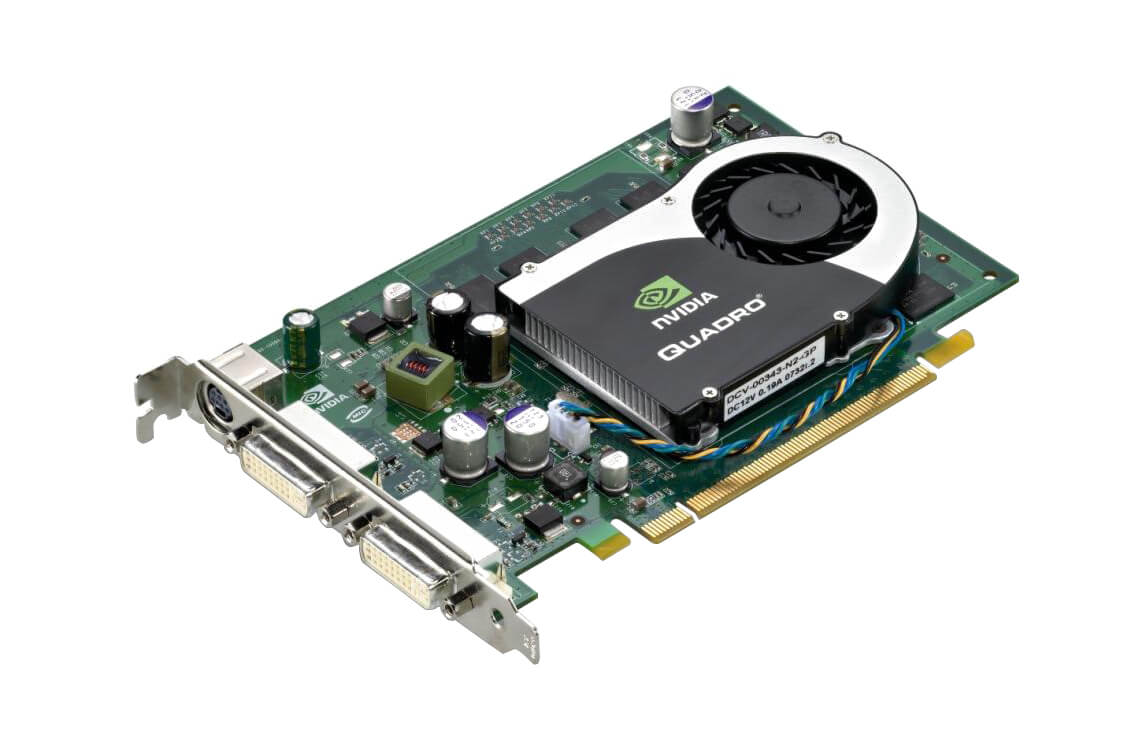
- Form factor: The GP529UT HP Nvidia Quadro FX 1700 has a single slot, full height form factor, making it compatible with a wide range of computer systems. However, it is important to ensure that the computer case has enough space to accommodate the card’s dimensions (9.5 x 4.4 x 1.5 inches).
Installation process
Here is an overview of the installation process for the GP529UT HP Nvidia Quadro FX 1700 graphics card:
- Before installing the new graphics card, you should uninstall any previous graphics card drivers and software from your computer. This can be done through the Control Panel or the Device Manager in Windows, or through the package manager in Linux.
- Make sure your computer is powered off and unplugged from the wall outlet. Open the computer case and locate an available PCI Express 2.0 x16 slot.
- Gently insert the graphics card into the slot, making sure it is firmly seated and the locking mechanism clicks into place. If your graphics card requires additional power, connect the power cable from the power supply to the graphics card.
- Replace the computer case cover and connect the necessary cables to the graphics card, such as the DVI cables for your monitors.
- Power on your computer and wait for the operating system to detect the new hardware. Insert the installation disc that came with the graphics card and follow the on-screen instructions to install the drivers and software.
- Restart your computer to complete the installation process.
It’s important to note that the installation process may vary slightly depending on the specific computer system and operating system you are using. Always refer to the manufacturer’s installation instructions for your specific graphics card model, and make sure to follow all safety precautions when working with computer hardware.
Maintenance tips
Here are some maintenance tips for the GP529UT HP Nvidia Quadro FX 1700 graphics card to ensure optimal performance and longevity:
- Keep the graphics card and its surrounding area clean: Dust and debris can accumulate on the graphics card over time and interfere with its cooling system, causing overheating and potentially damaging the card. Use compressed air or a soft brush to clean the card and its surroundings regularly.
- Monitor temperatures: Overheating can also occur if the card is working too hard or not getting enough airflow. You can use software such as MSI Afterburner or GPU-Z to monitor the temperature of the graphics card, and adjust the fan speed or settings as needed to ensure the card is operating at a safe temperature.
- Keep drivers and software up to date: Nvidia regularly releases driver updates to optimize performance, fix bugs, and improve stability. Check the Nvidia website or use Nvidia GeForce Experience to ensure you have the latest drivers installed. It’s also important to keep your operating system and other software up to date.
- Avoid overclocking: Overclocking, or pushing the graphics card beyond its factory settings, can increase performance but also increase the risk of damage or instability. If you do choose to overclock, do so in small increments and monitor the card’s performance and temperature closely.
- Handle the card with care: Graphics cards are sensitive to static electricity, which can damage the components. When handling the card, use an antistatic wristband or touch a grounded metal object to discharge any static electricity from your body.
By following these maintenance tips, you can help extend the lifespan of your GP529UT HP Nvidia Quadro FX 1700 graphics card and ensure it continues to deliver reliable and high-performance graphics capabilities.
Key Features:
- Type: Graphics Card
- Card Interface: Pci Express X16
- Compatibility: Pc
PROCESSOR:
- Graphic Processor: Nvidia Quadro Fx 1700
- Ramdac Speed: 400 Mhz
Memory/Technology:
- Installed Memory: 512 Mb
- Memory Tech: Ddr2 Sdram
- Memory Clock Speed: 400 Mhz
Technical Features:
- Form Factor: Plug-In Card
- Max Screen Resolution: 3840 X 2400
- Refresh Rate At Max. Resolution: 3840 X 2400 @ 85 Hz
- Special Features: Hdtv Tv-Out Support
- Api Supported: Directx 10, Opengl 2.1
- Max Monitors Supported: 2
- Digital Video Standard: Digital Visual Interface (Dvi)
Input / Output:
- Display Interface: Dvi-I (Dual Link) X 1
- Tv Interface: Hdtv Out
System Requirements:
- Operating System: Linux • Microsoft Windows Xp • Microsoft Windows Vista
Package Contents:
- Vga Card, Software Cd, Dvi To Vga Adapter X2