

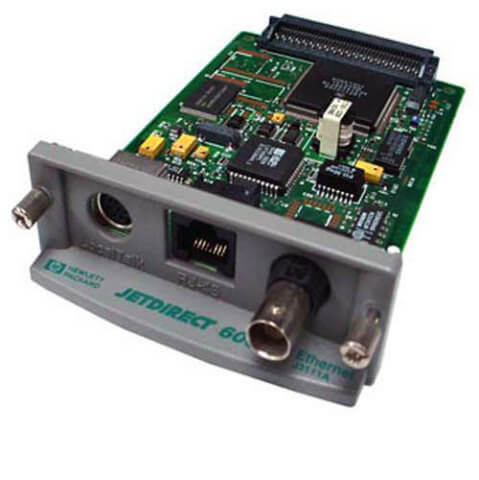

Description
Advanced Security Features
The J3111-60002 HP Jetdirect 600N Ethernet 10/100base-Tx Print Server Card is designed to offer advanced security features that help to protect the printer and the network from unauthorized access and hacking attempts. Some of the key security features of this print server card include
- Secure Network Access: The J3111-60002 HP Jetdirect 600N Ethernet Print Server Card offers secure network access through support for protocols such as IPsec, SNMPv3, and HTTPS. These protocols help to encrypt data transmissions and provide secure access to the printer and print server.
- Authentication and Authorization: The J3111-60002 HP Jetdirect 600N Ethernet Print Server Card offers support for authentication and authorization protocols such as Kerberos, LDAP, and Active Directory. These protocols help to ensure that only authorized users can access the printer and print server.
- Firewall Protection: The J3111-60002 HP Jetdirect 600N Ethernet Print Server Card offers built-in firewall protection that helps to prevent unauthorized access to the printer and print server. The firewall can be configured to block access from specific IP addresses or ranges, and can be customized to meet specific security requirements.
- Access Control: The J3111-60002 HP Jetdirect 600N Ethernet Print Server Card offers support for access control lists (ACLs) that help to control access to the printer and print server. ACLs can be used to restrict access to specific users or groups, and can be configured to allow or deny access to specific functions and services.
- Encryption: The J3111-60002 HP Jetdirect 600N Ethernet Print Server Card offers support for encryption protocols such as SSL and TLS, which help to encrypt data transmissions and provide secure access to the printer and print server.
Remote Printing with Print Server Card
The J3111-60002 HP Jetdirect 600N Ethernet 10/100base-Tx Print Server Card provides remote printing capabilities for printers. Remote printing allows users to send print jobs from a computer or mobile device to a printer that is located in a different location.
To use remote printing with the J3111-60002 HP Jetdirect 600N Ethernet Print Server Card, the printer must be connected to a network and the print server card must be installed and configured. Once this is done, users can send print jobs to the printer from their computer or mobile device, as long as they are connected to the same network as the printer.
One of the benefits of remote printing with the J3111-60002 HP Jetdirect 600N Ethernet Print Server Card is that it allows users to print from anywhere on the network, without having to physically connect their device to the printer. This is especially useful in office environments where multiple users need to access the same printer from different locations.
Another benefit of remote printing is that it can save time and increase productivity. Instead of having to physically go to the printer to retrieve printed documents, users can simply send the print job and retrieve the documents later.
Remote printing with the J3111-60002 HP Jetdirect 600N Ethernet Print Server Card is also secure, as it comes with built-in security features that protect the printer and the network from unauthorized access and hacking attempts. These security features include password protection and encryption of print jobs.
Installation and Configuration
The installation and configuration of the J3111-60002 HP Jetdirect 600N Ethernet 10/100base-Tx Print Server Card is a fairly straightforward process that involves the following steps
- Determine compatibility: Before installing the J3111-60002 HP Jetdirect 600N Ethernet Print Server Card, it is important to ensure that it is compatible with the printer model you are using. Check the manufacturer’s specifications to confirm compatibility.
- Power off printer: Before installing the print server card, power off the printer and disconnect all cables.
- Open printer casing: Open the printer casing to access the printer’s internal card slot.
- Insert print server card: Carefully insert the J3111-60002 HP Jetdirect 600N Ethernet Print Server Card into the card slot, making sure that it is securely in place.
- Connect cables: Connect the appropriate cables, including the Ethernet cable that connects to the network, the power cable that powers the print server card, and any other necessary cables.
- Power on printer: Power on the printer and wait for it to initialize.
- Configure print server card: To configure the J3111-60002 HP Jetdirect 600N Ethernet Print Server Card, connect a computer to the same network as the printer and print server card. Open a web browser and enter the print server card’s IP address to access its web interface. From here, you can configure the print server card’s settings, including IP address, subnet mask, gateway address, and more.
- Test print server card: After configuring the print server card, test it by sending a print job to the printer from a computer on the same network. If the print job is successful, the J3111-60002 HP Jetdirect 600N Ethernet Print Server Card is properly installed and configured.
General Information
- Manufacturer Name: HP
- Part Number or SKU# J3111-60002
- Sub-Type: Print Server 10-100
- Device Type : Print Server
- Form Factor : Plug-In Card
- Interface (Bus) Type : EIO
Networking
- Connectivity Technology : Wired
- Cabling Type : Ethernet 10Base-T, Ethernet 10Base-2
- Data Link Protocol : Ethernet
- Data Transfer Rate : 10 MBPS
- Remote Management Protocol : SNMP
- Features : Network Monitoring, Manageable
- Compliant Standards : IEEE 802.3
Expansion / Connectivity
- Compatible Slots : 1 X EIO
- Connections : 1 X Network – Ethernet 10Base-T – Rj-45 1 X Network – Ethernet 10Base-2 – BNC 1 X Network – Local Talk – 8 Pin Mini-Din


