

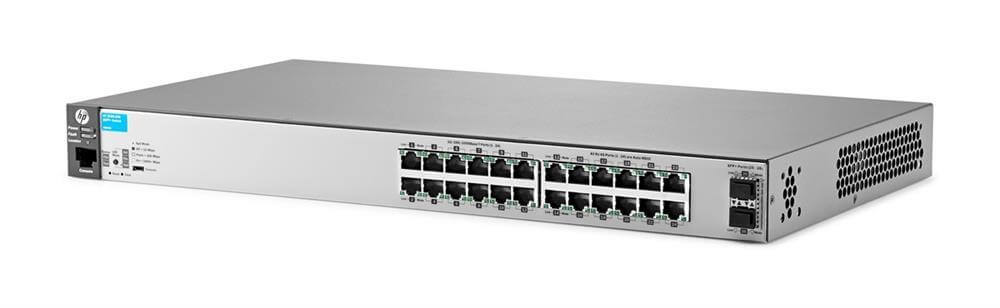
Description
Network Security of 10GBase-X – Rack-Mountable
Network security is a critical aspect of the J9856A HP 2530-24G-2SFP+ Switch, as it helps to protect the network against potential threats and unauthorized access. The following are some of the security features that are built into this switch to ensure the security of the network:
- Access Control Lists (ACLs): The switch supports ACLs, which allow you to specify which types of traffic are allowed or denied access to the network.
- Port Security: Port security allows you to configure specific ports on the switch to accept traffic from only specific MAC addresses, helping to prevent unauthorized access to the network.
- VLANs: Virtual LANs (VLANs) help to segment the network into smaller sub-networks, reducing the risk of unauthorized access and allowing for better traffic management.
- Spanning Tree Protocol (STP): The switch supports Spanning Tree Protocol (STP), which helps to prevent loops in the network by disabling redundant links, thereby improving network stability and security.
- DHCP Snooping: DHCP snooping helps to prevent rogue DHCP servers from being installed on the network, which could lead to security and network stability issues.
- Link Aggregation Control Protocol (LACP): LACP provides link redundancy by aggregating multiple physical links into a single logical link, improving network reliability and helping to prevent network outages.
- 802.1x Authentication: 802.1x authentication is a standard for network security that provides a secure method for authenticating users and devices on the network.
- SSH and SSL: The switch supports Secure Shell (SSH) and Secure Sockets Layer (SSL) protocols, providing secure, encrypted communication between the switch and network management systems.
In conclusion, the J9856A HP 2530-24G-2SFP+ Switch provides a robust set of security features to help protect the network against potential threats and unauthorized access. These features can be configured and managed through the switch’s web interface or command-line interface, allowing network administrators to tailor the security of the network to meet their specific needs.
Power Over Ethernet (PoE)
Power over Ethernet (PoE) is a technology that enables the delivery of both electrical power and data over a single Ethernet cable to devices such as access points, cameras, phones, and other networked devices. Instead of requiring a separate electrical outlet, PoE enabled devices can receive both power and data over the same cable, which simplifies installation and reduces costs.
There are two main standards for PoE: IEEE 802.3af and IEEE 802.3at, also known as PoE and PoE+. PoE provides up to 15.4 watts of power per port, while PoE+ provides up to 30 watts of power per port.
PoE technology is useful in situations where a networked device is located in an area where power outlets are not readily available, or where running separate electrical and data cables would be cost-prohibitive. It is commonly used in networks for wireless access points, IP cameras, and VoIP phones, among other applications
Installation and Deployment
Installation and deployment refer to the process of setting up and configuring a network device, such as a switch, router, access point, or any other networking equipment, in a new environment or network. The goal of the installation and deployment process is to get the device up and running, and to ensure that it is properly integrated with the existing network infrastructure.
The installation process involves physically setting up the device, which may involve mounting the device in a rack, attaching cables, and connecting power. The deployment process involves configuring the device to meet the requirements of the network, which may involve setting up IP addresses, subnets, VLANs, security settings, and other parameters.
The steps involved in installation and deployment can vary depending on the device and the network, but they generally follow a standard process, which can include the following:
- Unpacking and inspecting the device: Before installing the device, you need to verify that you have all the necessary components and that there are no physical damage to the device or the components.
- Physical installation: This involves installing the device in its desired location and connecting it to the network. This may involve mounting the device in a rack, connecting data cables, and attaching power cables.
- Initial configuration: Once the device is physically installed, you need to configure basic settings such as IP addresses, subnets, and VLANs. This is typically done through a web interface or command-line interface.
- Software updates: You should always check if there are any software updates available for the device, and if necessary, install the latest firmware or software updates.
- Network integration: This involves configuring the device to work seamlessly with the existing network infrastructure, which may involve setting up VLANs, security policies, and Quality of Service (QoS) settings.
- Testing: Finally, you should test the device to ensure that it is working properly and that it meets the requirements of the network.
In conclusion, installation and deployment is a crucial step in getting a network device up and running, and it is important to carefully follow the steps involved to ensure a successful and seamless integration of the device into the existing network infrastructure.
General Information
- Manufacturer Hewlett-Packard
- Part Number or SKU#J9856A
- Type: Networking
- Sub-Type: Switch 24 Ports
- Product Series 2530
- Product Model 2530-24G-2SFP+
- Product Name 2530-24G-2SFP+ Switch
- Product Type Ethernet Switch
Interfaces/Ports
- Stack Port No
- Total Number of Network Ports 24
- Number of Network (RJ-45) Ports 24
- Port/Expansion Slot Details 24 x Gigabit Ethernet Network, 2 x 10 Gigabit Ethernet Expansion Slot
Media & Performance
- Media Type Supported Twisted Pair
- Ethernet Technology Gigabit Ethernet, 10 Gigabit Ethernet
- Network Technology 10/100/1000Base-T, 10GBase-X
I/O Expansions
- Number of Total Expansion Slots 2
- Expansion Slot Type SFP+
Network & Communication
- Layer Supported 2
Management & Protocols
- Manageable Yes
Power Description
- PoE (RJ-45) Port No
- Input Voltage 120 V AC, 230 V AC


