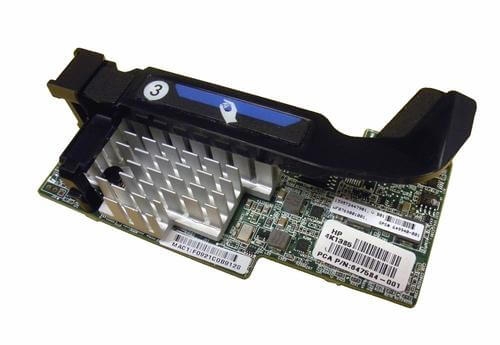
Description
Management and Monitoring
The HPE Flexfabric 10GB 2-Port 554flb Network Adapter supports a range of management and monitoring capabilities that can help network administrators to optimize the performance and reliability of their network infrastructure. Here are some key features of the adapter’s management and monitoring capabilities:
- HPE OneView: HPE OneView is a powerful infrastructure management platform that provides a centralized view of the entire IT environment, including servers, storage devices, and network infrastructure. With HPE OneView, network administrators can monitor the health and performance of the adapter, configure advanced networking features, and perform firmware and driver updates from a single console.
- HPE Systems Insight Manager (SIM): HPE SIM is another centralized management tool that can be used to monitor the health and performance of the adapter, as well as other HPE servers and storage devices. With HPE SIM, network administrators can receive alerts and notifications for critical events, track inventory and asset information, and perform software updates and patches.
- SNMP monitoring: The adapter also supports SNMP (Simple Network Management Protocol) monitoring, which enables network administrators to monitor the performance and health of the adapter using standard SNMP-based network management tools. SNMP monitoring allows administrators to track key performance metrics such as link utilization, error rates, and packet loss, and to receive alerts and notifications when these metrics exceed predefined thresholds.
- Diagnostics and troubleshooting: The adapter includes a range of diagnostic and troubleshooting features, including integrated self-test capabilities, link status and speed reporting, and error reporting. These features can help network administrators to quickly diagnose and resolve issues with the adapter and the underlying network infrastructure.
Maximize Network Performance
To maximize network performance with the HPE Flexfabric 10GB 2-Port 554flb Network Adapter, there are several key considerations that network administrators should take into account. Here are some strategies for optimizing network performance:
- Choose the right networking topology: The adapter supports a range of networking topologies, including Ethernet, Fibre Channel over Ethernet (FCoE), and iSCSI. Network administrators should choose the right topology based on the specific requirements of their network infrastructure and applications.
- Optimize network settings: The adapter supports advanced networking features such as TCP/IP offloading, jumbo frames, and VLAN tagging. These features can be configured to optimize network performance for specific applications and workloads.
- Monitor network performance: Network administrators should use monitoring tools to track key performance metrics such as link utilization, error rates, and packet loss. This information can be used to identify potential performance issues and to make adjustments to network settings or infrastructure as needed.
- Use Quality of Service (QoS) features: The adapter supports QoS features such as traffic prioritization and bandwidth allocation. These features can be used to ensure that critical applications and services receive the necessary network resources to perform optimally.
- Upgrade firmware and drivers: HPE regularly releases firmware and driver updates for the adapter that can improve performance, fix bugs, and enhance security. Network administrators should ensure that they are using the latest firmware and drivers for the adapter to take advantage of these improvements.
Network administrators can maximize the performance and reliability of their network infrastructure with the HPE Flexfabric 10GB 2-Port 554flb Network Adapter. This can help to ensure that critical business applications and services are always available and performing at their best, leading to improved productivity and user satisfaction.
Large-Scale Network Deployments
Large-scale network deployments can be complex and challenging, but with careful planning and execution, they can be successfully implemented. Here are some key considerations for large-scale network deployments:
- Planning and design: The first step in a large-scale network deployment is to develop a comprehensive plan and design for the network infrastructure. This should include a detailed assessment of business and technical requirements, a network topology design, and a list of hardware and software components required for the deployment.
- Network architecture: When designing a large-scale network, it is important to consider the architecture of the network, such as the use of core, distribution, and access layers, and the placement of network components such as switches, routers, and firewalls. This can help to ensure that the network is scalable, flexible, and able to meet the performance requirements of critical business applications.
- Testing and validation: Before deploying the network infrastructure, it is important to conduct testing and validation to ensure that the components and configurations are working as intended. This can include stress testing, performance testing, and security testing.
- Deployment and configuration: Once the network design has been finalized, the network components can be deployed and configured according to the plan. This includes configuring IP addresses, VLANs, routing protocols, and security settings.
- Monitoring and management: After the network has been deployed, it is important to monitor and manage the network to ensure that it is performing as expected. This includes monitoring performance metrics, identifying and resolving issues, and applying updates and patches as needed.
- Scalability: Large-scale network deployments should be designed to be scalable, meaning that they can accommodate growth and increased demand without requiring a major overhaul of the network infrastructure.
General Information
- Manufacturer: HPE
- MPN: 647586-B21
- Type: Networking
- Spare Part Number: 649940-001
- SKU: 647586-B21
- Sub-Type: Network Adapter 10 Gigabit
- Interface (Bus) Type : Pci Express 2.0 X8
- Processor : 1 – Emulex
- Ram : 128 MB
Networking
- Connectivity Technology : Wired
- Cabling Type : Ethernet 10Gbase-Kr
- Data Link Protocol : 10 Gigabit Ethernet, Fibre Channel Over Ethernet (Fcoe)
- Data Transfer Rate : 10 GBPS
Processor/Memory
- Processor: 1 Emulex
- RAM: 128 MB
Miscellaneous
- Compliant Standards: VCCI, ICES-003, UL 60950, MIC, AS/NZS 3548, FCC CFR47 Part 15, WEEE, RoHS
Compatibility Information
- HPE ProLiant BL460c Gen8, WS460c Gen8, WS460c Gen8 Graphics Expansion