

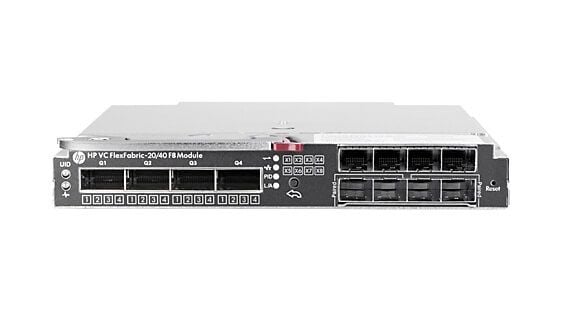
Description
28 Port Virtual Connect Flexfabric
The 28 Port Virtual Connect Flexfabric is a module developed by HPE for its C-Class Bladesystems. The module provides 28 Gigabit Ethernet ports that can be used to connect blade servers to the network. It is designed to work with HPE’s Virtual Connect technology, which allows multiple virtual networks to be created within a single physical network.
The Virtual Connect Flexfabric architecture provides a number of benefits, including:
- Network Segmentation: The ability to create multiple virtual networks within a single physical network allows administrators to separate different applications and workloads into different virtual networks for greater security, reliability, and flexibility.
- Virtual Machine Mobility: The Virtual Connect Flexfabric architecture supports virtual machine mobility, allowing virtual machines to be moved between blade servers without disrupting network connectivity.
- Scalability: The 28 Port Virtual Connect Flexfabric module can be easily scaled by adding additional modules to the Bladesystem chassis, allowing administrators to expand their network as needed.
- High Availability: The Virtual Connect Flexfabric architecture provides high availability through automatic failover, allowing the network to continue functioning even if one of the components fails.
- Easy Management: The Virtual Connect Flexfabric architecture simplifies network management by providing a single point of management for all network connections in the Bladesystem chassis.
Configuration Options
The HPE 40GB Ethernet 28 Port Virtual Connect FlexFabric Module provides several configuration options that allow you to customize the network connectivity for your HPE BladeSystem c-Class infrastructure. These options include:
- Network Connections: You can configure the module to provide network connectivity to individual server blades within the c-Class BladeSystem. This involves defining the network connections and assigning them to specific server blades.
- Network Profiles: You can create network profiles for individual server blades, which specify the network connections and settings for that blade. This allows you to easily switch between different network configurations as needed.
- VLANs: You can configure Virtual LANs (VLANs) to segment the network into separate broadcast domains, improving network security and providing greater control over network traffic.
- Link Aggregation: You can aggregate multiple physical links into a single logical link, improving network performance and providing redundancy.
- Quality of Service (QoS): You can configure Quality of Service (QoS) settings to prioritize network traffic and ensure that important network traffic receives the bandwidth it needs.
- Security: You can configure security settings to secure the network connections and protect against unauthorized access.
- Network Monitoring: You can configure network monitoring to monitor the network connections and network traffic, and to provide alerts and notifications when certain conditions are met.
These configuration options allow you to customize the network connectivity provided by the HPE 40GB Ethernet 28 Port Virtual Connect FlexFabric Module to meet the specific needs of your HPE BladeSystem c-Class infrastructure. It is important to carefully consider your requirements and to configure the module accordingly to ensure optimal network performance and reliability.
Installation and Setup
The installation and setup of the HPE 40GB Ethernet 28 Port Virtual Connect FlexFabric Module involves several steps that must be performed in the correct order to ensure a successful deployment.
Here are the general steps for installing and setting up the HPE 40GB Ethernet 28 Port Virtual Connect FlexFabric Module:
- Prepare the c-Class BladeSystem: Ensure that the c-Class BladeSystem is properly powered down and all cables are disconnected before installing the module.
- Install the module: The HPE 40GB Ethernet 28 Port Virtual Connect FlexFabric Module is installed in the interconnect bays of the c-Class BladeSystem. The installation process involves removing the blanking panel, inserting the module into the interconnect bay, and securing the module in place with screws.
- Connect the cabling: Connect the cabling for the module to the interconnect components and the network.
- Power on the c-Class BladeSystem: Power on the c-Class BladeSystem to complete the installation of the module.
- Configure the module: Use the HPE Virtual Connect Manager to configure the module. This involves defining network connections, creating network profiles, and configuring other settings as needed.
- Verify the configuration: Verify the configuration of the module by accessing the HPE Virtual Connect Manager and checking the network connections and profiles.
- Finalize the installation: Once the module is installed and configured, finalize the installation by updating the firmware and documentation as necessary.
It is important to follow the installation and setup steps carefully to ensure a successful deployment of the HPE 40GB Ethernet 28 Port Virtual Connect FlexFabric Module. Before starting the installation, it is recommended to consult the HPE installation guide for the module and to have all necessary tools and materials on hand.
Product Detail Description:
- Manufacturer: HPE
- MPN: 699350-001
- Type: Networking
- Module-Type: Expansion Module 16 Ports
- Option Part Number: 691367-B21
Technical Information
- Enclosure Type : Plug-In Module
- Ports : 16 X 10/20GBEthernet (Midplane Downlink) + 2 X 20GB Ethernet (Cross Connect Link) + 4 X 40 Gigabit Qsfp+ (Uplink) + 8 X 10 Gigabit Sfp+ (Uplink)
- Performance : Fabric Throughput : 1.2 TBPS
- Capacity : Network Access Groups : 128
- Jumbo Frame Support : 9216 Bytes
- Fibre Channel : Fc-Fg, Fc-Fla, Fc-Gs, Fc-Gs-2, Fc-Gs-3, Fc-Ph, Fc-Ph-2, Fc-Ph-3, Fc-Vi, Fc-Bb-5
- Routing Protocol : Igmpv2, Igmp, Igmpv3
- Remote Management Protocol : Snmp 1, Snmp 2, Https, Smi-S, Cli
- Encryption Algorithm : Ssl
- Authentication Method : Radius, Tacacs+, Ldap
- Features : Auto-Negotiation, Ldap Support, Vlan Support, Lldp Support, Non Blocking Ports, Transparent (N_Port Id Virtualization – Npiv) Mode Support, Sflow V5
- Compliant Standards : IEEE 802.2, IEEE 802.1q, IEEE 802.3ad (Lacp), IEEE 802.3ae, IEEE 802.1ab (Lldp), IEEE 802.3aq, IEEE 802.1qbb, IEEE 802.1qaz
- Status Indicators : Port Status, Link Activity, Status Of Modules, Module Locat
Expansion / Connectivity
- Interfaces : 16 X 10/20gbit Lan – Midplane Downlink 2 X 20gbit Lan – Cross Connect Link 4 X 40gbit Lan – Qsfp+ – Uplink 8 X 10gbit Lan – Sfp+ – Uplink


