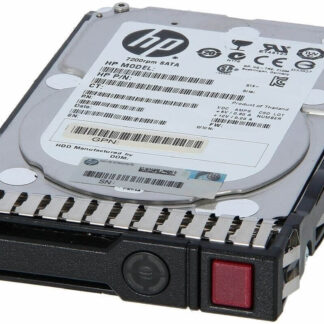
Description
Upgrading and Replacing
Upgrading and replacing refer to the process of improving or swapping out an existing hard drive with a newer or better one. Upgrading typically involves replacing the old hard drive with a newer one that has better capacity, speed, or features, while replacing involves swapping out a hard drive that has failed or is no longer functioning properly.
Upgrading a hard drive can be done for various reasons, such as needing more storage space, improving read and write speeds, or upgrading to a more reliable hard drive with better features. Upgrading a hard drive can be a straightforward process, but it’s important to ensure that the new hard drive is compatible with the computer or server and that the proper precautions are taken to safeguard the data on the old hard drive.
Replacing a hard drive is typically done when a hard drive has failed or is no longer functioning properly. This may be due to physical damage or wear and tear, or due to data corruption or other software issues. When replacing a hard drive, it’s important to ensure that the new hard drive is compatible with the computer or server and that the proper procedures are followed to install the new hard drive and transfer the data from the old hard drive to the new one.
Both upgrading and replacing a hard drive can be done by a trained technician or experienced user, and the process will vary depending on the specific computer or server being used. It’s important to carefully follow the manufacturer’s instructions and to take the necessary safety precautions to avoid damaging the hard drive or losing important data.
Maintenance and Care
Maintenance and care of a hard drive are important to ensure that it continues to function properly and reliably over time. Here are some tips for maintaining and caring for a hard drive:
- Keep the hard drive cool: Hard drives generate heat when in use, and excessive heat can cause damage to the components. Make sure the hard drive has proper ventilation and is not placed in an area where it can overheat.
- Protect from physical damage: Hard drives are delicate and can be easily damaged if dropped or bumped. Avoid jostling or moving the hard drive while it’s in use, and store it in a safe location where it won’t be knocked around.
- Avoid dust and debris: Dust and debris can clog up the hard drive’s internal components and cause it to overheat. Keep the area around the hard drive clean and dust-free.
- Defragment the hard drive regularly: Over time, files can become fragmented on the hard drive, causing it to slow down. Defragmenting the hard drive regularly can help to improve performance.
- Use a surge protector: Power surges can damage the hard drive and cause data loss. Use a surge protector to protect the hard drive from electrical damage.
- Back up important data: In case of a hard drive failure or other issues, it’s important to have a backup of important data. Regularly back up your files to an external hard drive or cloud storage service.
- Scan for viruses and malware: Viruses and malware can cause damage to the hard drive and compromise the security of your data. Use antivirus software and scan the hard drive regularly for any threats.
By following these tips, you can help to maintain the health and longevity of your hard drive and ensure that it continues to function properly and reliably over time.
Cost-Effectiveness
Cost-effectiveness is a measure of how efficiently a product or service provides a desired outcome relative to the cost incurred in obtaining it. In the case of the HPE 8TB 7.2K RPM hard drive, cost-effectiveness refers to how well the hard drive performs relative to its price.
For example, if the HPE 8TB 7.2K RPM hard drive is priced higher than other hard drives with similar specifications, it may not be considered cost-effective. However, if the hard drive provides better performance or reliability than other similarly priced hard drives, it may be considered a more cost-effective choice.
In general, a cost-effective product or service provides a high level of performance, quality, or utility relative to its cost. It’s important to note that cost-effectiveness is not the same as affordability, as a product that is affordable may not necessarily be cost-effective if it doesn’t provide the desired level of performance or quality.
When evaluating the cost-effectiveness of a product like the HPE 8TB 7.2K RPM hard drive, it’s important to consider factors such as its performance, reliability, compatibility, warranty and support, as well as its cost in comparison to other similar products on the market. By comparing these factors, you can determine whether the product provides good value for the cost.
General Information
- Manufacturer : HPE
- MPN : 819203-K21
- Spare Part Number: 820033-001
- Model Number: MB8000GFECR
- Model Number: MB008000GWBYL
- Model Number: MB008000GWJRT
- Model Number: MB008000GWRTC
- Assembly Number: 819200-001
- Assembly Number: 865410-002
- Assembly Number: 877683-002
- Assembly Number: P01105-001
- Type : Internal Hard Disk Drive (HDD)
- SSD Type : SATA-6GBPS
- SKU : 819203-K21
Technical Information
- Capacity: 8 TB
- Form Factor: 3.5 inch LFF
- Interface Type: SATA-6GBPS
- Bytes per Sector: 512
- Drive Technology (Fill): Air
- Plug Type: Hot Plug
- Format Type: 512e
- Carrier Type: Smart Carrier (SC)
- Workload Type: Midline
- Features: Native Command Queuing (NCQ), Digitally Signed Firmware, Advanced Format 512e
- Bundled with: HPE SmartDrive carrier
Performance
- Drive Transfer Rate: 6 GB/Sec (External)
- Average Seek Time: 8.5 ms
- Max Seek Time: 15.7 ms
- Track-to-Track Seek Time: 0.7 ms
- Spindle Speed: 7200 RPM
- Max Sequential Throughput (MiB/s): 230
- 128Kib Random Read (IOPs): 105
- 128Kib Random 70% RD/ 30% WT (IOPs): 110
- 128Kib Random 50% RD/ 50% WT (IOPs): 115
Expansion & Connectivity
- Interfaces: 1 x SATA 6 GB/s
- Compatible Bays: 1 x 3.5inch LFF
Power Consumption
- Idle Time: 8.80 Watt
- Random R/W: 12.10 Watt
- Sequential Read: 10.80 Watt
- Sequential Write: 10.50 Watt
Dimension and Weight
- Width : 4 Inch
- Depth : 5.8 Inch
- Height : 1 Inch
- Weight : 1.52 Lbs
Environmental Parameters
- Min Operating Temperature: 50 °F
- Max Operating Temperature: 95 °F
Compatibility
- HPE ProLiant DL Series: DL180 Gen9 (3.5 inch), DL180 Gen9 Base (3.5 inch), DL180 Gen9 Entry (3.5 inch), DL180 Gen9 Storage (3.5 inch), DL20 Gen9 Solution (3.5 inch), DL360 Gen10 (3.5 inch), DL360 Gen10 Base (3.5 inch), DL360 Gen10 Entry (3.5 inch), DL360 Gen10 High Performance (3.5 inch), DL360 Gen10 Low (3.5 inch), DL360 Gen10 Performance (3.5 inch), DL360 Gen10 Solution (3.5 inch), DL380 Gen10 (3.5 inch), DL380 Gen10 Base (3.5 inch), DL380 Gen10 Entry (3.5 inch), DL380 Gen10 High Performance (3.5 inch), DL380 Gen10 Performance (3.5 inch), DL380 Gen10 Solution (3.5 inch), DL385 Gen10 (3.5 inch), DL385 Gen10 Base (3.5 inch), DL385 Gen10 Entry (3.5 inch), DL385 Gen10 High-Performance (3.5 inch), DL385 Gen10 Performance (3.5 inch), DL385 Gen10 Solution (3.5 inch), DL388 Gen9 (3.5 inch), DL388 Gen9 Base (3.5 inch), DL80 Gen9 Entry (3.5 inch)
HPE ProLiant ML Series: ML110 Gen9 (3.5 inch), ML110 Gen9 Base (3.5 inch), ML110 Gen9 Entry (3.5 inch), ML30 Gen9 Entry (3.5 inch), ML30 Gen9 Solution (3.5 inch)
HPE StoreEasy 1450