


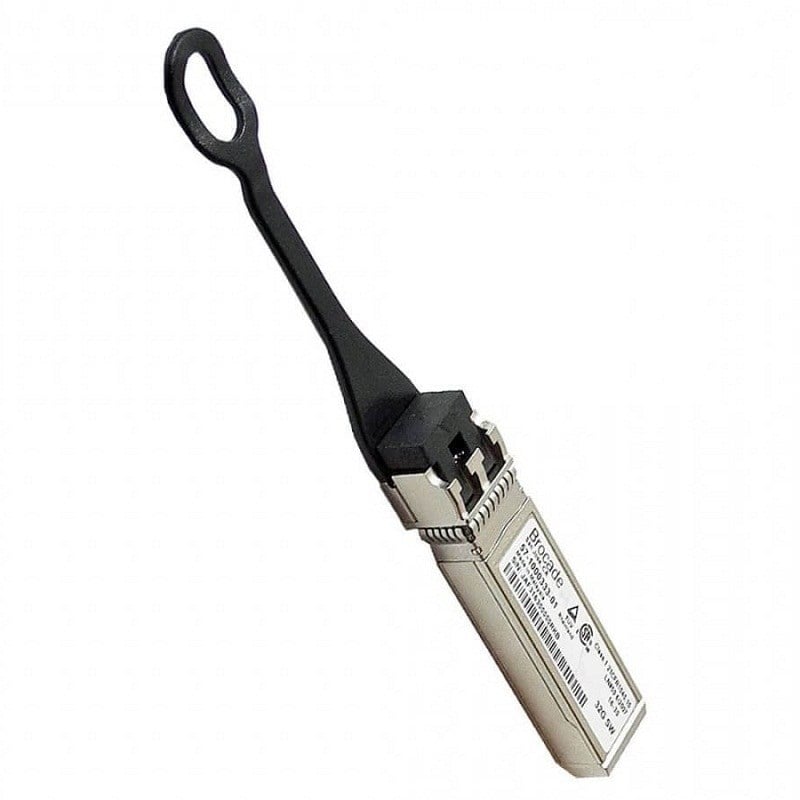

Description
Cost Analysis Considerations
Cost analysis considerations refer to the various factors that should be taken into account when evaluating the total cost of ownership of a product, such as the HPE Fiber SPS-Brcd 32GB SFP+SW. These considerations can help users make informed decisions about whether or not the product is a good investment, and how to optimize its use and maintenance to minimize costs over time.
Some of the cost analysis considerations for the HPE Fiber SPS-Brcd 32GB SFP+SW may include:
- Acquisition cost: This refers to the initial cost of purchasing the transceiver, including any applicable taxes, fees, or shipping costs. When evaluating acquisition costs, it is important to compare prices from different vendors and consider the warranty and support options that are included with the purchase.
- Installation cost: This refers to the cost of installing and configuring the transceiver in a network environment. Depending on the complexity of the installation, this may require the services of a professional installer or IT technician.
- Maintenance cost: This refers to the ongoing cost of maintaining the transceiver, including regular cleaning, firmware updates, and repairs. Users should consider the frequency and cost of maintenance tasks when evaluating the total cost of ownership.
- Energy cost: This refers to the cost of powering the transceiver, which can vary depending on the energy efficiency of the device and the local cost of electricity. Users should consider the energy consumption of the transceiver when evaluating its total cost of ownership over time.
- Replacement cost: This refers to the cost of replacing the transceiver when it reaches the end of its useful life or becomes obsolete. Users should consider the expected lifespan of the device and any future upgrades or replacements that may be necessary.
By taking these cost analysis considerations into account, users can make informed decisions about the total cost of ownership of the HPE Fiber SPS-Brcd 32GB SFP+SW and how to optimize its use and maintenance to minimize costs over time.
Maintenance and Upkeep
Proper maintenance and upkeep of the HPE Fiber SPS-Brcd 32GB SFP+SW can help ensure that it operates efficiently and effectively over its useful life. Here are some tips for maintaining and caring for this device:
- Keep the device clean: Dirt and dust can accumulate on the device and cause it to malfunction. Regular cleaning with a soft, lint-free cloth can help keep the device free of debris and ensure optimal performance.
- Handle with care: The HPE Fiber SPS-Brcd 32GB SFP+SW is a delicate electronic device, and it should be handled with care to avoid damage. Avoid dropping or otherwise mishandling the device, and store it in a protective case or container when not in use.
- Keep the device cool: High temperatures can cause the device to overheat and malfunction. Ensure that the device is stored in a cool, dry environment and avoid exposing it to direct sunlight or other sources of heat.
- Update firmware and software: Regular updates to the firmware and software of the HPE Fiber SPS-Brcd 32GB SFP+SW can help ensure that it operates at peak performance and is compatible with the latest networking protocols and standards.
- Regularly inspect connectors and cables: The connectors and cables that connect the device to the network should be inspected regularly for signs of wear or damage. Replace any damaged cables or connectors to avoid signal loss or other performance issues.
- Follow manufacturer recommendations: Follow the manufacturer’s recommendations for maintenance and upkeep of the device, including recommended cleaning products and schedules, and seek professional assistance if any issues arise.
By following these maintenance and upkeep tips, users can help ensure that their HPE Fiber SPS-Brcd 32GB SFP+SW operates at peak performance and remains reliable over its useful life.
Network Topologies
Network topologies refer to the physical or logical arrangement of the devices, connections, and communication pathways that make up a computer network. Essentially, a network topology describes how devices and nodes in a network are interconnected and how they communicate with each other.
There are several common network topologies, including:
- Bus topology: A bus topology is a linear network topology where all devices are connected to a single cable or “bus”. Data is transmitted over the bus to all devices, and each device reads the data and filters out what is not intended for it.
- Star topology: A star topology consists of a central hub or switch, to which all devices are connected. Data is transmitted from one device to the central hub, which then transmits the data to the appropriate device.
- Ring topology: In a ring topology, devices are connected in a circular manner, with each device connected to the next device in the loop. Data is transmitted around the ring in one direction, with each device reading the data and forwarding it to the next device until it reaches its intended destination.
- Mesh topology: In a mesh topology, devices are connected to multiple other devices in the network, creating a web of connections. Data is transmitted through multiple pathways, and if one pathway is unavailable, the data can be rerouted through another pathway.
- Tree topology: A tree topology, also known as a hierarchical topology, is a combination of bus and star topologies. Devices are arranged in a hierarchical structure, with multiple star topologies connected to a central bus.
- Hybrid topology: A hybrid topology is a combination of two or more network topologies, such as a combination of a star and mesh topology.
Each network topology has its advantages and disadvantages depending on the specific needs of a network. For example, a bus topology may be more cost-effective, but it may not be as reliable as a star topology, which allows for better control and management of data flow. Understanding the different network topologies and their applications can help network administrators and designers choose the most appropriate topology for their specific network needs.
Product Information about this HPE 871362-001
- Brand: HPE
- Model Number or SKU# 871362-001
- Product Type: Networking
- Product Name: 32 Gigabit Transceiver
Technical Feature of Transceiver
- Transceiver Type QSFP28
- Data Transfer Rate 32 GBPS
- Mode Multi-Mode Fiber (MMF)
- Max. Distance 100 m
- Wavelength 850 nm
- Connector Type Duplex LC Connector


