


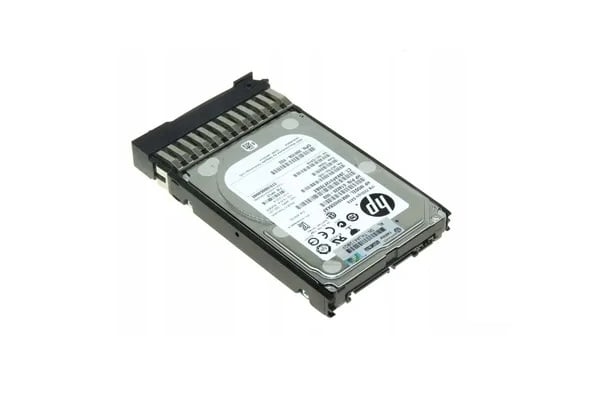
Description
High-Performance Computing
High-Performance Computing (HPC) refers to the use of advanced computing systems and techniques to solve complex computational problems that require a large amount of processing power or data. HPC involves the use of high-speed networking, parallel processing, and specialized hardware to perform calculations and simulations that would otherwise be too difficult or time-consuming for traditional computing systems.
HPC is used in a wide range of industries, including scientific research, engineering, finance, and healthcare, among others. Examples of applications that use HPC include weather forecasting, genome sequencing, drug discovery, and simulations of complex physical phenomena.
One of the key benefits of HPC is its ability to process large volumes of data in a short amount of time. This is achieved through parallel processing, which involves breaking down a computational problem into smaller tasks that can be executed simultaneously by multiple processors. By distributing the workload across multiple processors, HPC systems can achieve much faster processing speeds than traditional computing systems.
Another benefit of HPC is its ability to handle complex calculations and simulations that would otherwise be impossible with traditional computing systems. This is particularly useful in scientific research and engineering, where complex simulations and modeling are used to study natural phenomena, design new materials, and optimize product designs.
Drive Firmware Updates
Drive firmware updates are software updates that are designed to improve the performance, reliability, and security of hard drives. Firmware is the software code that is embedded in the hard drive’s hardware, controlling its functions and behavior. Just like any software, firmware can be updated to fix bugs, improve compatibility, and add new features.
Updating the firmware on a hard drive can help to ensure that it is operating at optimal performance and reduce the risk of data loss or corruption. Firmware updates can also address security vulnerabilities that may have been discovered in older versions of the firmware.
To update the firmware on a hard drive, the manufacturer typically provides a firmware update utility that can be downloaded and installed on the system. The utility will then scan the system to identify the hard drives that require an update and guide the user through the process of updating the firmware.
It is important to follow the manufacturer’s instructions carefully when updating the firmware on a hard drive. In some cases, firmware updates may require the hard drive to be temporarily removed from the system or put into a special maintenance mode. It is also important to ensure that the system is not powered off or disrupted during the firmware update process, as this could result in data loss or corruption.
In addition to updating the firmware on individual hard drives, many server and storage system vendors also provide firmware updates for their products as a whole. These updates may include updates to the firmware on the hard drives, as well as updates to the firmware on other components of the system. Regularly applying these updates can help to ensure that the entire system is operating at optimal performance and security.
Reliability Comparison
Reliability is an important factor to consider when comparing hard drives, as it impacts the long-term performance and durability of the device. There are several factors that can affect the reliability of a hard drive, including the quality of its components, the design of the device, and the manufacturing process used to produce it.
One way to compare the reliability of different hard drives is to look at their mean time between failures (MTBF) ratings. MTBF is an estimate of the average time that a device will operate before experiencing a failure. Hard drives with higher MTBF ratings are generally considered to be more reliable, as they are less likely to fail due to a manufacturing defect or other issue.
Another way to compare the reliability of hard drives is to look at the warranty period offered by the manufacturer. Longer warranties typically indicate that the manufacturer has confidence in the quality and reliability of the device. In general, hard drives with longer warranties are likely to be more reliable than those with shorter warranties.
In addition to MTBF ratings and warranty periods, there are several other factors that can impact the reliability of a hard drive, including its operating environment, usage patterns, and maintenance practices. For example, hard drives that are subjected to high levels of vibration or shock may be more prone to failure than those that are not. Similarly, hard drives that are operated continuously may be more likely to fail than those that are used intermittently.
General Information
- Manufacturer : HPE
- MPN : 9FN066-035
- Type : Internal Hard Drive (HDD)
- HDD Type : SAS-6GBPS
- SKU : 9FN066-035
Technical Information
- Buffer Size: 16 MB
- Bytes per Sector: 512
- Drive Technology (Fill): Air
- Plug Type: Hot Plug
- Carrier Type: Standard Carrier
- Workload Type: Enterprise
- Features: Dual Port
- Bundled with: HPE Standard Carrier
Performance
- Drive Transfer Rate: 6 Gb/Sec (External)
- Spindle Speed: 15000 RPM
- Average Seek Time: 3.5 MS
- Maximum Seek Time: 6.8 MS
- Track-to-Track Seek Time: 0.2 MS
Dimension and Weight
- Width : 4 Inch
- Depth : 5.8 Inch
- Height : 1 Inch
- Weight : 1.52 Lbs
Compatibility
- HPE ProLiant DL Series: DL120 G6 (3.5 inch), DL120 G6 Performance, DL120 G7 (3.5 inch), DL120 G7 Base (3.5 inch), DL120 G7 Entry (3.5 inch), DL120 G7 Performance (3.5 inch), DL160 G5 (3.5 inch), DL160 G5p (3.5 inch), DL160 G6 (3.5 inch), DL160se G6 (3.5 inch), DL165 G5, DL165 G5p, DL165 G5p Base, DL165 G5p Performance, DL165 G6, DL165 G7 (3.5 inch), DL165 G7 Base (3.5 inch), DL165 G7 Entry (3.5 inch), DL180 G5, DL180 G6 (3.5 inch), DL185 G5, DL2x170h G6, DL320 G6 (3.5 inch), DL320 G6 Entry, DL320 G6 High Efficiency, DL320 G6 Performance, DL370 G6 (3.5 inch), DL380 G6 (3.5 inch), DL380 G7 (3.5 inch), DL385 G5p (3.5 inch), DL385 G6 (3.5 inch), DL385 G6 Performance (3.5 inch), DL385 G7 (3.5 inch), DL4x170h G6
- HPE ProLiant ML Series: ML110 G7 (3.5 inch), ML150 G6, ML150 G6 Base, ML150 G6 Performance, ML310 G5p, ML330 G6, ML330 G6 Base, ML350 G5 (3.5 inch), ML350 G5 Entry, ML350 G6 (3.5 inch), ML350 G6 Entry, ML370 G6 (3.5 inch)
- HPE StorageWorks P4300 G2 SAS Storage System, P4500 G2 SAS Storage System
- HPE StorageWorks Disk Enclosure D2600
- HPE StorageWorks Modular Disk System 600
- HPE StorageWorks Modular Smart Array 60
- HPE StorageWorks Network Storage Gateway X3400
- HPE StorageWorks Network Storage System X1400 G2, X1500 G2, X1600 G2, X3410, X3420


