
Description
Performance and Scalability
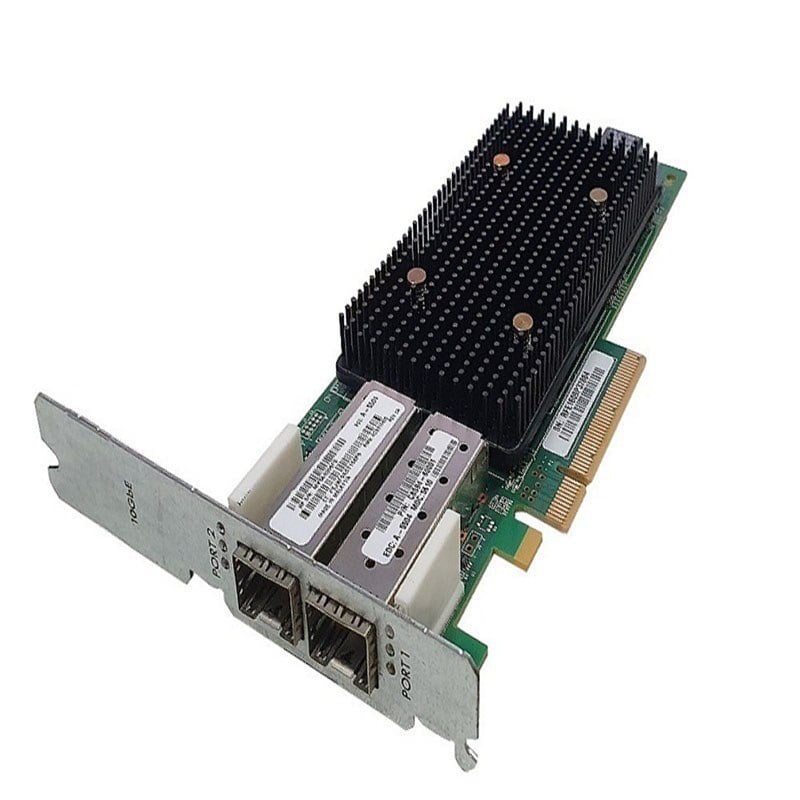
The HPE H6Z10A Dual-Ports 10Gbps iSCSI/FCoE Network Adapter is designed to deliver high-performance and scalability for data center and enterprise-level networks.
In terms of performance, the HPE H6Z10A adapter supports 10 Gigabit Ethernet connectivity, which provides up to 10 times faster data transfer rates than standard Gigabit Ethernet connections. The adapter also supports iSCSI and FCoE protocols, which allow for efficient storage access and data transfer. These features enable faster data transfer rates and improved application performance, which can benefit businesses that require high-speed network connectivity for data-intensive applications.
The adapter also supports multiple hardware offload engines that can help to offload the processing of TCP/IP, iSCSI, and FCoE protocols from the host CPU, which can improve system performance and reduce CPU utilization. This can lead to more efficient use of system resources, which can result in faster application performance and improved overall system performance.
In terms of scalability, the HPE H6Z10A adapter supports multiple virtual functions (VFs) and virtual ports (VPORTs), which can be used to create multiple virtual instances of the adapter. This enables the adapter to support multiple virtual machines (VMs) and network partitions, which can improve scalability and flexibility for data center and enterprise-level networks.
Additionally, the adapter supports advanced features such as quality of service (QoS), which allows for traffic prioritization and bandwidth allocation. This can help to ensure that critical applications receive the necessary network resources and can operate at optimal performance levels, while less critical applications are allocated lower network resources.
Advanced Security Features
The HPE H6Z10A Dual-Ports 10GBPS iSCSI/FCoE Network Adapter is equipped with advanced security features to ensure that data is transmitted securely across the network. These security features include:
- Data Encryption – The adapter supports multiple encryption protocols such as IPsec, SSL, and TLS to protect data from unauthorized access and interception.
- Authentication – The adapter supports multiple authentication protocols such as RADIUS, TACACS+, LDAP, and Kerberos to authenticate users and devices before allowing them access to the network.
- Access Control – The adapter supports Access Control Lists (ACLs) to control which devices or users are allowed to access specific resources on the network.
- Port Security – The adapter provides support for port security which allows administrators to restrict access to specific network ports based on MAC addresses.
- Secure Boot – The adapter supports secure boot which ensures that the firmware loaded on the adapter is signed and verified, preventing unauthorized changes to the firmware.
- SNMPv3 – The adapter supports SNMPv3 which provides secure management and monitoring of network devices.
- Firmware Updates – The adapter supports secure firmware updates to ensure that the adapter is running the latest, most secure firmware.
- Firewall – The adapter supports firewall capabilities to filter out unwanted traffic, including malware, viruses, and other security threats.
Maintenance for Network Adapter
HPE H6Z10A Dual-Ports 10Gbps iSCSI/FCoE Network Adapter requires regular maintenance to ensure optimal performance and reliability. The following are some maintenance practices that can be performed on the network adapter:
- Regular Cleaning: The network adapter should be regularly cleaned to prevent dust and debris from building up on the adapter’s components. This can be done using compressed air to blow away any debris or a soft, dry cloth to wipe the adapter.
- Firmware Updates: HPE regularly releases firmware updates for the network adapter to fix any bugs or security vulnerabilities that may be present. These updates should be downloaded and installed promptly to ensure the adapter’s optimal performance and security.
- Hardware Inspections: The network adapter should be periodically inspected for any signs of damage or wear and tear. This can include checking the adapter’s ports, cables, and connectors for any signs of damage, as well as inspecting the adapter’s circuit board for any signs of corrosion or other damage.
- Performance Monitoring: The performance of the network adapter should be regularly monitored to ensure that it is functioning correctly. This can be done using software tools that allow for monitoring of network traffic, latency, and other performance metrics.
- Replacement of Components: If any components on the network adapter fail or are damaged, they should be promptly replaced. This can include replacing cables, connectors, or even the entire adapter if necessary.
- Troubleshooting: In the event of any issues with the network adapter, troubleshooting should be performed to identify and resolve any problems. This can involve using software tools to diagnose network issues or physically inspecting the adapter for any signs of damage or failure.
In conclusion, regular maintenance of the HPE H6Z10A Dual-Ports 10Gbps iSCSI/FCoE Network Adapter is essential to ensure its optimal performance, reliability, and security. Performing these maintenance practices can help to extend the lifespan of the adapter and prevent costly downtime and repairs.
General Information about the HPE H6Z10A
- Manufacturer: HPE
- Part Number or SKU# H6Z10A
- Device Type: Network Adapter
Technical Specification
- Form Factor: Plug-in card
- Connectivity Technology: Wired
- Data Link Protocol: Fibre Channel over Ethernet (FCoE), iSCSI
- Ports: Gigabit Ethernet (iSCSI) x 2
Dimensions & Weight
- Height: 2.24 Inch
- Width: 7.68 Inch
- Depth: 9.5 Inch
- Weight: 1.5 LBS
Compatibility Information
HPE 3PAR StoreServ 8000, StoreServ 8000 LFF SAS Drive Enclosure Field Integrated, StoreServ 8000 SFF SAS Drive Enclosure, StoreServ 8000 SFF SAS Drive Enclosure Field Integrated, StoreServ 8200, StoreServ 8200 2-node Storage Base, StoreServ 8200 2-node Storage Base for Storage Centric Rack, StoreServ 8200 All Flash Starter Kit, StoreServ 8400, StoreServ 8400 2-node Storage Base, StoreServ 8400 2-node Storage Base Field Integrated, StoreServ 8400 2-node Storage Base for Storage Centric Rack, StoreServ 8400 4-node Storage Base, StoreServ 8400 Upgrade Node Pair, StoreServ 8440, StoreServ 8440 2-node Storage Base, StoreServ 8440 4-node Storage Base, StoreServ 8440 4-node Storage Base for Storage Centric Rack, StoreServ 8440 Upgrade Node Pair, StoreServ 8450, StoreServ 8450 2-node Storage Base, StoreServ 8450 2-node Storage Base for Storage Centric Rack, StoreServ 8450 4-node Storage Base, StoreServ 8450 4-node Storage Base Field Integrated, StoreServ 8450 Upgrade Node Pair