Description
Overview
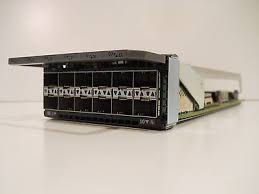
The HPE 5400R zl2 12-port 1GBE SFP MACsec v3 zl2 expansion module (part number J9993A) is an expansion module designed for the HPE 5400R zl2 switch series. It provides an additional 12 ports of 1 Gigabit Ethernet connectivity, each using Small Form-factor Pluggable (SFP) transceivers.
One notable feature of this expansion module is its support for MACsec (Media Access Control Security), which is a security technology used to encrypt and authenticate Ethernet frames. This helps to prevent unauthorized access to sensitive data transmitted over the network.
The expansion module supports the latest version of MACsec (MACsec v3), which provides enhanced security features such as the ability to use different encryption keys for different network connections.
The module also supports Quality of Service (QoS) features, such as traffic prioritization and bandwidth management, to help ensure that critical network traffic is given priority over less important traffic.
The HPE 5400R zl2 switch series is a modular switch platform designed for enterprise networks. With the addition of the 12-port 1GBE SFP MACsec v3 zl2 expansion module, the switch can be expanded to support additional network connections and enhanced security features.
Deployment Scenarios
The HPE 5400R Zl2 12-Ports 1GBE SFP Macsec V3 Zl2 Expansion Module (9989A) is a network expansion module that provides additional 1GBE SFP ports with MACsec encryption capability to HPE 5400R Zl2 switch series. The module can be deployed in various network scenarios, such as:
- Campus network: In a large enterprise campus network, the HPE 5400R Zl2 switch series can be used as a core or distribution switch, while the 9989A module can be deployed as an access switch to provide secure 1GBE connectivity with MACsec encryption to the end devices.
- Data center network: In a data center network, the HPE 5400R Zl2 switch series can be used as a top-of-rack (ToR) switch to connect servers, while the 9989A module can be deployed in the spine switches to provide secure connectivity between the ToR switches.
- Service provider network: In a service provider network, the HPE 5400R Zl2 switch series can be used as a provider edge (PE) switch, while the 9989A module can be deployed in the provider core (PC) switches to provide secure connectivity between the PE switches.
- Cloud network: In a cloud network, the HPE 5400R Zl2 switch series can be used as a network virtualization edge (NVE) switch, while the 9989A module can be deployed in the network virtualization infrastructure (NVI) switches to provide secure connectivity between the NVE switches.
Troubleshooting Common Issues
Here are some common issues that may arise with the HPE 5400R Zl2 12-Ports 1GBE SFP Macsec V3 Zl2 Expansion Module, along with troubleshooting tips:
- Power issues: If the expansion module is not powering on or is not receiving power, check the power supply and ensure that it is properly connected. If the power supply is functioning properly, try resetting the expansion module by disconnecting and reconnecting the power cable.
- Connectivity issues: If you are experiencing connectivity issues, check the cables and ensure that they are properly connected to the expansion module and the devices they are connecting to. If the cables are properly connected, verify the device’s configuration and ensure that the correct VLANs and protocols are enabled.
- Configuration issues: If you are having trouble configuring the expansion module, verify that it is compatible with your device and that the firmware is up to date. Also, ensure that the configuration settings are correct and that there are no conflicts with other devices on the network.
- Performance issues: If the expansion module is not performing as expected, verify that it is not being overloaded by other devices on the network. Also, check the settings on the module to ensure that they are optimized for your specific needs and that there are no bottlenecks in the network.
- Hardware issues: If the expansion module is experiencing hardware issues, contact HPE technical support for assistance. They will be able to diagnose the problem and provide a solution.
- Compatibility issues: If you are experiencing compatibility issues with the expansion module, verify that it is compatible with your device and that the firmware is up to date. If the module is not compatible, you may need to upgrade your device or find a compatible expansion module.
In general, it is important to follow the manufacturer’s instructions and recommendations when installing and configuring the expansion module. If you are unable to resolve the issue on your own, contact HPE technical support for assistance.
General Information about the HPE J9989A
- Manufacturer : HPE
- Part Number or SKU# J9989A
- Device Type : Expansion Module 12 Ports
Networking
- Ports : Gigabit Ethernet (Poe+) X 12 + Gigabit Sfp X 12
- Connectivity Technology : Wired
- Cabling Type : Ethernet 10Base-T, Ethernet 100Base-Tx, Ethernet 1000Base-T
- Data Link Protocol : 10MB Lan, 100MB Lan, Gige
- Data Transfer Rate : 1 GBPS
- Features : Poe+, Macsec Support
- Form Factor : Plug-In Module
Expansion / Connectivity
- Interfaces : 12 X 1000Base-T (Poe+) – Rj-45 ¦ 12 X Ethernet 1000 – Sfp (Mini-Gbic)