



Description
Rack Mountable Design
Rack mountable design refers to the capability of a network device, such as the HPE 1950 switch, to be mounted in a standard 19-inch server rack. This design feature provides several benefits, including:
- Space savings: By mounting the switch in a server rack, you can save valuable floor space in your data center or server room.
- Improved organization: Mounting the switch in a server rack allows for a neat and organized arrangement of network equipment, making it easier to access and manage.
- Increased reliability: Mounting the switch in a server rack provides a secure and stable environment for the device, reducing the risk of damage from accidental knocks or bumps.
- Easy cable management: Rack-mountable switches typically include cable management features, such as cable tie-downs and cable organizers, to help you manage the cables running to and from the switch.
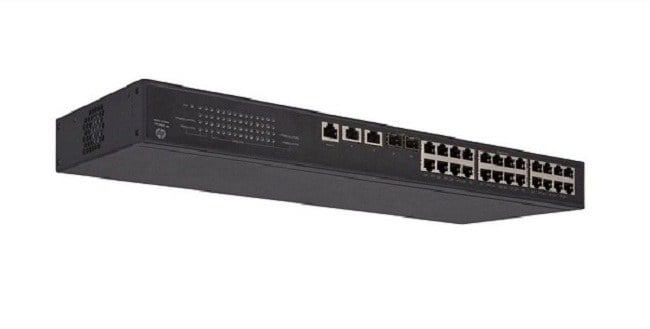
The HPE 1950 switch is designed for rack mountable installation, and includes rack-mounting hardware to enable you to easily mount the switch in a standard 19-inch server rack. The switch can be mounted in either a 1U (1.75 inch) or a 2U (3.5 inch) rack space, depending on your specific requirements.
Console and Web-Based Management
Console and web-based management refers to the two main methods for accessing and controlling the HPE 1950 switch configuration.
- Console management is achieved through a serial connection to the switch using a console cable and terminal emulation software. This method provides direct access to the switch command-line interface (CLI) where you can configure and manage the switch settings.
- Web-based management is achieved through a web browser and enables you to manage the switch remotely over the network. It provides a graphical user interface (GUI) that simplifies the configuration and management of the switch. You can monitor switch status, manage VLANs, configure Quality of Service (QoS), and perform other management tasks through a web browser.
Both console and web-based management provide the same level of control and configuration options for the HPE 1950 switch, and the choice between them depends on your specific management needs and preferences.
Advanced Network Management
Advanced network management refers to the set of features and capabilities that enable advanced control, monitoring, and configuration of network devices such as the HPE 1950 switch. Advanced network management provides several benefits to network administrators, including:
- Improved network visibility: Advanced network management provides real-time monitoring and reporting of network performance and usage, allowing administrators to proactively identify and resolve potential network issues.
- Increased control: Advanced network management provides granular control over network configuration, such as VLANs, Quality of Service (QoS), security policies, and access control.
- Simplified management: Advanced network management tools provide a centralized interface for managing multiple network devices, reducing the time and effort required to manage complex network environments.
- Enhanced security: Advanced network management provides robust security features such as access control, firewalls, and secure authentication, which can help prevent unauthorized access to the network and data.
The HPE 1950 switch provides advanced network management capabilities through its web-based management interface, allowing network administrators to easily monitor, control, and configure the switch from a centralized location.
Main Specification about the HPE JG960A#ABA
- Manufacturer: HPE
- Part Number or SKU # JG960A#ABA
- Device Type: Managed Switch
Technical Information
- Enclosure Type : Rack-Mountable – 1u
- Subtype : Gigabit Ethernet
- Ports : 24 X 10/100/1000 + 2 X Gigabit Sfp / 10 Gigabit Sfp+ + 2 X 10gb Ethernet
Performance
- Throughput (64-Byte Packet Size) : Up To 95.2 Mpps ¦ Routing/Switching Capacity : 128 Gbps
- Capacity : Static Routes : 32 ¦ Virtual Interfaces (Vlans) : 8 ¦ Ipv4 Routing Table Entries : 32 ¦ Ipv6 Routing Table Entries : 32
- Mac Address Table Size : 16384 Entries
- Jumbo Frame Support : 10kb
- Routing Protocol : Igmp, Vrrp, Static Ipv4 Routing, Static Ipv6 Routing, Ecmp
- Remote Management Protocol : Snmp 1, Rmon 2, Rmon, Snmp 3, Snmp 2c, Http, Https, Cli
Features
- Auto-Uplink (Auto Mdi/Mdi-X), Igmp Snooping, Port Mirroring, Spanning Tree Protocol (Stp) Support, Access Control List (Acl) Support, Quality Of Service (Qos), Stp Root Guard, Link Aggregation Control Protocol (Lacp), Dhcp Client, Packet Storm Protection, Class Of Service (Cos)
Compliant Standards
- Ieee 802.3, Ieee 802.3i, Ieee 802.3z, Ieee 802.1d, Ieee 802.1q, Ieee 802.1p, Ieee 802.3x, Ieee 802.3ad (Lacp), Ieee 802.1w, Ieee 802.1x, Ieee 802.1s, Ieee 802.1ab (Lldp), Ieee 802.3at
- Ram : 1 Gb (Max)
- Flash Memory : 128 Mb
Expansion / Connectivity
- Interfaces :
- 24 X 1000base-T – Rj-45
- 2 X Gigabit / 10gbit Lan – Sfp+
- 2 X 10gbase-T – Rj-45
- 1 X Console – Rj-45 – Management
Dimension and Weight
- Height: 1.7inch
- Width: 17.2inch
- Depth: 6.3inch
- Weight: 7 Lbs


