

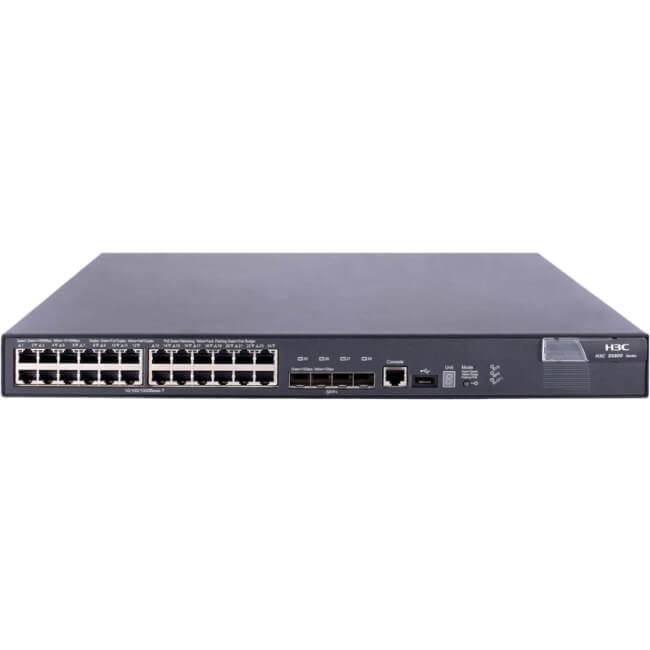
Description
Energy-Efficient Network Solution
Energy-Efficient Network Solution refers to the design and implementation of network systems and devices that minimize energy consumption while still delivering high performance and functionality. This helps organizations to reduce their energy costs and minimize their carbon footprint, which is important for both financial and environmental reasons.
Energy-efficient networking solutions often use advanced power-saving technologies, such as power-over-ethernet (PoE), dynamic power management, and low-power standby modes, to reduce energy consumption while still delivering high-speed network connectivity. Additionally, many energy-efficient network devices are designed to be highly efficient in their use of energy, with features such as fanless designs and passive cooling systems, which reduce energy consumption and minimize the need for cooling and ventilation.
By adopting an energy-efficient network solution, organizations can significantly reduce their energy costs, while still enjoying the benefits of high-performance, reliable and secure network connectivity.
Protecting Sensitive Data Network
Protecting sensitive data on a network is critical to maintaining the confidentiality, integrity, and availability of confidential information. There are several key strategies that can be used to protect sensitive data on a network, including:
- Encryption: Encrypting sensitive data can help to prevent unauthorized access and ensure that even if the data is intercepted, it will not be readable. There are several encryption algorithms available, such as AES and RSA, and it is important to choose the right one based on the type of data being protected and the level of security required.
- Access Control: Implementing access control measures such as user authentication and authorization can help to ensure that only authorized users are able to access sensitive data on a network. This can be done using tools such as firewalls, access control lists (ACLs), and virtual private networks (VPNs).
- Firewalls: Firewalls are an important tool for protecting sensitive data on a network. They help to prevent unauthorized access to the network by monitoring incoming and outgoing traffic and blocking suspicious or malicious traffic.
- Data Backup and Recovery: Regularly backing up sensitive data and having a robust disaster recovery plan can help to minimize the risk of data loss and ensure that sensitive data is protected in the event of a network failure.
- Network Segmentation: Network segmentation involves dividing a network into smaller sub-networks, each with its own security measures. This can help to prevent unauthorized access to sensitive data and limit the damage that can be done if a security breach occurs.
By implementing these and other security measures, organizations can help to protect their sensitive data and ensure that their network remains secure and protected against cyber threats.
Web-Based Interface and CLI
Web-Based Interface and CLI (Command Line Interface) are two commonly used methods for managing and configuring network devices such as switches, routers, and firewalls.
Web-Based Interface: A web-based interface is a graphical user interface (GUI) that allows network administrators to manage and configure network devices using a web browser. The web-based interface provides a visual representation of the device’s configuration and status, and allows administrators to easily make changes to the device’s settings. This method of device management is user-friendly and does not require specialized knowledge of command-line interfaces, making it an accessible option for many users.
CLI (Command Line Interface): CLI, on the other hand, is a text-based interface that requires users to enter commands in order to manage and configure network devices. This method is often preferred by experienced network administrators who need a high level of control and visibility over their devices, as it provides a powerful, direct method for accessing the device’s functions and configurations. CLI is also highly scriptable, allowing administrators to automate repetitive tasks and streamline their device management processes.
Both the web-based interface and the CLI provide essential tools for managing network devices, and the choice between them will depend on the user’s preferences and level of experience with network administration. Some devices may provide both options, allowing administrators to choose the method that best suits their needs.
Main Specification about the HPE JG962A
- Manufacturer: HPE
- Part Number or SKU # JG962A
- Device Type: Managed Switch
Technical Information
- Enclosure Type : Rack-Mountable – 1u
- Ports : 24 X 10/100/1000 (Poe+) + 2 X Gigabit Sfp / 10 Gigabit Sfp+ + 2 X 10gb Ethernet
- Power Over Ethernet (PoE) : PoE+
- Poe Budget : 370 W
Performance
- Throughput (64-Byte Packet Size) : Up To 95.2 Mpps ¦ Routing/Switching Capacity : 128 Gbps
Capacity
- Static Routes : 32 ¦ Virtual Interfaces (Vlans) : 8 ¦ Ipv4 Routing Table Entries : 32 ¦ Ipv6 Routing Table Entries : 32
- Mac Address Table Size : 16384 Entries
- Jumbo Frame Support : 10KB
- Routing Protocol : IGMP, VRRP, Static Ipv4 Routing, Static Ipv6 Routing, ECMP
- Remote Management Protocol : SNMP 1, RMON 2, RMON, SNMP 3, SNMP 2c, Http, Https, Cli
- Ram : 1 Gb (Max) – SDRAM
- Flash Memory : 128 MB
Expansion / Connectivity
- Interfaces : 24 X 1000base-T – Rj-45 – Poe+ ¦ 2 X Gigabit / 10gbit LAN – SFP+ ¦ 2 X 10gbase-T – Rj-45 ¦ 1 X Console – Rj-45 – Management
Power
- Power Device : Internal Power Supply
- Voltage Required : Ac 120/230 V ( 50/60 Hz


