

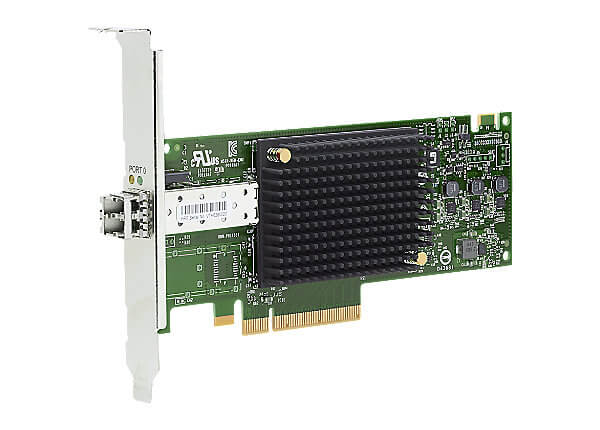


Description
Management of Q0L11A HPE StoreFabric SN1600E 32GB
The Q0L11A HPE StoreFabric SN1600E 32GB Single Port Fibre Channel Host Bus Adapter (HBA) is a high-performance storage networking adapter designed to provide reliable and scalable connectivity between servers and storage arrays. To effectively manage the HBA, you can use the HPE StoreFabric SN1600E HBA Manager software.
Here are some common management tasks for the Q0L11A HPE StoreFabric SN1600E 32GB Single Port Fibre Channel Host Bus Adapter:
- Monitor Performance: The HPE StoreFabric SN1600E HBA Manager software provides real-time monitoring of the HBA’s performance. You can view statistics such as IOPS, throughput, and latency to help identify performance issues.
- Configure Settings: The HPE StoreFabric SN1600E HBA Manager software allows you to configure various settings for the HBA, including the Fibre Channel speed, WWN, and boot settings.
- Update Firmware: Regularly update the firmware of the HBA to the latest version. Firmware updates can fix bugs and security vulnerabilities, and also improve performance.
- Diagnose Issues: The HPE StoreFabric SN1600E HBA Manager software provides diagnostic tools to help identify and troubleshoot issues with the HBA. You can use the software to run diagnostic tests, view error logs, and generate reports.
- Manage Multiple HBAs: If you have multiple Q0L11A HPE StoreFabric SN1600E 32GB Single Port Fibre Channel Host Bus Adapters, you can use the HPE StoreFabric SN1600E HBA Manager software to manage them all from a single interface.
Performance of Q0L11A HPE StoreFabric SN1600E 32GB Single Port
The Q0L11A HPE StoreFabric SN1600E 32GB Single Port Fibre Channel Host Bus Adapter (HBA) provides high-speed connectivity between servers and Fibre Channel storage area networks (SANs). It is designed to deliver high performance and low latency, making it suitable for a wide range of applications.
The Q0L11A HPE StoreFabric SN1600E 32GB Single Port Fibre Channel HBA supports 32Gbps Fibre Channel, which is the fastest speed currently available for Fibre Channel HBAs. This allows for faster data transfers between the server and the storage array, reducing latency and improving overall system performance.
The HBA also features advanced data protection capabilities, such as hardware-assisted virtualization and data integrity checks, which help ensure that data is transmitted and stored accurately and securely.
In addition, the Q0L11A HPE StoreFabric SN1600E 32GB Single Port Fibre Channel HBA is designed to be easy to install and manage, with a range of tools and utilities available to simplify setup, configuration, and monitoring.
Configuration of Q0L11A HPE StoreFabric SN1600E 32GB
Here are the basic steps for configuring the Q0L11A HPE Storefabric SN1600E 32GB Single Port Fibre Channel Host Bus Adapter:
- Install the Q0L11A HBA card into an available PCIe slot in your server.
- Connect the HBA card to your Fibre Channel fabric using a compatible fibre optic cable.
- Install the appropriate drivers and software for the HBA card. HPE provides drivers and software for the Q0L11A on their website. You may also need to install firmware updates for the HBA card.
- Configure the HBA card using the management software provided by HPE. This software allows you to set up the HBA card for specific applications and performance requirements. You can also use the management software to monitor the HBA card’s performance and troubleshoot any issues.
- Once the HBA card is configured, you can begin using it to connect your server to your Fibre Channel storage system. You may need to configure your storage system to recognize the new HBA card.
- Test the connection to ensure that the HBA card is functioning correctly and that you can access your storage system. You can use tools like HPE’s SmartSAN to help you with this process.
General Information about this HPE Q0L11A
- Manufacturer: HPE
- Part Number or SKU# Q0L11A
- Product Type : Controller
- Product Name : Fibre Channel
Technical Specifications of Q0L11A HPE 32GB Single Port
- Interface Type: PCIe 3.0 x8
- Data Transfer Rate: 32 Gb/s
- Protocols Supported: Fibre Channel (FC) Protocol, NVMe over FC
- Port Configuration: Single Port
- Form Factor: Low profile PCIe card
- OS Support: Windows Server, Red Hat Enterprise Linux, SUSE Linux Enterprise Server, VMware ESXi, Citrix XenServer, Oracle Linux
- Power Consumption: 7W (typical)
- Dimensions (HxWxD): 6.35 x 16.76 x 1.94 cm


