Description
Power Management Options
Power management options refer to the various methods and techniques used to manage the power consumption of the R0X39B HPE Aruba 6400 Expansion Module. The following are some common power management options for the R0X39B HPE Aruba 6400 Expansion Module:
- Power Saving Modes: The R0X39B HPE Aruba 6400 Expansion Module may support various power saving modes that can be used to reduce its power consumption. These modes may include sleep modes, hibernation modes, or other power-saving configurations.
- Power Scheduling: Power scheduling allows administrators to set a schedule for the R0X39B HPE Aruba 6400 Expansion Module to turn on and off, or to enter a power-saving mode. This can help to reduce power consumption during periods of low network activity.
- Power Supply Redundancy: The R0X39B HPE Aruba 6400 Expansion Module may support redundant power supplies, which can provide a backup power source in the event of a failure. This can help to ensure that the device remains operational even if one of the power supplies fails.
- Energy Efficiency Features: The R0X39B HPE Aruba 6400 Expansion Module may support various energy efficiency features, such as the ability to regulate power consumption based on network activity, or to adjust the power usage of individual components.
- Power Management Software: Some network management software may provide power management features for the R0X39B HPE Aruba 6400 Expansion Module, such as the ability to monitor and control power consumption, set power policies, and schedule power events.
By using these power management options, administrators can reduce the power consumption of the R0X39B HPE Aruba 6400 Expansion Module, lower energy costs, and improve the overall efficiency of the network.
Security Considerations
Security considerations refer to the measures that should be taken to protect the R0X39B HPE Aruba 6400 Expansion Module from unauthorized access and potential security threats. The following are some of the key security considerations for the R0X39B HPE Aruba 6400 Expansion Module:
- Access Control: Ensure that only authorized personnel have access to the R0X39B HPE Aruba 6400 Expansion Module, its configuration and data. This can be achieved through the use of strong passwords, authentication mechanisms and access controls.
- Network Security: Ensure that the network the R0X39B HPE Aruba 6400 Expansion Module is connected to is secure. This may involve implementing firewalls, virtual private networks (VPNs) and other security measures to prevent unauthorized access to the network and the device.
- Data Encryption: Ensure that sensitive data transmitted through the R0X39B HPE Aruba 6400 Expansion Module is encrypted to prevent unauthorized access or theft.
- Software Updates: Keep the R0X39B HPE Aruba 6400 Expansion Module software updated to the latest version in order to stay protected from known security vulnerabilities.
- Physical Security: Ensure that the R0X39B HPE Aruba 6400 Expansion Module is located in a secure location and is physically protected from tampering or theft.
- Logging and Monitoring: Enable logging and monitoring on the R0X39B HPE Aruba 6400 Expansion Module in order to track security incidents and detect any unusual activity.
It is important to follow these security considerations in order to maintain the integrity and security of the R0X39B HPE Aruba 6400 Expansion Module, its data and the network it is connected to.
Monitoring and Managing
Monitoring and managing the R0X39B HPE Aruba 6400 Expansion Module involves keeping track of the device’s performance and availability, as well as making changes to its configuration as needed. The following are some key aspects of monitoring and managing the R0X39B HPE Aruba 6400 Expansion Module:
- Performance Monitoring: Keep track of the performance of the R0X39B HPE Aruba 6400 Expansion Module, including its utilization, error rates and other key performance metrics. This information can help to identify potential performance bottlenecks and resolve them before they impact the network.
- Availability Monitoring: Ensure that the R0X39B HPE Aruba 6400 Expansion Module is available and functioning as expected. This may involve monitoring the device’s status, network connectivity, and power supply.
- Configuration Management: Make changes to the configuration of the R0X39B HPE Aruba 6400 Expansion Module as needed, in order to meet the changing needs of the network. This may involve adding or removing ports, changing network settings or modifying the device’s firmware.
- Log Management: Keep track of the logs generated by the R0X39B HPE Aruba 6400 Expansion Module, including system logs, security logs and performance logs. These logs can provide valuable information about the device’s performance, security incidents, and other critical events.
- Security Monitoring: Monitor the security of the R0X39B HPE Aruba 6400 Expansion Module, including its connectivity to the network, the status of its firewall and other security features, and any security incidents that may have occurred.
- Software Updates: Keep the software on the R0X39B HPE Aruba 6400 Expansion Module up-to-date in order to ensure that the device is functioning optimally and that it is protected from known security vulnerabilities.
Proper monitoring and management of the R0X39B HPE Aruba 6400 Expansion Module is essential in order to maintain the performance, availability and security of the device and the network it is connected to.
Main Specification about the HPE R0X39B
- Manufacturer: HPE
- Part Number or SKU# R0X39B
- Device Type: Expansion Module
Technical Information
- Device Type : Expansion Module
- Form Factor : Plug-in Module
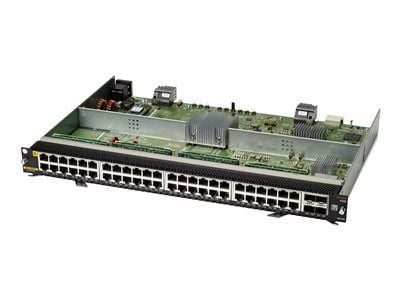
- Ports : Gigabit Ethernet (poe) X 48 + Gigabit Ethernet X 4
- Connectivity Technology : Wired
- Data Link Protocol : Gige
- Data Transfer Rate : 1 Gbps
- Features : 8mb Packet Buffer, Poe Class 4
Expansion / Connectivity
- Interfaces : 48 X Ethernet 1000 (poe) – Rj-45 ¦ 4 X Ethernet 1000 – Sfp56
Processor / Memory
- Processor : Cortex-a72
- Processor Clock Speed : 1.8 Ghz
- Ram : 4 GB