Description
Configuration
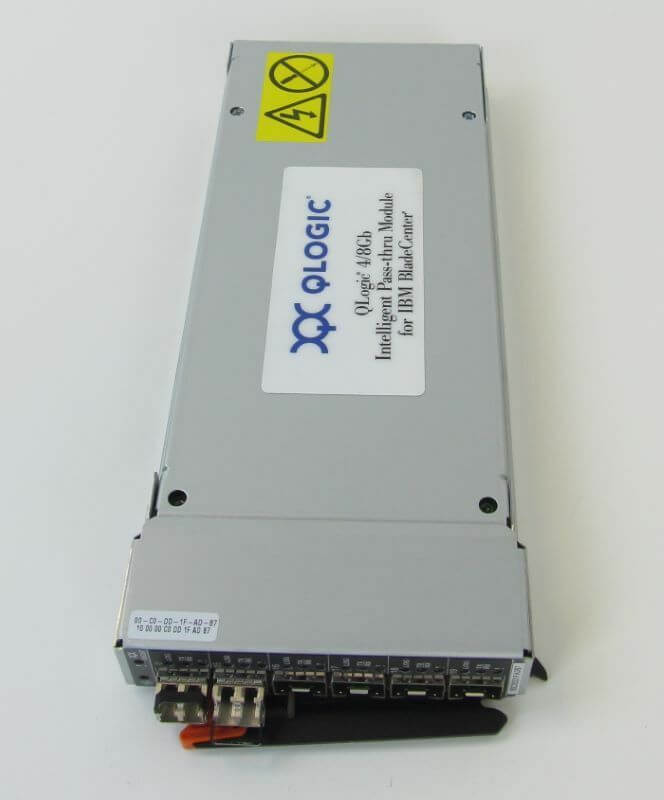
The 88Y6412 IBM Qlogic 4/8GB Intelligent Pass-Thru Module is designed for use with IBM BladeCenter. Here are some basic configuration details:
- The module supports up to 16 internal 4/8Gbps Fiber Channel ports for connection to blade servers.
- It also has two external 4/8Gbps Fiber Channel ports for connection to an external SAN switch.
- The module has a management port that allows for remote configuration and monitoring.
- It is compatible with both Brocade and Cisco SAN fabrics.
To configure the module, you would typically need to log in to the BladeCenter management interface and follow the instructions provided in the module’s user manual. You would need to assign IP addresses, set up zones, and configure other settings as needed to connect your blade servers to your SAN fabric. It is recommended to consult with an experienced network administrator or IBM support before attempting to configure the module, to ensure that you configure it correctly and avoid any potential issues.
Deployment Scenarios
The IBM Qlogic 4/8GB Intelligent Pass-Thru Module for BladeCenter (part number 88Y6412) is a network module designed for use in blade servers. It allows for the connection of the blade server to a Fibre Channel or iSCSI network, providing high-speed data transfer capabilities.
There are a few different deployment scenarios for the IBM Qlogic 4/8GB Intelligent Pass-Thru Module, depending on the specific needs of the user’s IT environment. Here are a few examples:
- Fibre Channel Storage Area Network (SAN) Deployment: In this scenario, the pass-thru module is used to connect blade servers to a Fibre Channel SAN, which is a dedicated high-speed network used for storage. The pass-thru module allows the blade server to access the SAN, providing fast data access and retrieval.
- iSCSI Deployment: The pass-thru module can also be used to connect blade servers to an iSCSI network, which is a storage area network that uses the IP protocol to transfer data over Ethernet. This deployment scenario is ideal for smaller IT environments that don’t require the high-speed performance of Fibre Channel.
- Virtualization Deployment: The pass-thru module can be used to connect blade servers to a virtualized environment, allowing multiple virtual machines to access the same storage resources. This scenario is ideal for data centers that need to maximize their use of resources and minimize the number of physical servers required.
- Cloud Deployment: The pass-thru module can also be used in cloud computing environments, where it can connect blade servers to the cloud storage network. This allows the cloud provider to deliver high-speed, reliable storage to customers, while minimizing latency and ensuring data security.
Troubleshooting Common Issues
The IBM Qlogic 4/8GB Intelligent Pass-Thru Module for BladeCenter is a networking device designed to provide high-speed connectivity for BladeCenter servers. Like any other networking device, it may encounter issues that can impact its performance. Here are some common troubleshooting steps to follow if you encounter issues with your 88Y6412 IBM Qlogic 4/8GB Intelligent Pass-Thru Module:
- Check the connection: Verify that the module is correctly installed and connected to the network. Check for any loose connections or cables that might have come undone.
- Check the configuration: Ensure that the module’s configuration is correct. Verify the module’s firmware version and compatibility with other hardware and software components.
- Check for network errors: Check for any errors on the network that may be impacting the module’s performance. Look for issues such as dropped packets, network congestion, or routing errors.
- Check for module errors: The module may have errors that need to be addressed. Check the event log to identify any issues that the module may have reported.
- Reboot the module: A simple reboot can often fix a variety of issues. Try rebooting the module and checking its performance afterward.
- Update the firmware: Check for any firmware updates that may be available for the module. Updating the firmware can often resolve known issues and improve performance.
- Contact support: If the above steps do not resolve the issue, contact IBM support for further assistance. They may be able to provide additional troubleshooting steps or may need to replace the module if it is found to be faulty.
General Information about the IBM 88Y6412
- Manufacturer: IBM
- Model Number or SKU# 88Y6412
- Device Type : Expansion Module
Networking
- Connectivity Technology: Wired
- Data Link Protocol: 4GB Fibre Channel, 8GB Fibre Channel
- Data Transfer Rate: 8.5 GBPS
Expansion / Connectivity
- Interfaces: 14 X Network Host ( Internal ) 6 X Network ( External )