

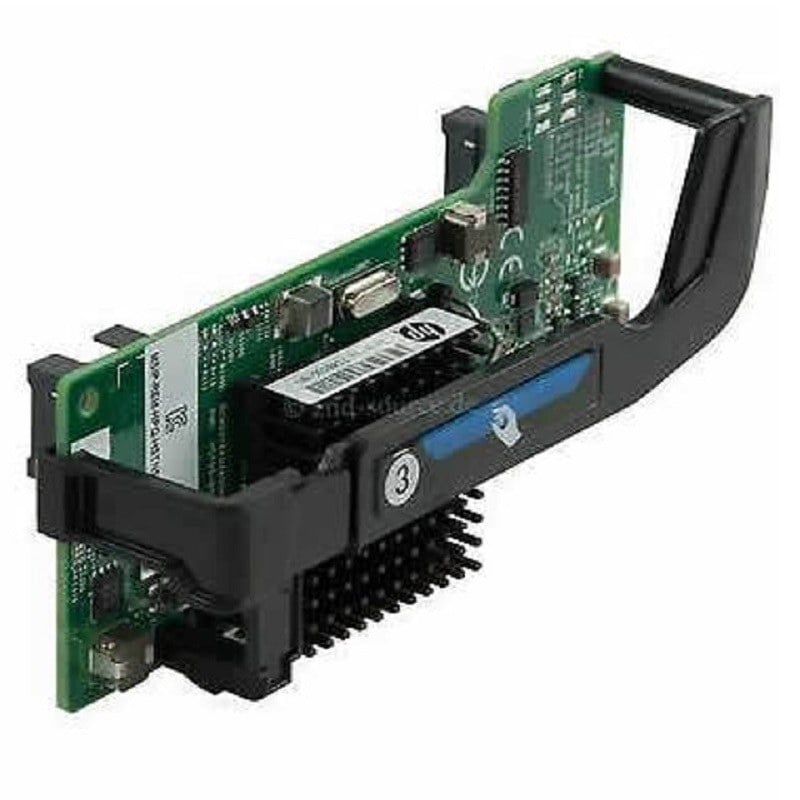
Description
PCIe 2.0 Network Adapter
A PCIe 2.0 Network Adapter is a type of network interface card that connects a computer or server to a network using the Peripheral Component Interconnect Express (PCIe) 2.0 interface. The PCIe 2.0 standard is the second generation of PCIe technology and provides faster data transfer rates than the previous PCIe 1.0 standard.
A PCIe 2.0 Network Adapter typically uses a PCIe x8 or PCIe x16 interface, which provides higher bandwidth and faster data transfer rates than other interface types, such as PCI or PCI-X. This makes it an ideal choice for high-performance applications that require fast and reliable network connectivity, such as data center and server environments.
The HPE FlexFabric 20Gbps PCIe 2.0 Network Adapter for ProLiant is a specific example of a PCIe 2.0 Network Adapter that is designed for use with HPE ProLiant servers. It provides high-speed connectivity using dual-port 10Gb Ethernet (10GbE) technology, which supports a wide range of networking protocols and standards, including virtualization and cloud computing technologies.
The HPE FlexFabric 20Gbps PCIe 2.0 Network Adapter also includes features such as hardware-based acceleration for virtualization, support for converged network traffic, and advanced security features, such as integrated firewall and intrusion prevention capabilities. These features make it an ideal choice for data center and high-performance computing environments where reliability, security, and performance are critical.
Network Adapter Options
A network adapter, also known as a network interface controller (NIC) or network interface card, is a hardware component that connects a computer or other device to a network. There are a variety of network adapter options available, each with its own unique features and capabilities.
Some common network adapter options include:
- Ethernet adapters – Ethernet adapters are the most commonly used type of network adapter. They are used to connect devices to wired Ethernet networks using copper or fiber optic cabling.
- Wireless adapters – Wireless adapters are used to connect devices to wireless networks, such as Wi-Fi or Bluetooth. They are commonly used in laptops, tablets, and smartphones.
- Fiber Channel adapters – Fiber Channel adapters are used to connect devices to storage area networks (SANs) using fiber optic cabling. They are commonly used in high-performance computing environments.
- InfiniBand adapters – InfiniBand adapters are used to connect devices to high-speed data center networks using InfiniBand technology. They are commonly used in large-scale data centers and high-performance computing environments.
- Token Ring adapters – Token Ring adapters are used to connect devices to Token Ring networks, which are a type of local area network (LAN) that was commonly used in the past.
- Powerline adapters – Powerline adapters are used to connect devices to a network using the electrical wiring in a building. They are commonly used in situations where running Ethernet cabling is not feasible.
- USB adapters – USB adapters are used to add network connectivity to devices that do not have built-in network adapters, such as some desktops or laptops. They connect to a USB port and provide Ethernet or Wi-Fi connectivity.
When selecting a network adapter, it is important to consider factors such as the type of network being used, the speed and bandwidth requirements, the physical space available for cabling and equipment, and the security and management requirements. Choosing the right network adapter can help to ensure reliable and high-performance network connectivity for the devices on the network.
Installation Requirements
Installation requirements refer to the necessary conditions and specifications that must be met to successfully install a particular hardware or software component. In the case of the HPE Flexfabric 20Gbps PCIe 2.0 Network Adapter for ProLiant, there are certain installation requirements that need to be fulfilled to ensure a proper and efficient installation.
Some of the installation requirements for the HPE Flexfabric 20Gbps PCIe 2.0 Network Adapter may include:
- Compatible server or system – The network adapter is designed to work with specific ProLiant servers and other compatible systems. It is important to ensure that the adapter is compatible with the system in which it is to be installed.
- Available PCIe slot – The HPE Flexfabric 20Gbps PCIe 2.0 Network Adapter requires an available PCIe slot on the server or system for installation.
- Power supply – The server or system should have a power supply that is capable of providing adequate power to the network adapter.
- Operating system support – The network adapter requires support from the operating system to function properly. It is important to ensure that the operating system being used is supported by the adapter.
- Proper drivers and software – The HPE Flexfabric 20Gbps PCIe 2.0 Network Adapter requires proper drivers and software to be installed on the server or system. It is important to ensure that the latest drivers and software are installed to ensure optimal performance.
- Network cables – The network adapter requires network cables to connect to the network. Ensure that the network cables are compatible and of the appropriate length for the installation.
It is important to review the installation requirements carefully before attempting to install the HPE Flexfabric 20Gbps PCIe 2.0 Network Adapter to ensure that all requirements are met for a successful installation.
Specifications
- Manufacturer: HPE
- MPN: 700076-B21
- Type: Networking
- Adapter Type: Network Adapter 2 Ports
- Interface (Bus) Type: PCI Express 2.0 x8
- PCI Specification Revision: PCIe 2.0
Networking:
- Ports: 20 Gigabit Ethernet x 2
- Connectivity Technology: Wired
- Data Link Protocol: FCoE, 20 Gigabit LAN
- Data Transfer Rate: 20 Gbps
- Network/Transport Protocol: TCP/IP, UDP/IP
- Remote Management Protocol: SNMP
- Features: Full duplex capability, TCP/IP offloading, Quality of Service (QoS), Jumbo Frames support, teaming support, PXE support, Large Send Offload (LSO), Receive Side Scaling (RSS), Single Root I/O Virtualization (SR-IOV), TCP Segmentation Offload (TSO), checksum offload support, Extended Message-Signaled Interrupts (MSI-X), UDP/IP offloading
- Compliant Standards: IEEE 802.3, IEEE 802.3u, IEEE 802.1Q, IEEE 802.3ab, IEEE 802.1p, IEEE 802.3x, IEEE 802.3ad (LACP), IEEE 802.3ae, IEEE 802.3p, IEEE 802.3ap
Processor/Memory:
- Processor: 1 x BCM57840S – Qlogic
MiscellaneousCompliant Standards: FCC Class A certified, UL, CISPR 22 Class A, BSMI CNS 13438 Class A, EN 60950, ICES-003, EN55024, FCC Part 15, WEEE, RoHS, VCCI V-3 Class A ITE, KN24, KN22 Class A, EN55022:2006 Class APower:
- Power Consumption Operational: 12 Watt
System Requirements:
- OS Required: Microsoft Windows Server 2008 (32/64-bits) SP2, SuSE Linux Enterprise Server 11 SP2, Microsoft Windows Server 2012, Microsoft Windows Server 2008 R2 (32/64-bits), Red Hat Enterprise Linux 5.9, Citrix XenServer 6.1, Microsoft Windows Server 2012 R2, Red Hat Enterprise Linux 6.4, VMware vSphere 5.5, Oracle Solaris x64 11, SuSE Linux Enterprise Server 11 SP3, Red Hat Enterprise Linux 6.5, Oracle Solaris 10 update 10, Red Hat Enterprise Linux 5.10, VMware ESXi 5.0 update 3, VMware ESXi 5.1 update 2
Environmental Parameters
- Min Operating Temperature: 32 °F
- Max Operating Temperature: 131 °F
- Humidity Range Operating: 10 – 90% (non-condensing)
Compatibility:
- Designed For: HPE ProLiant BL460c Gen8, BL465c Gen8, BL660c Gen8, BL660c Gen8 Entry, BL660c Gen8 Performance, WS460c Gen9 Graphics, WS460c Gen9 Graphics Expansion


