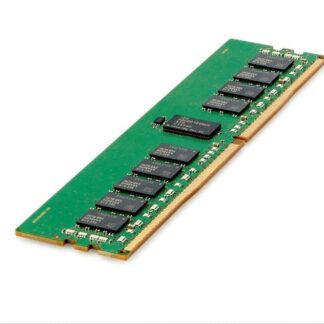
Description
Installation and Configuration Guidelines
The Samsung M393A1G40EB2-CTD is an 8GB memory module designed for use in servers and other high-performance computing systems. Here are the installation and configuration guidelines for this memory module:
- Turn off the system: Before installing the memory module, turn off the system and unplug it from the power source.
- Locate the memory slots: Locate the memory slots on the motherboard. Refer to the motherboard manual for the location and number of memory slots.
- Insert the memory module: Hold the memory module by the edges and align the notches on the module with the slot on the motherboard. Insert the module at a slight angle and press down firmly until it clicks into place. Repeat this process for additional memory modules.
- Power on the system: After installing the memory module, plug in the system and turn it on. The system should recognize the new memory automatically.
- Check memory configuration: After the system boots up, check the memory configuration to ensure that the new memory is recognized. This can be done through the system BIOS or through the operating system.
- Configure memory settings: If needed, configure memory settings in the BIOS to optimize system performance. Refer to the motherboard manual for instructions on configuring memory settings.
It’s important to note that memory modules must be installed in pairs or in multiples of four for optimal performance. Consult the motherboard manual to determine the optimal memory configuration for the system.
In terms of configuration guidelines, here are some tips to help optimize system performance:
- Set memory speed: The Samsung M393A1G40EB2-CTD memory module operates at a speed of 2666MHz. Ensure that the system is configured to run the memory at this speed for optimal performance.
- Set memory timings: The memory timings can be set in the BIOS to optimize system performance. Consult the motherboard manual for instructions on setting memory timings.
- Enable ECC: The Samsung M393A1G40EB2-CTD memory module supports Error-Correcting Code (ECC) to detect and correct memory errors. Ensure that ECC is enabled in the BIOS for added system reliability.
- Balance memory channels: If the system has multiple memory channels, ensure that memory is installed evenly across all channels to balance the system performance.
By following these installation and configuration guidelines, the Samsung M393A1G40EB2-CTD memory module can provide reliable and high-performance memory for computing systems.
Improved Performance and Efficiency
The Samsung M393A1G40EB2-CTD is an 8GB memory module designed for use in high-performance computing systems such as servers. This memory module is designed to provide improved performance and efficiency compared to previous generations of memory modules.
One key feature of the Samsung M393A1G40EB2-CTD is its operating speed. This memory module operates at a speed of 2666MHz, which is faster than previous generations of memory modules. This higher speed allows for faster data transfer rates, improving overall system performance.
Another feature of the Samsung M393A1G40EB2-CTD is its energy efficiency. This memory module is designed to consume less power than previous generations of memory modules, reducing the overall power consumption of the system. This can lead to cost savings over time, as well as reducing the environmental impact of the system.
In addition to these features, the Samsung M393A1G40EB2-CTD also includes error correction code (ECC) technology. ECC technology helps to detect and correct errors in the memory module, improving the reliability of the system.
Conclusion and Recommendations
In conclusion, the Samsung M393A1G40EB2-CTD 8GB Memory Module is a high-performing and reliable memory module designed for use in servers and other high-performance computing systems. Its low power consumption, high speed, and high memory density make it an ideal choice for applications that require large amounts of data processing and storage.
To ensure optimal performance and reliability, it is important to choose a system that is compatible with the Samsung M393A1G40EB2-CTD memory module and to install it correctly. It is also recommended to regularly perform maintenance tasks such as cleaning the memory module and the system, avoiding overclocking, and upgrading firmware when necessary.
For organizations that require even higher levels of performance and reliability, it may be worth considering the use of multiple Samsung M393A1G40EB2-CTD memory modules in a system, or upgrading to higher-capacity memory modules. Additionally, it may be worth keeping an eye on future developments in memory technology, as new advancements may offer even greater performance and energy efficiency.
General Information
- Manufacturer: Samsung
- Part Number or SKU# M393A1G40EB2-CTD
- Type: Memory (RAM)
- Sub-Type: Pc4-19200
- Product Name: 8GB DDR4 SDRAM Memory Module
Technical Information
- Storage Capacity: 8 GB
- Memory Technology: DDR4 SDRAM
- Number Of Modules: 1 X 8GB
- Bus Speed: 2666Mhz DDR4-21300/pc4-2666v
- Data Integrity Check: Ecc
- Signal Processing: Registered
- Cas Latency Timings: Cl19
- Rank Features: 1rx4
Physical Characteristics
- Dimensions (W X D X H): 8.89 X 19.81 X 1.91 Cm (3.5 X 7.8 X 0.75 In)
- Weight: 0.45 Kg (1 Lb)
Contact us or ask for live chat/help if you have any questions about the compatibility of this item to ensure the model’s matching features with your current system.