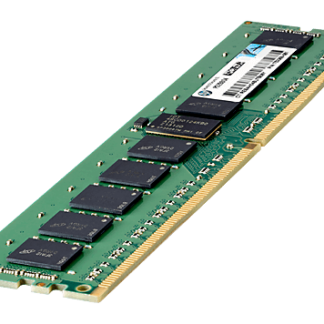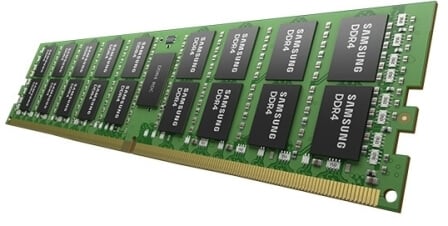


Description
Differences between Registered and Unregistered Memory Modules
Registered and unregistered memory modules are two different types of memory technology that are commonly used in computer systems. The main differences between these two types of memory modules are as follows:
- Functionality: Registered memory modules, also known as buffered memory modules, have an additional register between the memory controller and the DRAM chips. This register acts as a buffer, allowing the memory controller to more easily manage and control large amounts of memory. Unregistered memory modules, also known as unbuffered memory modules, do not have this additional register.
- Capacity: Because registered memory modules have an additional register, they can support larger amounts of memory than unregistered memory modules. This is because the buffer helps to reduce the load on the memory controller, allowing it to manage more memory.
- Latency: Registered memory modules typically have higher latency than unregistered memory modules. This is because the additional buffer introduces an extra step in the data transfer process, which can slow down the overall performance of the memory module.
- Compatibility: Registered memory modules are typically only compatible with server-class motherboards and processors, whereas unregistered memory modules are compatible with a wider range of computer systems.
- Price: Registered memory modules are generally more expensive than unregistered memory modules, due to their larger capacity and additional functionality.
Understanding 240-pin DIMMs and their Advantages
240-pin DIMMs (Dual Inline Memory Modules) are a type of memory module that is commonly used in modern desktop and server computers. These memory modules consist of a number of memory chips that are organized into a compact module that can be easily installed onto the motherboard of a computer.
The advantages of 240-pin DIMMs include:
- High Capacity: 240-pin DIMMs can support high-capacity memory modules, allowing for larger amounts of memory to be installed in a single computer. This is important for applications that require large amounts of memory, such as video editing, gaming, and scientific computing.
- High Speed: 240-pin DIMMs support high-speed DDR3 and DDR4 memory, which allows for faster data transfer between the CPU and memory. This can improve overall system performance, particularly in tasks that involve large amounts of data.
- Easy to Install: 240-pin DIMMs are easy to install onto the motherboard of a computer, making them a popular choice for both system builders and end-users.
- Dual Channel Support: Many motherboards support dual-channel memory, which requires the installation of two identical memory modules. 240-pin DIMMs make it easy to install two identical memory modules into the appropriate memory slots on the motherboard, enabling dual-channel memory support.
- Scalability: 240-pin DIMMs offer good scalability, as it is possible to add more memory modules to a computer as needed. This can help to extend the useful lifespan of a computer system, as additional memory can be added to accommodate new software and applications.
Compatibility with Different Motherboards and CPUs
When selecting memory modules for a computer system, it is important to ensure that they are compatible with the motherboard and CPU being used. Here are some key factors to consider when checking compatibility:
- Memory Type: Different memory modules support different types of memory, such as DDR3, DDR4, or DDR5. The motherboard and CPU will typically have a specific type of memory that they support, so it is important to select memory modules that are compatible with this memory type.
- Memory Speed: Memory modules are also rated for different speeds, such as 2400MHz, 2666MHz, or 3200MHz. Again, the motherboard and CPU will typically have a specific range of memory speeds that they support, so it is important to select memory modules that are compatible with these speeds.
- Memory Capacity: The motherboard and CPU will typically have a maximum memory capacity that they support, so it is important to select memory modules that are within this capacity range. For example, if the motherboard supports a maximum of 64GB of memory, then it is important to select memory modules that add up to 64GB or less.
- Memory Channel: Some motherboards and CPUs support dual-channel or quad-channel memory, which requires the installation of identical memory modules in specific slots. It is important to select memory modules that are compatible with the specific memory channel configuration of the motherboard and CPU.
- Voltage: Some memory modules require higher voltages than others, so it is important to ensure that the motherboard and CPU can support the voltage required by the memory modules being used.
General information
- Manufacturer: samsung
- Manufacturer part number: M393B1G70QH0-CMA
- Type: Memory (RAM)
- Sub-Type: PC3-14900
- Product name: 8gb ddr3 sdram memory module
Technical information
- Storage capacity: 8gb
- Memory technology: ddr3 sdram
- Number of modules: 1 x 8gb
- Bus speed: 1866mhz ddr3-1866/pc3-14900
- Data integrity check: ecc
- Signal processing: registered
- Cas latency timings: cl13
- Rank features: single
- Platform support: server