Description
Advanced Security
Features
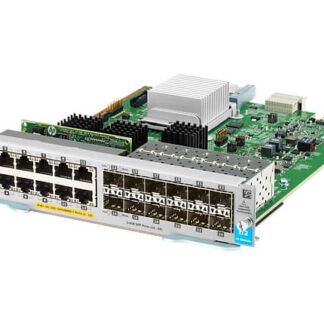
The N55-M12T Cisco Nexus 5500 12 Ports 10 GBPS Expansion Module is a network device that provides additional ports and bandwidth for Cisco Nexus 5500 series switches. The N55-M12T expansion module also includes advanced security features designed to help protect your network from a variety of threats.
One of the advanced security features of the N55-M12T expansion module is MACsec (Media Access Control Security), which provides secure communication between devices by encrypting data transmitted over the network. MACsec helps to prevent unauthorized access to the network and protect against data breaches and cyberattacks.
The N55-M12T expansion module also includes Cisco TrustSec, a comprehensive security solution that provides secure access to the network and helps to prevent unauthorized access. Cisco TrustSec uses an identity-based approach to security that enables the network to automatically enforce policies based on user identity and the security posture of the device.
Another security feature of the N55-M12T expansion module is ACL (Access Control List) support, which allows you to control access to the network by specifying which devices are allowed to access the network and what types of traffic are permitted. ACLs can be configured to block traffic from specific IP addresses or to limit the amount of bandwidth that can be used by certain types of traffic.
The N55-M12T expansion module also supports SNMPv3 (Simple Network Management Protocol version 3), which provides secure communication between the switch and network management applications. SNMPv3 uses encryption to protect against unauthorized access and provides a secure way to monitor and manage the network.
Troubleshooting and Common Issues
The N55-M12T Cisco Nexus 5500 12 Ports 10 GBPS Expansion Module is an expansion module that can be used to increase the number of 10 Gigabit Ethernet ports on a Cisco Nexus 5500 Series switch. While the N55-M12T is a reliable and high-performance network device, there are certain issues that may arise from time to time. Some common issues and troubleshooting tips for the N55-M12T are:
- Physical connectivity issues: The N55-M12T may not function properly if there are issues with physical connectivity. Check the cables and connectors to ensure that they are properly seated and that there is no damage.
- Port configuration issues: Incorrect port configuration can lead to connectivity issues or performance degradation. Ensure that the port configuration is correct and matches the requirements of the connected devices.
- Compatibility issues: The N55-M12T may not be compatible with certain devices or software versions. Verify that the devices are compatible before attempting to connect them.
- Power issues: The N55-M12T may not power on or may shut down unexpectedly due to power supply issues. Check the power supply and verify that it is functioning correctly.
- Firmware issues: Firmware upgrades may cause the N55-M12T to malfunction or stop functioning. Ensure that the firmware is compatible and that the upgrade process is properly followed.
- Hardware failures: Hardware components may fail, causing the N55-M12T to malfunction or stop functioning altogether. Check for physical damage and replace any faulty components.
- Performance issues: Slow network performance may be caused by a variety of factors, including high network traffic or incorrect configurations. Monitor the network performance and identify the source of the issue.
To troubleshoot any of these issues, it is important to consult the documentation and support resources provided by Cisco. These resources may include user guides, troubleshooting guides, and online forums. In addition, it may be helpful to contact Cisco support for further assistance. It is important to properly maintain and regularly monitor the N55-M12T to avoid any potential issues and ensure optimal performance.
Configuration and Management
The N55-M12T is an expansion module for the Cisco Nexus 5500 series switches that provides 12 ports of 10 Gigabit Ethernet connectivity. Configuration and management of the N55-M12T module can be done through the Cisco Nexus switch’s command-line interface (CLI) or through the Cisco Nexus Data Center Network Manager (DCNM) graphical user interface (GUI).
Here are the steps for configuring and managing the N55-M12T module:
- Install the module: The N55-M12T module can be installed in an empty module slot on the Cisco Nexus 5500 series switch.
- Configure the ports: Once the module is installed, the ports on the N55-M12T module need to be configured. This can be done using the CLI or the DCNM GUI.
- Assign VLANs: VLANs can be assigned to the ports on the N55-M12T module to segregate network traffic. This can be done using the VLAN configuration commands in the CLI or through the VLAN configuration screens in the DCNM GUI.
- Configure link aggregation: Link aggregation can be used to combine multiple ports on the N55-M12T module into a single logical link. This can be done using the Link Aggregation Control Protocol (LACP) configuration commands in the CLI or through the LACP configuration screens in the DCNM GUI.
- Configure Quality of Service (QoS): QoS policies can be applied to the ports on the N55-M12T module to prioritize traffic based on specific criteria such as application type, traffic volume, or user identity. This can be done using the QoS configuration commands in the CLI or through the QoS configuration screens in the DCNM GUI.
- Monitor and troubleshoot: Once the module is configured, it can be monitored for performance and errors. The CLI or the DCNM GUI can be used to monitor the module and troubleshoot any issues that arise.
General Information
- Manufacturer: Cisco Systems, Inc
- MPN: N55-M12T
- Brand Name: Cisco
- Product Name: 12-Port 10G Bese-T Ethernet Module
- Product Type: Expansion Module
- SKU: N55-M12T
Technical Information
- Application/Usage: Data Networking
Interfaces / Ports
- Interfaces/Ports: 12 x 10GBase-T LAN
- Interfaces/Ports Details: 12 x RJ-45 10GBase-T Network LAN
Media & Performance
- Connectivity Media: Twisted Pair 10GBase-T
- Data Transfer Rate: 10 Gbps 10 Gigabit Ethernet
Miscellaneous
- Certifications & Standards- Cisco Nexus 5596T Chassis