

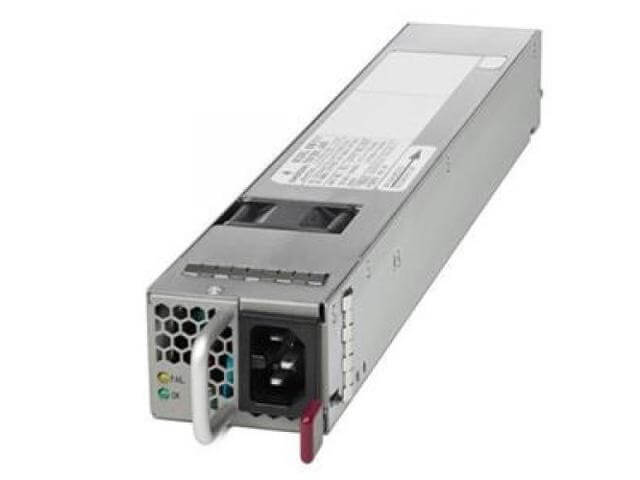
Description
Compatibility and Technical Specifications
The N55-PAC-1100W Cisco Nexus 5596UP 1100 Watt Power Supply is designed to be used with the Cisco Nexus 5596UP switch. It is compatible with the Nexus 5500 series switches and provides power to the switch in both AC and DC voltage options.
The technical specifications for the N55-PAC-1100W Cisco Nexus 5596UP 1100 Watt Power Supply are as follows:
- Input voltage: 100-240 VAC
- Input frequency: 47-63 Hz
- Output power: 1100 watts
- Power efficiency: 94%
- Temperature range: 32 to 104°F (0 to 40°C)
- Altitude: 0-13,123 ft (0-4000 m)
- Operating humidity: 10 to 90% noncondensing
- MTBF: 4,902,541 hours
The N55-PAC-1100W Cisco Nexus 5596UP 1100 Watt Power Supply is designed to provide reliable and continuous power to the switch, even in the event of a power failure or other malfunction. It has built-in redundancy and failover capabilities to ensure that the switch continues to function even if there is a problem with the primary power supply.
It also has built-in monitoring and diagnostic capabilities that allow administrators to detect and troubleshoot any potential issues with the power supply.
It is important to note that the N55-PAC-1100W Cisco Nexus 5596UP 1100 Watt Power Supply is a hot-swappable device, which means that it can be replaced without interrupting the operation of the switch.
Installation and Setup Process
The installation and setup process for the N55-PAC-1100W Cisco Nexus 5596UP 1100 Watt Power Supply is similar to that of the N55-PAC-1100W-B model. Here are the steps to follow:
- Install the power supply into the Cisco Nexus 5596UP chassis. The power supply is inserted into the back of the chassis and secured with a locking mechanism.
- Connect the power supply to the power source. The power supply has two power connectors, one for primary power and one for redundant power. Connect the power cables to the appropriate connectors on the power supply.
- Connect the power supply to the Cisco Nexus 5596UP switch. The power supply has a power cord that connects to the switch.
- Configure the power supply in the Cisco Nexus 5596UP switch. The switch has a built-in command-line interface (CLI) that can be used to configure the power supply. Use the CLI to configure the power supply settings, such as the input voltage range and the power redundancy mode.
- Test the power supply. Verify that the power supply is providing power to the switch by checking the power status indicators on the switch and the power supply.
- Monitor the power supply. The Cisco Nexus 5596UP switch has built-in monitoring and diagnostic capabilities that can be used to monitor the power supply. Use these capabilities to monitor the power supply and ensure that it is operating correctly.
It is important to note that the N55-PAC-1100W Cisco Nexus 5596UP 1100 Watt Power Supply is compatible with Nexus 5596UP series switches and must be used with the right model and series.
It is also recommended to have the latest firmware version to ensure compatibility and avoid any potential issues with the installation and setup.
Power Redundancy Modes and Configuration
The N55-PAC-1100W Cisco Nexus 5596UP 1100 Watt Power Supply supports two power redundancy modes: non-redundant and redundant.
- Non-Redundant Mode: In non-redundant mode, the switch uses only one power supply. The second power supply is not used and is kept as a spare. This mode is used when the switch is not critical or when the cost of a second power supply is not justified.
- Redundant Mode: In redundant mode, the switch uses two power supplies to ensure that the switch remains powered even if one power supply fails. If one power supply fails, the second power supply takes over and continues to provide power to the switch. This mode is used when the switch is critical and the cost of a second power supply is justified.
To configure the power redundancy mode for the N55-PAC-1100W Cisco Nexus 5596UP 1100 Watt Power Supply, you will need to use the Cisco Nexus command-line interface (CLI). Here are the steps to configure the power redundancy mode:
- Connect to the switch using the CLI.
- Enter the configuration mode by typing “configure terminal” and press enter.
- Type “power redundancy-mode” and press enter.
- Type “redundant” to configure the switch to use redundant mode or “non-redundant” to configure the switch to use non-redundant mode.
- Verify the configuration by typing “show power” and press enter.
- Type “exit” to exit the configuration mode.
It’s worth noting that with the N55-PAC-1100W Cisco Nexus 5596UP 1100 Watt Power Supply, the power redundancy mode can be changed on the fly, which means that you can change the redundancy mode without shutting down the switch.
In addition, it’s recommended to have the latest firmware version of the switch installed to ensure compatibility and avoid any potential issues with the power redundancy configuration.
General Information
- Manufacturer Cisco Systems, Inc
- Manufacturer Part Number N55-PAC-1100W
- Brand Name Cisco
- Product Name Nexus 5596UP PSU Port-Side Exhaust Airflow module, A/C, 100-240V, 1100W
- Input Voltage 120 V AC
- Input Voltage 230 V AC


