



Description
More Information
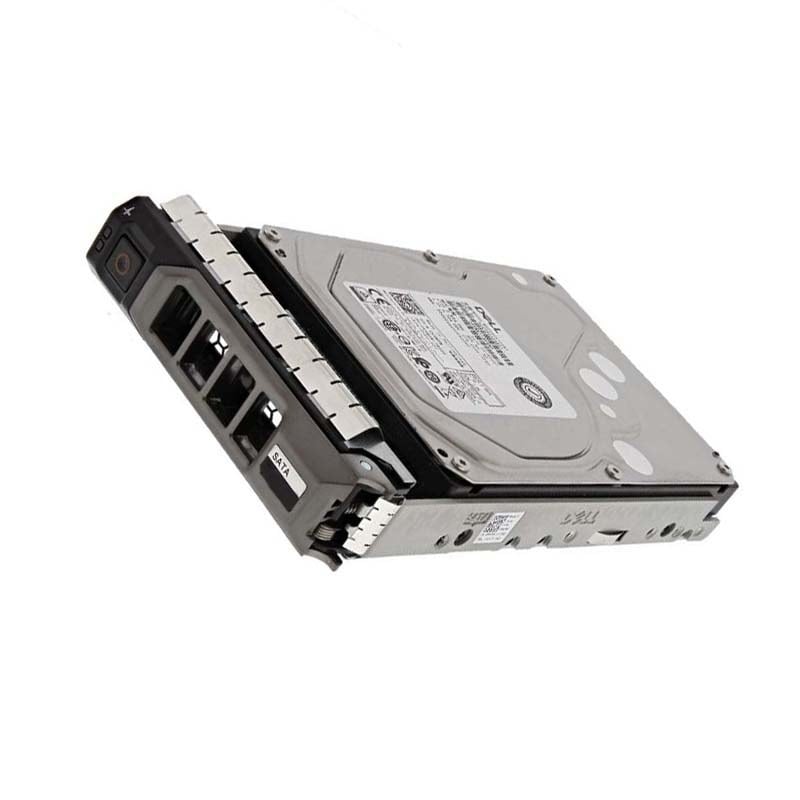
The Dell 5HYG2 18TB SAS 12 GBPS 7.2k RPM Hot Plug Hard Drive is a high-capacity and high-performance storage device designed for use in enterprise-level servers and storage arrays. The drive has a storage capacity of 18TB, which allows for the storage of large amounts of data.
The drive utilizes the SAS (Serial Attached SCSI) interface, which provides a high data transfer rate of 12 Gbps. This interface is commonly used in enterprise storage systems and is designed for high-speed data transfer and reliability. The SAS interface also allows for the drive to be connected to a SAS controller which enables the drive to be part of a RAID configuration, this can improve the overall data protection and availability.
The drive operates at a rotational speed of 7.2k RPM, which provides fast data access and transfer rates. This makes it suitable for use in high-performance computing and data-intensive applications.
One of the key features of the drive is its hot-plugging capability, which allows for easy replacement of the drive without shutting down the system. This means that if the drive fails, it can be replaced without disrupting the operation of the system.
It is important to note that the reliability of a hard drive can be affected by a number of factors including environmental conditions, usage patterns, and how well it is maintained. To ensure maximum reliability, it is important to use the drive in a controlled environment, follow recommended usage patterns, and properly maintain the drive.
Backup & Restore Facilities
The Dell 18TB SAS 12 Gbps 7.2k RPM Hot-Plug Hard Drive is a high-capacity hard drive that is designed for use in servers and other high-performance computing environments. It has a storage capacity of 18 terabytes and runs at a rotation speed of 7200 RPM. The drive uses the SAS (Serial Attached SCSI) interface for data transfer, which supports a data transfer rate of 12 Gbps and supports hot-plugging, which means that the drive can be replaced or added to a system while it is still running.
Like any other storage device, the hard drive itself does not have any built-in backup and restore facilities. It is recommended to use backup software or services to create and manage backups of the data stored on the drive. These software or services can schedule regular backups, incremental backups, or full backups as per the requirement.
It’s also important to regularly test the backups to ensure that they can be successfully restored. This is important in case of data loss or drive failure. Additionally, it’s recommended to store the backups in a separate location, such as another hard drive or cloud storage, to ensure that the data can be recovered in case of a disaster or other event that affects the primary storage location.
SAS drives are known for their high reliability and performance compared to SATA drives. SAS drives are also designed for use in enterprise environments and are built to handle heavy workloads and 24×7 operations. RAID or other data redundancy technologies can also be used to provide data redundancy and protection.
It is always recommended to check with Dell support or seek professional help to confirm the best practices and options for backup and restore solutions for the drive with your specific use case.
RAID & Data Protection Facilities
The Dell 18TB SAS 12 Gbps 7.2k RPM Hot Plug Hard Drive would be a high-capacity and high-performance hard drive that would be designed for use in high-availability and high-performance environments such as data centers and enterprise storage systems. The SAS interface offers fast data transfer speeds and the 12 Gbps SAS controller ensures optimal performance. The 7.2k RPM speed and large buffer size helps to enhance the reliability of the data storage system.
However, as Dell doesn’t currently offer 18TB SAS 12 GBPS 7.2k RPM Hot Plug Hard Drive, it is important to check the compatibility of the hard drive with the specific server or storage array before purchasing to ensure proper operation.
For data protection, it is recommended to use backup software such as Dell EMC Data Protection Suite, Dell EMC NetWorker, Dell EMC Integrated Data Protection Appliance (IDPA) DP4400, Dell EMC IDPA DP4800, Dell EMC IDPA DP6600, Dell EMC IDPA DP8800, Dell EMC IDPA DP9000, Dell EMC Data Domain, Dell EMC Avamar, Dell EMC Data Protection Software, Dell EMC Data Protection Software for Microsoft, Dell EMC Data Protection Software for Oracle, Dell EMC Data Protection Software for SAP, Dell EMC Data Protection Software for VMWare, Dell EMC Data Protection Software for OpenStack, Dell EMC Data Protection Software for Nutanix, Dell EMC Data Protection Software for Commvault, Dell EMC Data Protection Software for IBM Spectrum Protect, Dell EMC Data Protection Software for Rubrik, Dell EMC Data Protection Software for Actifio to perform backup and restore operations.
RAID (Redundant Array of Independent Disks) can also be used to improve data reliability by combining multiple hard drives into a single logical unit. However, it is important to note that RAID does not replace the need for proper backup and recovery procedures. RAID can improve data reliability but it is not a substitute for proper data backup and recovery.
General Information about this Dell 5HYG2
- Manufacturer: Dell
- Part Number or SKU# 5HYG2
- Capacity: 18 TB
- Product Type: Hard Disk Drive With Tray
Technical Information of Dell 18TB Hard Drive
- Rotational Speed: 7200 Rpm
- Interface Type: SAS 12GBPS
- Form Factor: 3.5inch
- Drive Transfer Rate: 600 Mbps (external)
- Buffer: 512 Mb
Dimension and Weight for this Dell 3.5 Inch Hard Disk
- Width: 4 Inch
- Depth: 5.8 Inch
- Height: 1 Inch
- Weight: 1.52 Lbs
Expansion & Connectivity of Dell SAS 12GBPS Hard Disk Drive
- Interfaces: 1 X SAS 12GBPS
- Compatible Bays: 1 X Hot-plug 3.5 Inch
Compatibility
- Poweredge C6420
- Poweredge R240
- Poweredge R340
- Poweredge R440
- Poweredge R540
- Poweredge R640
- Poweredge R6415
- Poweredge R740
- Poweredge R740xd
- Poweredge R740xd2
- Poweredge R7415
- Poweredge R7425
- Powervault Nx3240
- Powervault Nx440
Contact us or ask for live chat/help if you have any questions about the compatibility of this item to ensure the model’s matching features with your current system.


