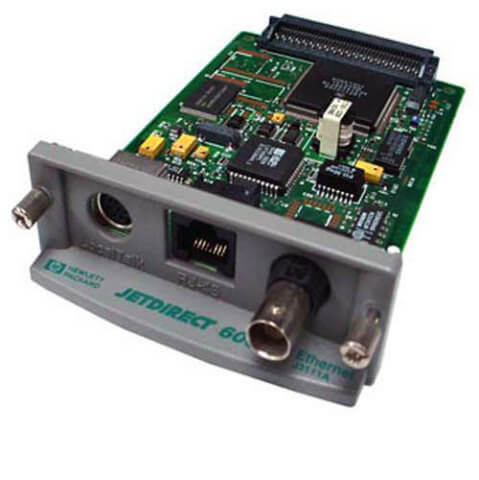
Description
Security Features of Print Server Card
The J3111-69001 HP Jetdirect 600N Ethernet 10bt/10b2 Local Talk EIO Rj45 print server card comes equipped with several security features that help protect the printer and network from unauthorized access and potential security breaches.
- Encryption: The J3111-69001 HP Jetdirect 600N Ethernet Print Server Card supports encryption protocols such as SSL/TLS, which helps to secure data transmission between the printer and the user’s computer.
- Password protection: The print server card can be configured to require a password for access to its web interface, preventing unauthorized access and configuration changes.
- IP filtering: The print server card can be configured to only allow access from specific IP addresses, limiting the risk of unauthorized access.
- SNMPv3: The Simple Network Management Protocol (SNMP) version 3 is supported, which provides authentication and encryption features to ensure that only authorized users can access and manage the print server card.
- Port blocking: The print server card allows the user to block specific TCP/IP ports, which can help prevent unauthorized access to the printer and its functions.
- Firewall support: The J3111-69001 HP Jetdirect 600N Ethernet Print Server Card is compatible with most firewalls, allowing users to set up additional layers of protection for their network.
- Secure Printing: The J3111-69001 HP Jetdirect 600N Ethernet Print Server Card also supports secure printing by allowing print jobs to be held in a secure queue and only released for printing once the user has authenticated themselves at the printer.
Key Features and Benefits
The J3111-69001 HP Jetdirect 600N Ethernet 10bt/10b2 Local Talk EIO Rj45 is a network interface card that allows printers to connect to a network for sharing and remote printing. Some key features and benefits of the J3111-69001 HP Jetdirect 600N Ethernet Print Server Card include
- Ethernet connectivity: The J3111-69001 HP Jetdirect 600N Ethernet Print Server Card supports 10Base-T and 10Base-2 Ethernet connectivity, which allows printers to connect to a wired network and share the printer with multiple users.
- LocalTalk support: The J3111-69001 HP Jetdirect 600N Ethernet Print Server Card also supports LocalTalk connectivity, which allows printers to connect to a Macintosh network.
- EIO interface: The J3111-69001 HP Jetdirect 600N Ethernet Print Server Card uses an EIO (Enhanced Input/Output) interface, which allows for easy installation and compatibility with a wide range of HP printers.
- Web Jetadmin support: The J3111-69001 HP Jetdirect 600N Ethernet Print Server Card is compatible with HP Web Jetadmin software, which allows for easy remote management of the print server and connected printers.
- Remote printing: With the J3111-69001 HP Jetdirect 600N Ethernet Print Server Card, users can print to a shared printer from anywhere on the network, which increases productivity and efficiency.
- Security features: The J3111-69001 HP Jetdirect 600N Ethernet Print Server Card offers several security features, including password protection, SNMPv3, and SSL/TLS encryption, which help to secure the network and protect sensitive data.
- Compatibility: The J3111-69001 HP Jetdirect 600N Ethernet Print Server Card is compatible with a wide range of HP printers, which makes it a versatile and cost-effective solution for network printing.
Troubleshooting and Maintenance
The J3111-69001 HP Jetdirect 600N is an Ethernet network interface card (NIC) that is designed for use with Hewlett-Packard printers and other devices that support EIO expansion cards. It provides a fast and reliable connection to an Ethernet network and supports both 10Base-T and 10Base-2 (also known as Thinnet) network topologies. Additionally, it supports LocalTalk, a proprietary Apple networking protocol that uses a unique connector called a PhoneNet connector.
If you’re experiencing issues with your J3111-69001 HP Jetdirect 600N Ethernet card, the following troubleshooting and maintenance tips can help
- Check the physical connections: Ensure that the Ethernet cable, LocalTalk cable, and power cable are securely plugged into the card and that the other end of the cables are properly connected to the network, printer, and power outlet, respectively.
- Verify the configuration settings: Check that the card’s configuration settings are correct, including its IP address, subnet mask, default gateway, and other network settings. These settings can be accessed and modified through the card’s web-based configuration utility or through HP’s Jetadmin software.
- Update the firmware: Ensure that the card has the latest firmware installed. You can download firmware updates from HP’s website or use HP’s Jetadmin software to update the card.
- Reset the card: Sometimes, resetting the card to its factory default settings can resolve connectivity issues. To reset the card, press and hold the Reset button on the card for about 10 seconds.
- Replace the card: If the above troubleshooting steps do not resolve the issue, the card may be faulty and needs to be replaced.
Regular maintenance can also help keep your J3111-69001 HP Jetdirect 600N Ethernet card running smoothly. Here are some tips for maintaining your card
- Keep the card clean: Use a soft, dry cloth to clean the card’s exterior, being careful not to damage any of the components.
- Avoid physical damage: Protect the card from physical damage, such as dropping or bumping it, as this can cause permanent damage.
- Keep the firmware up-to-date: Regularly check for and install firmware updates to keep your card running smoothly and securely.
- Perform regular network maintenance: Regularly monitor your network and perform maintenance tasks, such as checking for and repairing network cable faults, to ensure that the network is functioning properly and to avoid any issues with the card.
By following these troubleshooting and maintenance tips, you can help ensure that your J3111-69001 HP Jetdirect 600N Ethernet card is running at its best and providing fast and reliable network connectivity to your printer or other devices.
General Information
- Manufacturer :HP
- Part Number or SKU# J3111-69001
- Sub-Type: Print Server 10-100
- Device Type : Print Server
- Form Factor : Plug-In Card
- Interface (Bus) Type : EIO
Networking
- Connectivity Technology : Wired
- Cabling Type : Ethernet 10Base-T, Ethernet 10Base-2
- Data Link Protocol : Ethernet
- Data Transfer Rate : 10 MBPS
- Remote Management Protocol : SNMP
- Features : Network Monitoring, Manageable
- Compliant Standards : IEEE 802.3
Expansion / Connectivity
- Compatible Slots : 1 X EIO
- Connections : 1 X Network – Ethernet 10Base-T – Rj-45 1 X Network – Ethernet 10Base-2 – BNC 1 X Network – Local Talk – 8 Pin Mini-Din