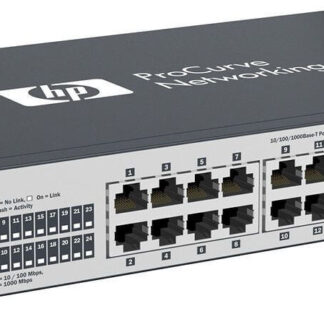
Description
Procurve 6600 Switch Accessories
The HPE J9264-61101 Procurve 6600 Switch may come with various accessories that can enhance its functionality and make it easier to integrate into your network environment. Some common Procurve 6600 Switch accessories include:
- Mounting kits – for rack-mounting the switch in a server room or data center.
- Power cords – for connecting the switch to a power source.
- SFP and SFP+ transceivers – for expanding the uplink connectivity options of the switch.
- Cable management accessories – for organizing and managing network cables.
- Console cables – for connecting the switch to a computer for initial configuration and management.
- Software and firmware upgrades – for improving the performance and security of the switch.
- Spare power supplies – for ensuring uninterrupted operation of the switch in case of power supply failure.
Using the right accessories can help improve the performance, reliability, and ease of use of the Procurve 6600 Switch. It’s recommended to use accessories that are specifically designed and tested for compatibility with the switch.
Troubleshooting and Maintenance
Troubleshooting and Maintenance are important aspects of ensuring the reliable and efficient functioning of the HPE J9264-61101 Procurve 6600 Ethernet Switch.
Troubleshooting involves identifying and resolving issues that may arise with the switch, such as network connectivity problems, port or link failures, and system performance issues. This can be done through various methods such as checking log files, using diagnostic tools, and resetting the switch to its default settings.
Maintenance, on the other hand, involves proactive measures to prevent issues from arising and to keep the switch running optimally. This includes regular software and firmware updates, physical cleaning of the switch, and monitoring the switch’s performance and usage.
Regular maintenance and troubleshooting can help extend the life of the switch and minimize downtime, ensuring the smooth operation of your network environment.
Advanced Traffic Management
Advanced Traffic Management refers to the process of controlling and directing network traffic in a sophisticated manner to ensure that network resources are used efficiently and effectively. This can be accomplished through various techniques and technologies.
- Quality of Service (QoS): Quality of Service (QoS) allows you to prioritize certain types of network traffic, such as voice or video, over other types of traffic. This ensures that critical traffic gets the bandwidth it needs to operate effectively, even during periods of high network utilization.
- Link Aggregation: Link aggregation allows you to increase the bandwidth between network devices by combining multiple physical links into a single logical link. This can help ensure that network resources are used efficiently, even during periods of high network utilization.
- Virtual LANs (VLANs): Virtual LANs (VLANs) allow you to segment your network into different subnets, improving network security and efficiency. VLANs also make it easier to manage network traffic by allowing you to control the flow of traffic between different parts of your network.
- Access Control Lists (ACLs): Access Control Lists (ACLs) allow you to control access to network resources based on predefined rules. This can be used to restrict access to sensitive network resources and improve network security.
- Load Balancing: Load balancing allows you to distribute network traffic across multiple devices, improving network performance and reducing the risk of network downtime.
- Traffic Shaping: Traffic shaping allows you to control the flow of network traffic by throttling the bandwidth available to certain types of traffic. This can help ensure that network resources are used efficiently and that critical traffic gets the bandwidth it needs to operate effectively.
Advanced traffic management can help improve network performance, reliability, and security by ensuring that network resources are used efficiently and effectively. It can also help reduce the risk of network downtime and improve the overall quality of your network environment.
Specifications
- Manufacturer: HPE
- Model Number or SKU# J9264-61101
- Type: Networking
- Sub-Type: Switch 24 Ports
- Enclosure Type : External – 1u
Networking
- Ports Qty : 24 X Ethernet 10base-T, Ethernet 100base-Tx, Ethernet 1000base-T
- Data Transfer Rate : 10 Gbps
- Data Link Protocol : Ethernet, Fast Ethernet, Gigabit Ethernet, 10 Gigabit Ethernet
- Routing Protocol : Rip-1, Rip-2, Static Ip Routing, Igmpv3
- Remote Management Protocol : Snmp 1, Rmon 1, Rmon 2, Rmon 3, Rmon 9, Snmp 3, Snmp 2c
- Connectivity Technology : Wired
- Communication Mode : Full-Duplex
- Switching Protocol : Ethernet
- Features : Layer 3 Switching, Vlan Support, Manageable, Quality Of Service (Qos), Jumbo Frames Support
- Compliant Standards : Ieee 802.3ad (Lacp), Ieee 802.1x, Ieee 802.1s, Ieee 802.1ad, Ieee 802.1v, Ieee 802.1ab (Lldp)
Memory
- Ram : 256 Mb Sdram
- Flash Memory : 4 Mb Flash
- Expansion / Connectivity :
- Expansion Slots Total (Free) :
- 4 ( 0 ) X Sfp
- 4 ( 4 ) X Sfp (Mini-Gbic)
Interfaces
- 1 X Management – Rs-232c – 9 Pin D-Sub (Db-9)
- 28 X Network – Ethernet 10base-T/100base-Tx/1000base-T – Rj-45
Power
- Power Device : Power Supply – Redundant
- Voltage Required : Ac 120/230 V ( 50/60 Hz )
- Power Consumption Operational : 172 Watt