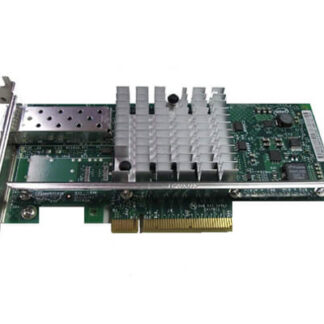
Description
PCIe 10GbE Adapter
PCIe 10GbE Adapter is a network interface card (NIC) that is used to connect a server, workstation, or other computing device to a high-speed 10 Gigabit Ethernet (10GbE) network. The term “PCIe” stands for “Peripheral Component Interconnect Express,” which is a high-speed interface for connecting peripheral devices to a computer’s motherboard.
A PCIe 10GbE adapter typically connects to a PCIe slot on the motherboard of the computing device and provides a single or multiple 10GbE network interfaces. The adapter can operate at full-duplex, providing up to 20 Gbps of bi-directional bandwidth between the computer and the network.
This high-speed connection can be used to support applications that require high network bandwidth, such as data center applications, cloud computing, virtualization, high-performance computing, and multimedia streaming. PCIe 10GbE adapters can also provide improved network performance and lower latency compared to traditional Ethernet adapters.
There are different types of PCIe 10GbE adapters available in the market, including single-port or multi-port adapters, copper or fiber-optic interfaces, and adapters that support different network protocols such as TCP/IP, iSCSI, and FCoE. The specific type of adapter to choose depends on the requirements of the network and the computing device it is being connected to.
Compatibility Information
Compatibility information for the 709600-001 HPE PCA Intel SFP+ SP PCIe 10GbE Adapter refers to the list of hardware and software components that are supported by the adapter. This information is important because it helps to ensure that the adapter will work properly with the existing IT infrastructure, and prevent potential issues and downtime.
The compatibility information includes the following:
- Operating System (OS) compatibility: The adapter may only be compatible with certain operating systems, such as Windows, Linux, or VMware. The compatibility information will list the specific versions of the OS that the adapter is certified to work with.
- Server and Storage compatibility: The adapter may only be compatible with certain servers and storage devices. The compatibility information will list the specific models and versions of the server or storage device that the adapter is certified to work with.
- Driver and Firmware compatibility: The adapter may require specific drivers and firmware to function correctly. The compatibility information will list the specific versions of the driver and firmware that are compatible with the adapter.
- Network compatibility: The adapter may only be compatible with certain network devices, such as switches and routers. The compatibility information will list the specific models and versions of the network device that the adapter is certified to work with.
- Third-party software compatibility: The adapter may be used in conjunction with other third-party software, such as virtualization software or backup software. The compatibility information will list the specific versions of the third-party software that the adapter is certified to work with.
It is important to check the compatibility information for the 709600-001 HPE PCA Intel SFP+ SP PCIe 10GbE Adapter before purchasing and installing the adapter to ensure that it will work with the existing IT infrastructure. If the adapter is not compatible with the hardware and software in the IT environment, it may not function properly and cause issues and downtime.
Supported Operating Systems
Supported operating systems refer to the list of operating systems (OS) that a particular device or software is compatible with and can function properly on. In the context of the 709600-001 HPE PCA Intel SFP+ SP PCIe 10GbE Adapter, supported operating systems would be the list of operating systems on which the adapter can be installed and function without any issues.
The HPE PCA Intel SFP+ SP PCIe 10GbE Adapter supports a wide range of operating systems, including popular ones such as Microsoft Windows Server, Red Hat Enterprise Linux, SUSE Linux Enterprise Server, VMware ESXi, and Citrix XenServer. The exact list of supported operating systems may vary based on the version or firmware of the adapter, so it’s important to check the product documentation or vendor website for the latest compatibility information.
It’s important to note that installing an adapter on an operating system that is not supported may result in compatibility issues, driver errors, and other technical difficulties. Therefore, it’s always recommended to verify the list of supported operating systems before purchasing and installing any hardware or software.