Description
Overview
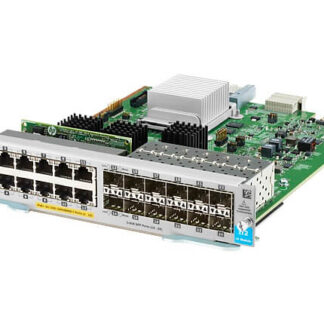
The J9989-61001 HPE 5400R 12-Ports V3 Zl2 Expansion Module is an advanced network expansion module designed for use with the HPE 5400R zl2 Switch Series. This module is designed to provide users with additional ports and capabilities to help them enhance the performance and scalability of their network infrastructure.
The J9989-61001 module features 12 ports, which can be used to connect additional devices to the network. These ports support a range of network protocols, including Gigabit Ethernet and 10 Gigabit Ethernet, as well as other network technologies such as Fibre Channel over Ethernet (FCoE).
One of the key features of the J9989-61001 module is its hot-swappable design. This means that the module can be inserted or removed from the switch without having to power down the entire network, which can help minimize network downtime and disruptions.
Installation and Configuration
Installing and configuring the J9989-61001 module is a straightforward process. The module is designed to be hot-swappable, which means that it can be inserted or removed from the switch without having to power down the network.
To install the module, users simply need to align the module with the appropriate slot on the switch and slide it into place. Once the module is installed, users can configure its settings using the switch’s web-based management interface.
The configuration options for the J9989-61001 module will vary depending on the needs of the user. However, some common configuration tasks may include setting the network speed for each of the module’s ports, configuring VLANs, and setting up QoS policies.
Troubleshooting and Maintenance
To troubleshoot and maintain the J9989-61001 HPE 5400R 12-Ports V3 Zl2 Expansion Module, you can follow the steps below:
- Check for Physical Damage: Inspect the module for any physical damage such as bent pins, cracks or broken parts. If there is any damage, you may need to replace the module.
- Check Connections: Ensure that all connections between the module and the switch are secure and tight. Loose connections can cause intermittent connectivity issues.
- Check for Firmware Upgrades: Make sure the module is running the latest firmware version. If not, upgrade to the latest firmware version available from the HPE website.
- Monitor Logs: Monitor the logs on the switch to look for any errors or warnings related to the module. These logs can provide valuable information to identify any issues.
- Test with Known Good Device: If the module is not working properly, try testing it with a known good device to see if the issue is with the module or the device.
- Reset the Module: If all else fails, reset the module to factory default settings. This will erase all configuration settings, and you will need to reconfigure the module from scratch.
In terms of maintenance, you can follow these best practices:
- Keep the module clean: Clean the module regularly with a soft, dry cloth to remove any dust or debris that may accumulate on it.
- Keep the module cool: Ensure that the module is not exposed to direct sunlight or heat sources, which can cause it to overheat. Install the module in a well-ventilated area to ensure proper airflow.
- Perform Regular Inspections: Conduct regular inspections of the module to ensure that it is functioning properly and there is no physical damage.
- Perform Regular Backups: Back up the configuration settings of the module regularly to ensure that you can easily restore them if there is a failure or issue.
- Stay Up-to-date: Stay up-to-date with the latest firmware updates and security patches from the HPE website to ensure that the module is running smoothly and securely.
General Information about the HPE J9989-61001
- Manufacturer: HPE
- Part Number or SKU# J9989-61001
- Device Type : Expansion Module 12 Ports
Networking
- Ports : Gigabit Ethernet (POE+) X 12 + Gigabit SFP X 12
- Connectivity Technology : Wired
- Cabling Type : Ethernet 10Base-T, Ethernet 100Base-Tx, Ethernet 1000Base-T
- Data Link Protocol : 10MB LAN, 100MB LAN, Gige
- Data Transfer Rate : 1 GBPS
- Features : POE+, Macsec Support
- Form Factor : Plug-In Module
Expansion / Connectivity
- Interfaces : 12 X 1000Base-T (POE+) – RJ-45 ¦ 12 X Ethernet 1000 – SFP (Mini-Gbic)