

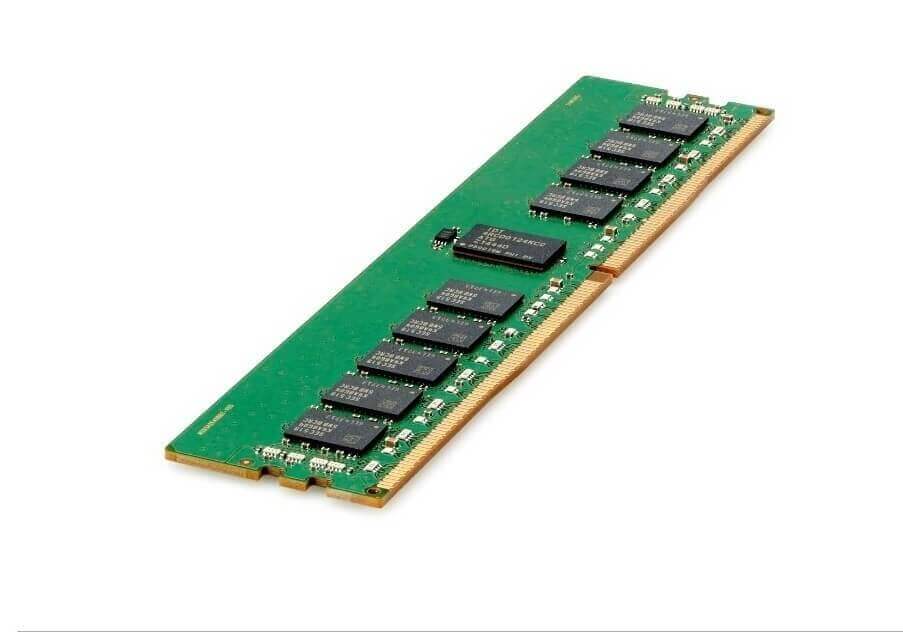


Description
Memory Capacity and Speed
Memory capacity refers to the amount of memory (or RAM) that a computer or device has available to use. In the case of the P14635-001 HPE 32GB 2933Mhz Pc4-23400 Ecc DDR4 288-pin Registered Ram, the memory capacity is 32GB, which means the module has 32 gigabytes of memory available for the computer to use.
Memory speed, also known as clock speed, refers to the rate at which the memory can perform operations. It is measured in megahertz (MHz) or gigahertz (GHz). In the case of the P14635-001 HPE RAM, the memory speed is 2933 MHz, which means it can perform 2933 million operations per second. A higher memory speed generally results in faster performance, as the computer has quicker access to the data it needs.
Pin Configuration and Compatibility
Pin configuration refers to the arrangement of the pins (small metal connectors) on the memory module. The P14635-001 HPE RAM has a 288-pin configuration, which is the standard for DDR4 memory. The number of pins and their arrangement are important for ensuring that the memory module is compatible with the computer’s motherboard.
Compatibility refers to the ability of the memory module to work with the computer’s motherboard. The P14635-001 HPE RAM is DDR4 memory, which is the fourth generation of double data rate (DDR) memory. It is compatible with motherboards that have DDR4 memory slots. Additionally, it’s ECC (Error Correction Code) memory and is registered which means it’s meant to be used in servers and workstations which support ECC and registered memory.
It’s important to check the motherboard’s documentation to confirm that it supports DDR4 memory, as well as the specific pin configuration and memory speed before purchasing a memory module. It’s also important to check the maximum memory capacity supported by the motherboard, to ensure that adding the P14635-001 HPE RAM does not exceed the maximum limit.
Installation and Configuration
Installing the P14635-001 HPE 32GB 2933Mhz Pc4-23400 Ecc DDR4 288-pin Registered Ram involves physically inserting the module into the appropriate memory slot on the motherboard. The process typically involves the following steps:
- Turn off the computer and unplug it from the power source.
- Open the computer case to access the motherboard.
- Locate the memory slots on the motherboard. These are typically long, thin slots that are labeled as “DIMM” or “RAM.”
- Carefully align the P14635-001 HPE RAM module with the memory slot, making sure that the notches on the module align with the tabs on the slot.
- Gently press down on the module until it clicks into place.
- Close the computer case and plug the computer back in.
- Turn on the computer and check the system’s memory capacity in the BIOS or UEFI firmware setup, or in the operating system to confirm that the module has been recognized and is working properly.
Once the module has been installed and recognized by the system, it will be automatically configured and ready to use. In case of registered ECC memory, the system might require additional configuration depending on the server’s or workstation’s BIOS/UEFI firmware. The user should refer to the motherboard or system’s manual for more information.
It’s important to handle the memory module carefully to avoid damaging the pins, and to wear an anti-static wrist strap when working inside the computer to prevent static electricity damage to the components.
General Information
- Brand Name: HPE
- MPN: P14635-001
- Type: Memory (RAM)
- RAM Type: Pc4-23400
- Product Name:HPE 32GB (1X32GB) Dual Rank X4 DDR4-2933 Cas-21-21-21 Registered Smart Memory Kit
- SKU: P14635-001
Technical Information
- Storage Capacity: 32GB
- Memory Type: DDR4 SDRAM – Dimm 288-pin
- Number Of Modules: 1 X 32GB
- Memory Speed: 2933MHZ (PC4-23400)
- Features: Dual Rank X4, Registered
- Error Checking: Ecc
- Voltage: 1.2 V
- Latency Timings: Cl21 (21-21-21)
- Upgrade Type: System Specific
Physical Characteristics
- Dimensions (W X D X H) : 8.89 X 19.81 X 1.91 Cm (3.5 X 7.8 X 0.75 In)
- Weight: 0.45 Kg (1 Lb)
Compatibility Information
- HPE Proliant Bl460c Gen10 Blade Servers
- HPE Proliant Dl180 Gen10, Dl360 Gen10, Dl380 Gen10, Dl388 Gen10 Servers
- HPE Proliant Dx170r Gen10, Dx360 Gen10, Dx380 Gen10, Dx560 Gen10 Servers
- HPE Proliant Dl560 Gen10, Dl580 Gen10 Servers
- HPE Proliant Ml350 Gen10 Servers
- HPE Synergy 480 Compute Modules
- HPE Synergy 660 Compute Modules
- HPE Proliant Xl230k Servers
- HPE Proliant Apollo 2000 Xl170r, Xl190r, Apollo 4200, Apollo 4500 Xl450, Apollo 6500 Servers


