Description
25 Gigabit LAN Port Configuration
The 25 Gigabit LAN ports on the R0X43-61001 HPE Aruba 6400 Expansion Module provide fast and reliable network connectivity for devices that require a higher level of network performance. These ports support the 25GBASE-T Ethernet standard and can be used to connect to a variety of devices, including servers, workstations, and other high-performance devices.
To configure the 25 Gigabit LAN ports on the R0X43-61001 HPE Aruba 6400 Expansion Module, you will need to perform the following steps:
- Connect the device to be connected to the 25 Gigabit LAN port using a 25 Gigabit Ethernet cable.
- Log into the configuration interface for the HPE Aruba 6400 switch. This can be done through a web browser or through a terminal emulation program.
- Navigate to the network configuration settings for the 25 Gigabit LAN port. This can typically be found in the switch’s interface under a menu item such as “Interfaces” or “Ports”.
- Configure the 25 Gigabit LAN port as desired. This may include setting the port’s speed and duplex mode, configuring any VLANs or other network parameters, and enabling or disabling the port as needed.
- Save the configuration changes and apply them to the switch.
- Test the 25 Gigabit LAN connection to ensure it is working as expected.
It’s important to note that the specific steps required to configure the 25 Gigabit LAN ports on the R0X43-61001 HPE Aruba 6400 Expansion Module may vary depending on the specific version of the switch and the network configuration. If you’re unsure of how to configure the 25 Gigabit LAN ports, it’s best to consult the switch’s user manual or the HPE Aruba support website for more information.
Network Connectivity Options
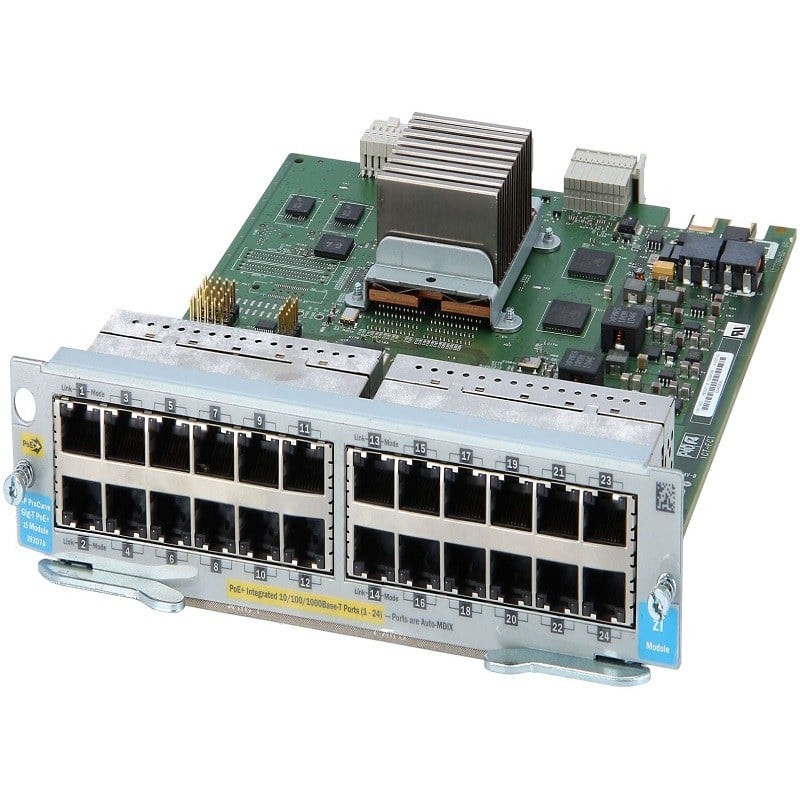
The R0X43-61001 HPE Aruba 6400 Expansion Module provides a range of network connectivity options to help users expand their network capabilities. The expansion module provides 100MB LAN, 25 Gigabit LAN, and 50 Gigabit LAN ports, which can be used to connect to a variety of network devices and services.
100MB LAN ports provide a basic level of network connectivity for devices that do not require high-speed connectivity, such as printers or other peripherals. 25 Gigabit LAN ports offer a fast and reliable connection for devices that require a higher level of network performance, such as servers or workstations. 50 Gigabit LAN ports provide even faster connectivity and support for high-bandwidth applications, such as video streaming or large data transfers.
The R0X43-61001 HPE Aruba 6400 Expansion Module is designed to be compatible with a wide range of HPE Aruba networking solutions, including switches, routers, and access points. This allows users to easily integrate the expansion module into their existing network infrastructure, without having to make any major changes or upgrades.
Maintenance and Upgrades
To ensure the reliable and efficient operation of the R0X43-61001 HPE Aruba 6400 Expansion Module, it is important to regularly perform maintenance and upgrades. Here are some of the key tasks involved in maintaining and upgrading the module:
- Firmware upgrades: The firmware of the R0X43-61001 module can be updated to ensure that it is running the latest version and that any bugs or security issues are addressed. To upgrade the firmware, you will need to download the latest firmware from the HPE Aruba support website, upload the firmware to the switch, and apply the update.
- Hardware upgrades: If you need to upgrade any hardware components of the R0X43-61001 module, such as the memory or disk storage, you will need to follow the instructions provided by HPE Aruba for the specific hardware component you are upgrading.
- Cleaning: Regular cleaning of the module can help to keep it running smoothly and prevent any issues from dust or debris accumulation. This can be done by using a soft cloth and a mild cleaning solution to wipe down the module’s exterior.
- Monitoring: Monitoring the performance and status of the R0X43-61001 module can help to identify any potential issues before they become serious problems. This can be done through the switch’s management interface, which provides information on the module’s performance, status, and any errors or warnings that may have been generated.
- Troubleshooting: If you encounter any issues with the R0X43-61001 module, it’s important to diagnose and resolve the issue as quickly as possible to minimize any disruption to your network. This may involve using the switch’s management interface to view log files or event histories, or connecting a serial console to the switch for more advanced troubleshooting.
It’s important to follow the specific maintenance and upgrade procedures provided by HPE Aruba for the R0X43-61001 module to ensure that it is operating correctly and efficiently. If you’re unsure of how to perform any of these tasks, it’s best to consult the module’s user manual or the HPE Aruba support website for more information.
Main Specification about the HPE R0X43-61001
- Manufacturer: HPE
- Part Number or SKU# R0X43-61001
- Device Type: Expansion Module
Technical Information
- Application/Usage: Data Networking
- Application/Usage: Optical Network
- Ports: 100M/1G/10 Gigabit Ethernet x 24 + 1Gb Ethernet/10Gb Ethernet/25Gb Ethernet/50Gb Ethernet SFP56 x 4
- Connectivity Technology: Wired
- Data Link Protocol: Fast Ethernet, Gigabit Ethernet, 10 Gigabit Ethernet, 25 Gigabit Ethernet, 50 Gigabit Ethernet
- Data Transfer Rate: 50 GBPS
Media & Performance
- Media Type Supported: Optical Fiber
I/O Expansions
- Number of Total Expansion Slots: 28
- Expansion Slot Type: SFP+
Dimensions and Weight
- Height: 1.7 Inch
- Width: 17.3 Inch
- Depth: 12.4 Inch
- Weight: 6.60 Lbs