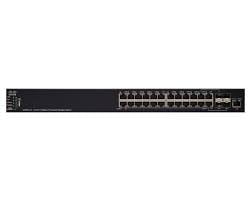
Description
Configuration and Management
To configure and manage the SF550X-24MP-K9-NA Cisco Small Business 24 Ports Managed Switch, you can use the web interface or the command line interface (CLI).
To access the web interface, connect to the switch using a web browser and enter the IP address of the switch in the address bar. The default IP address is 192.168.1.254, and the default username and password are both “admin”.
To access the CLI, connect to the switch using a console cable and a terminal emulator program (such as PuTTY). The default baud rate is 9600. The default username and password are both “cisco”.
Once you have access to the switch, you can use the web interface or the CLI to configure various settings such as VLANs, port security, QoS, and access control. You can also use the switch’s management features to monitor and troubleshoot network issues.
It is recommended to refer to the Cisco Small Business SF550X-24MP-K9-NA switch user guide or professional help.
Troubleshooting and Maintenance
- Power Issues: If the switch is not powering on, check to make sure the power cord is properly connected and check the outlet for power. If the issue persists, the power supply may need to be replaced.
- Port Issues: If a specific port is not functioning properly, make sure the cable is properly connected and check for any damage to the cable. Also, check the port configuration in the switch’s management interface to ensure it is configured correctly.
- Network Connectivity: If the switch is not connecting to the network, check the cable connections and ensure the switch is configured with the correct IP address and subnet mask. Also, check to see if the switch is set to the correct VLAN.
- Firmware Update: If the switch is experiencing issues, check to see if there is a newer firmware version available and update accordingly.
- Factory Reset: If all else fails, a factory reset may be necessary. This will erase all configuration settings and return the switch to its original state.
- Regular Maintenance: Regularly check the switch’s temperature, power supply, and fan to ensure they are working properly. Also, check for any dust accumulation and clean the switch as necessary.
Security and Access Control
The SF550X-24MP-K9-NA Cisco Small Business 24 Ports Managed Switch offers a variety of security and access control features to protect your network and ensure that only authorized users can access it. Some of these features include:
- Access Control Lists (ACLs): This feature allows you to define access policies for different users and devices on your network. You can use ACLs to restrict access to specific ports or IP addresses, or to block certain types of traffic.
- Port Security: This feature allows you to limit the number of MAC addresses that can be learned on a specific port, which can help prevent unauthorized devices from accessing your network.
- IEEE 802.1x Authentication: This feature allows you to authenticate users and devices before they can access your network. This can help prevent unauthorized users from gaining access to your network.
- Secure Shell (SSH) and Telnet: These features allow you to remotely access and manage the switch using a secure connection, which can help prevent unauthorized access to your network.
- SNMPv3: This feature allows you to monitor and manage the switch using a secure version of the Simple Network Management Protocol (SNMP), which can help prevent unauthorized access to your network.
- VLANs: This feature allows you to segment your network into different virtual LANs (VLANs), which can help increase security by isolating different groups of users and devices on your network.
- MAC Filtering: This feature allows you to restrict access to your network based on the MAC addresses of devices, which can help prevent unauthorized devices from accessing your network.
- DHCP Snooping: This feature allows you to prevent DHCP spoofing attacks by verifying DHCP messages and blocking unauthorized DHCP servers.
- IP Source Guard: This feature prevents IP spoofing by allowing only the IP address that has been learned on the port to access the network.
- Storm Control: This feature allows you to control the amount of broadcast, multicast, or unknown unicast traffic on your network, which can help prevent network flooding attacks.
- Quality of Service (QoS): This feature allows you to prioritize different types of traffic on your network, which can help ensure that critical applications receive the bandwidth they need to function properly.
- Link Aggregation Control Protocol (LACP): This feature allows you to bundle multiple physical ports together to form a single logical link, which can help increase bandwidth and improve network reliability.
General Information
- Manufacturer Cisco Systems, Inc
- MPN: SF550X-24MP-K9-NAProduct Series 550X
- Product Model SF550X-24MP
- Product Name SF550X-24MP Layer 3 Switch
- Product Type Layer 3 Switch
- SKU: SF550X-24MP-K9-NA
Interfaces/Ports
- Total Number of Network Ports 26
- Uplink Port Yes
- Modular Yes
- Stack Port Yes
- Port/Expansion Slot Details 4 x 10 Gigabit Ethernet Uplink
- Port/Expansion Slot Details 2 x 10 Gigabit Ethernet Network
- Port/Expansion Slot Details 24 x Fast Ethernet Network
Performance
- Media Type Supported Optical Fiber
- Media Type Supported Twisted Pair
- Ethernet Technology 10 Gigabit Ethernet
- Ethernet Technology Fast Ethernet
- Network Technology 10/100Base-T
- Network Technology 10GBase-T
- Network Technology 10GBase-X
I/O Expansions
- Number of Total Expansion Slots 4
- Expansion Slot Type SFP+
- Shared SFP Slot Yes
- Number of SFP+ Slots 4
Network & Communication
- Layer Supported 3
Management & Protocols
- Manageable Yes
Power Description
- Power Source Power Supply
- Redundant Power Supply Supported Yes
Miscellaneous
- Package Contents-
- SF550X-24MP Layer 3 Switch
- Power Cord
- Mounting Kit
- Serial Cable
- CD-ROM with User Documentation (PDF)
- Quick Start Guide